API Proxy Architecture for Web Clients
How we route all frontend API calls through a proxy layer for security, caching, and observability — edge runtime, header injection, and error handling.

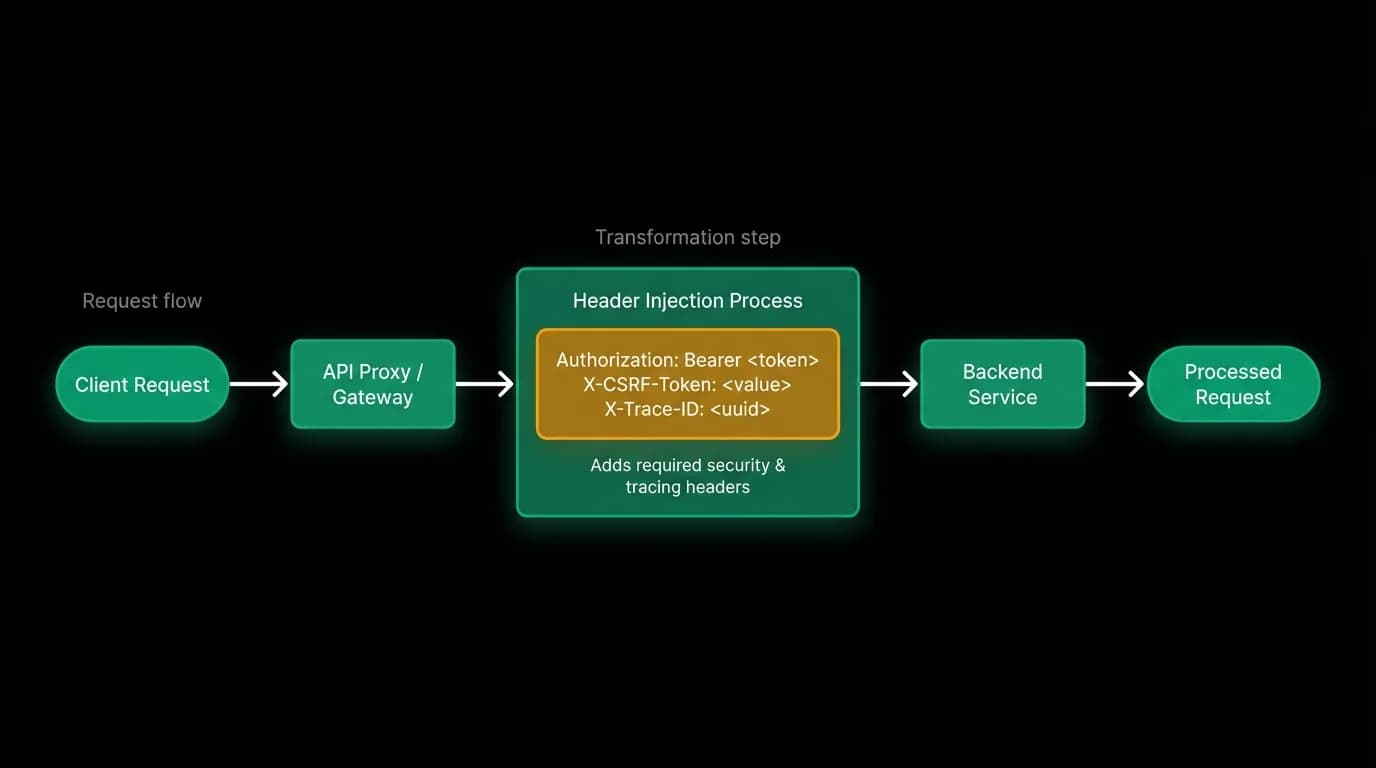
The frontend never talks to the backend directly. Every API request from the web application goes through a proxy layer that runs at the edge. The proxy adds authentication headers, enforces cross-site request forgery protection, hides the backend's URL from the browser, and provides a consistent entry point for monitoring.
This sounds like an extra hop that adds latency and complexity. It is an extra hop. But the security, observability, and operational benefits justify it many times over. Let me explain why and how we built it.
Why proxy API calls
The most immediate reason: hiding the backend URL. If the web client calls the backend API directly, the backend's URL is visible in the browser's network tab. Anyone who opens DevTools can see where the API lives, what endpoints exist, and what the request format looks like. The proxy masks this. The browser sees requests to `/api/proxy/trips`, not to `https://api.internal.example.com/trips`.
Security is the second reason. The proxy layer adds authentication headers that the browser shouldn't have direct access to. The web client authenticates through the identity provider and receives a session token. The proxy reads this token, validates it, generates the appropriate authorization header for the backend, and attaches it to the forwarded request. The backend never receives unauthenticated requests because the proxy is the gatekeeper.
cross-site request forgery protection is the third reason. The proxy enforces cross-site request forgery tokens on state-changing requests (POST, PUT, DELETE). The web client includes a cross-site request forgery token with every mutation. The proxy validates the token before forwarding the request. This prevents cross-site request forgery attacks where a malicious site tricks the user's browser into making API calls.
Observability is the fourth reason. Every request flows through one place. The proxy can log request timing, response codes, and error rates for every API call. This single observation point gives us a complete picture of the web client's API usage without instrumenting every backend endpoint individually.
Edge runtime for minimal latency
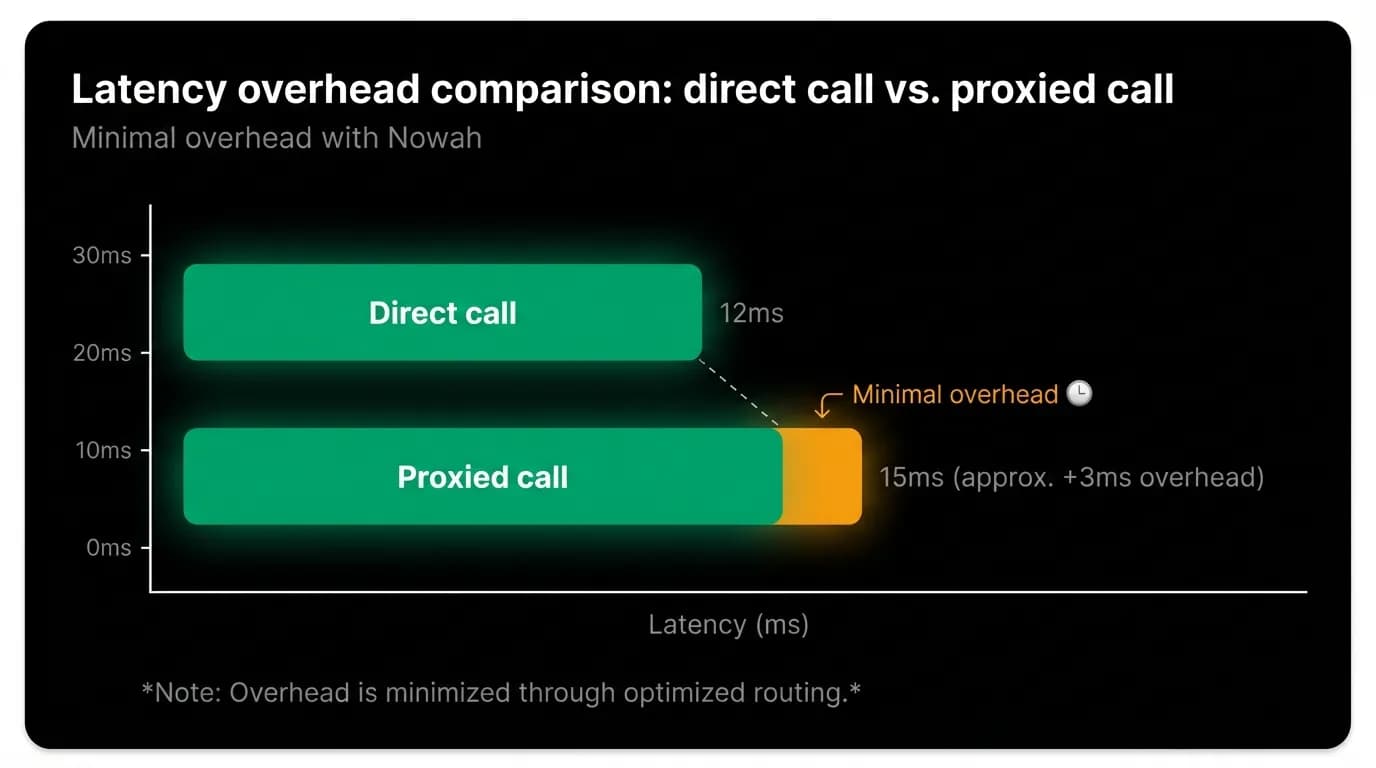
The proxy runs on the edge runtime of our web framework. Edge runtime means the proxy code executes at the CDN edge, geographically close to the user. The proxy adds microseconds of processing overhead, not the milliseconds that a cold-start server function would add.
The edge runtime also means no server-side rendering overhead. The proxy is a thin passthrough that reads the request, adds headers, forwards to the backend, and returns the response. It doesn't render components, query databases, or perform heavy computation.
The proxy handler is a catch-all route that matches any path under `/api/proxy/`. A request to `/api/proxy/trips` gets forwarded to the backend's `/trips` endpoint. A request to `/api/proxy/agent/process-message` gets forwarded to the backend's `/agent/process-message` endpoint. The path mapping is mechanical: strip the `/api/proxy` prefix and forward.
For streaming endpoints (like the AI chat endpoint), the proxy forwards the streaming response without buffering. The edge runtime supports streaming responses natively, so the server streaming events pass through the proxy with negligible additional latency. The proxy opens a connection to the backend, receives the stream, and pipes it to the client.
Request transformation
The proxy transforms requests in several ways before forwarding them.
Authentication header injection. The proxy reads the user's session (from the identity provider's cookie or token), generates a backend-compatible authorization header (typically a signed session tokens), and attaches it to the forwarded request. The web client never constructs the authorization header itself. This means the backend's auth token format can change without updating the web client.
cross-site request forgery token validation. For state-changing requests, the proxy checks the cross-site request forgery token in the request header against the expected token for the session. If the token is missing or invalid, the proxy returns a 403 without forwarding the request. The backend never sees cross-site request forgery-invalid requests.
Trace ID injection. The proxy generates a unique trace ID for each request and attaches it as a header. The backend reads this trace ID and includes it in all log entries for the request. If something goes wrong, we can trace the request from the proxy's log through the backend's processing to the response.
Content type enforcement. The proxy validates that the request's content type matches what the backend expects. A JSON endpoint should receive JSON, not form data. This catch at the proxy prevents malformed requests from reaching the backend.
The backend receives these proxied requests with consistent headers regardless of which client sent them. The mobile app sends authentication directly (because there's no proxy layer for native apps). The web app sends authentication through the proxy. The backend handles both identically because the authorization header format is the same.
Error handling at the proxy layer
The proxy handles several error categories before they reach the client.
Backend unreachable. If the proxy can't connect to the backend (network issue, backend down), it returns a standardized error response to the client. The error includes a generic message ("Service temporarily unavailable") and a retry hint. The client displays this message without exposing internal details about why the backend is unreachable.
Authentication failure. If the user's session is expired or invalid, the proxy returns a 401 with a redirect hint to the login page. The client handles this by redirecting the user to re-authenticate. This catches expired sessions at the proxy rather than letting them hit the backend and return authentication errors that the client then has to parse.
Timeout. The proxy has its own timeout for backend responses. If the backend takes too long (which can happen during complex AI processing), the proxy returns a timeout error to the client. For streaming endpoints, the proxy's timeout is longer because streaming responses are expected to take more time.
Response validation. The proxy can validate that the backend's response matches expected patterns. If the backend returns a 500 error, the proxy logs the full error details (for debugging) but returns a sanitized error to the client (for security). Internal error messages, stack traces, and system details never reach the browser.
Monitoring proxy health
The proxy must never become the bottleneck. If the proxy adds noticeable latency or drops requests, it defeats its purpose. We monitor several metrics.
Proxy latency. The time the proxy adds to each request, measured as the difference between the total request duration and the backend's processing time. This should be under 5 milliseconds. If it creeps up, we investigate.
Error rate. The percentage of requests that fail at the proxy level (not backend failures, but proxy-specific failures like authentication errors or cross-site request forgery rejections). A sudden spike in proxy errors indicates a configuration problem or an attack.
Throughput. The number of requests per second flowing through the proxy. This tells us if we're approaching the edge runtime's limits and need to review our scaling.
Backend connectivity. The proxy's ability to reach the backend, measured by periodic health check calls. If the proxy can't reach the backend, we need to know immediately.
Set up an API proxy for your web application
If your web application calls a backend API directly, consider adding a proxy layer. Here's the approach.
Create a catch-all route handler in your web framework. For the web framework, this is a route handler at `app/api/proxy/[...path]/route.ts`. The handler reads the incoming request, transforms it, forwards it to the backend, and returns the response.
Run the proxy at the edge. If your framework supports edge runtime, use it. The reduced latency matters because the proxy is on every request path.
Add authentication at the proxy. The proxy should handle session validation and token generation. The web client should never construct backend auth headers directly.
Add cross-site request forgery protection. State-changing requests through the proxy should require a valid cross-site request forgery token. This is one of the simplest and most effective security measures.
Add a trace ID. Every request through the proxy should get a unique ID that flows through to the backend. This is invaluable for debugging and incident response.
Monitor the proxy as critical infrastructure. It's on the critical path of every API call. Any degradation in the proxy degrades the entire web application.
Nowah is an AI travel agent that searches and books real flights and hotels through conversation — no filters, no thirty open tabs. Plan your next trip.