Database Migrations Without Downtime
How we evolve the database schema of a live travel booking platform without breaking anything — expand-and-contract, backward compatibility, and rollback.
A migration that locks the bookings table for 30 seconds costs real revenue. Not hypothetical revenue. Real travelers trying to book real flights, seeing timeout errors, and going somewhere else.
We operate a travel booking platform where the booking path needs 99.9% uptime. That means we get about 8 minutes of downtime per year across the entire booking flow. A single careless migration could eat that entire budget.
So we don't do careless migrations. Every schema change follows a process designed to keep the system running while the database evolves underneath it.
The expand-and-contract pattern
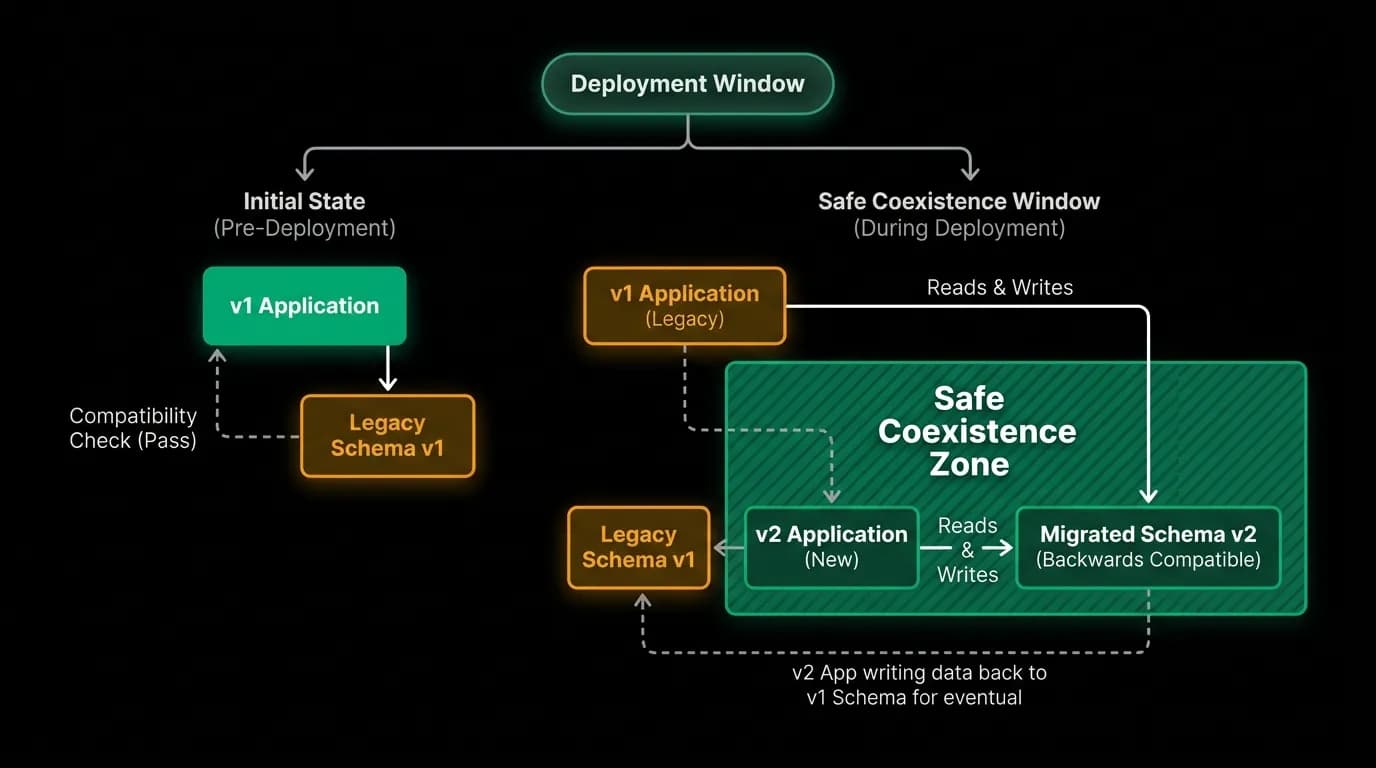
The fundamental technique is expand-and-contract, and it works like this.
Say we need to rename a column from `booking_ref` to `confirmation_code`. The naive approach: write a migration that renames the column. Problem: the moment the migration runs, every query that references `booking_ref` fails. The application code still references the old name. Everything breaks until you deploy the updated application code, and there's always a gap between the migration and the deployment.
The expand-and-contract approach takes three steps:
Expand. Add the new column `confirmation_code` alongside the old `booking_ref`. Write application code that writes to both columns but reads from the old one. Deploy this code. Nothing breaks because the old column still exists and is still the source of truth.
Migrate data. Run a backfill that copies values from `booking_ref` to `confirmation_code` for all existing rows. This runs as a background operation, not a locking migration. It processes rows in batches during low-traffic periods.
Contract. Update application code to read from `confirmation_code` instead of `booking_ref`. Deploy. Verify everything works. Then, in a subsequent migration, drop the old `booking_ref` column.
Three deployments instead of one. More work? Yes. But zero downtime and zero risk of breaking the booking path during the transition.
Backward compatibility during migration
The critical insight is that during the migration window, old code and new schema must coexist. And sometimes, new code and old schema must coexist too (if you need to roll back the code change).
We enforce this rule: every migration must be backward-compatible with the currently deployed application code. That means:
Adding a column is always safe. Existing code ignores columns it doesn't know about. The new column can have a default value or be nullable.
Removing a column is never safe as a single step. You must first deploy code that stops using the column, then remove the column in a subsequent migration.
Changing a column type requires the expand-and-contract pattern. Create a new column with the desired type, migrate data, switch reads, then drop the old column.
Adding a NOT NULL constraint requires a backfill first. You can't add NOT NULL to a column that has existing NULL values. Backfill defaults, then add the constraint.
Our ORM generates migration files from schema changes. But we don't blindly apply those generated migrations. We review each one against these backward-compatibility rules. Sometimes the generated migration is too aggressive (a destructive change in one step) and we split it into safe phases.
Data backfills without locking
When a migration adds a new column that needs values populated from existing data, the backfill has to run without locking the table. On a table with millions of rows, a naive `UPDATE ... SET new_column = old_column` can lock the entire table for seconds or minutes.
We run backfills in batches. Process 1,000 rows, commit the transaction, pause briefly, process the next 1,000. Each batch acquires and releases locks on a small set of rows. The table remains fully accessible between batches.
For large tables, we run backfills during low-traffic hours. Our booking volume has predictable daily patterns. Running batch updates during the lowest-traffic window minimizes contention.
We also track backfill progress. Each batch job records the last processed row ID, so if the backfill is interrupted (deploy restart, manual stop), it resumes from where it left off rather than starting over.
Migration testing in staging
Every migration runs in staging before production. Our staging environment mirrors production's schema structure (different data, same structure). This catches:
Syntax errors and type mismatches. The migration runs against a real database, not just a dry-run checker.
Performance issues. A migration that takes 200 milliseconds on a dev database with 100 rows might take 30 seconds on staging with 100,000 rows. We measure execution time in staging and flag anything over a threshold.
Backward-compatibility violations. We run the migration against staging while the current application code is running and verify that no errors occur. If the migration breaks existing queries, we catch it here.
Migrations that pass staging go through a phased production rollout. We run the migration, monitor error rates for a few minutes, and only then proceed with the application code deployment that uses the new schema.
Rollback strategies
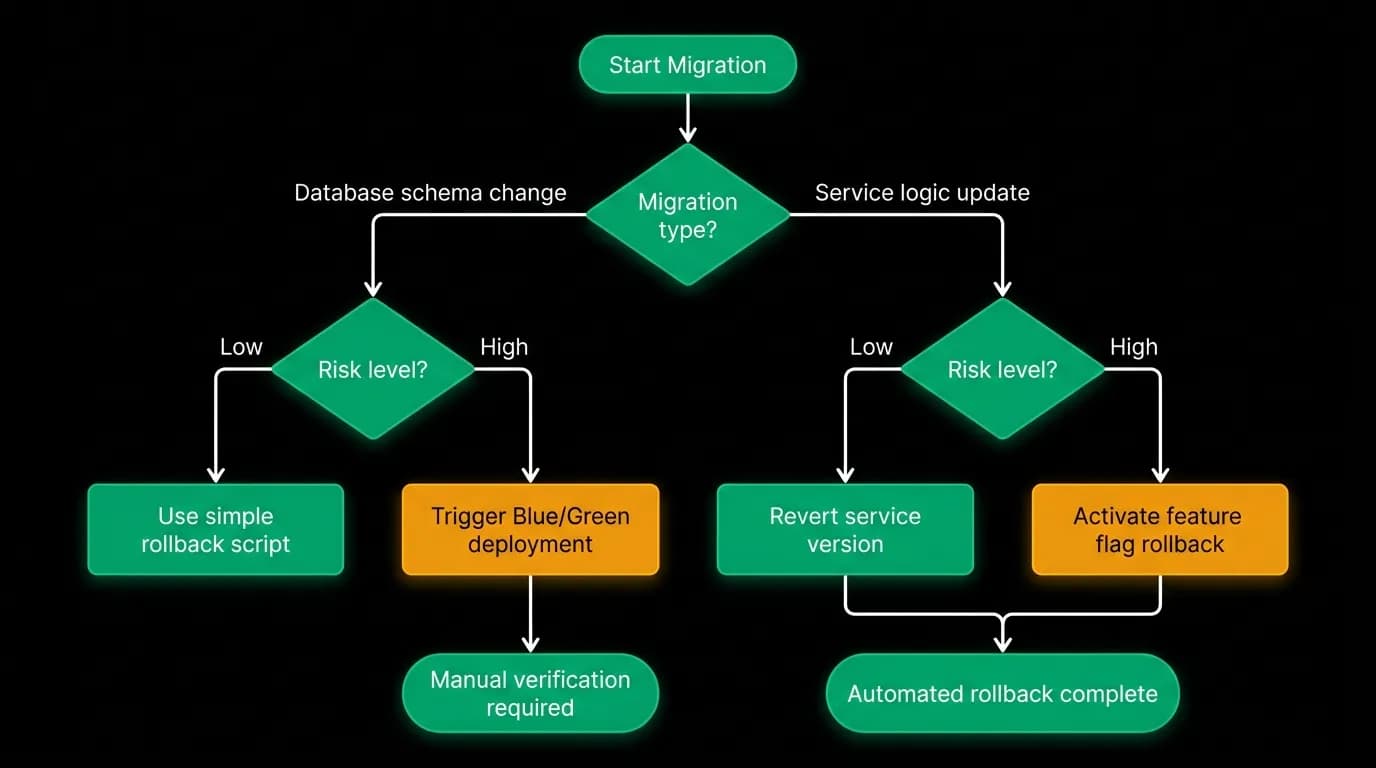
Not every migration is easily reversible. Adding a column can be undone by dropping it. But a data transformation (converting timestamps from local time to UTC) can't be trivially reversed without data loss.
We categorize migrations by rollback complexity:
Trivially reversible. Add column, add index, create table. Drop the added artifact.
Reversible with data recovery. Column rename, type change, data transformation. The old data must be preserved (in a backup column or a backup table) until we're confident the migration is correct.
Practically irreversible. Data deletion, column removal. These only run after the previous migration phase has been stable in production for a defined period. We never drop a column in the same release that deploys code stopping its use.
For every migration, the review checklist includes "What's the rollback plan?" If the answer is "we can't roll back," the migration needs extra scrutiny and a longer stabilization period before the contract phase runs.
The checklist
For anyone running migrations on a live booking platform:
Never modify and delete in the same step. Add first, then migrate, then remove. Three steps minimum for any destructive change.
Run migrations in the deployment pipeline, not manually. Manual migrations are forgotten, mis-ordered, and unauditable. Pipeline migrations are reproducible and tracked.
Measure migration execution time in a realistic environment. Your development database is not realistic. Staging with production-like data volume is the minimum.
Always have a rollback plan. Write it down before running the migration. If the rollback plan is "restore from backup," you'd better have tested that your backup restore actually works.
Don't rush the contract phase. The expand phase (adding the new thing) is low risk. The contract phase (removing the old thing) is where data loss happens. Wait until you're confident before contracting.
Nowah is an AI travel agent that searches and books real flights and hotels through conversation — no filters, no thirty open tabs. Plan your next trip.