Graceful Degradation When the AI Model Is Slow
What the travel platform does when LLM inference takes 30 seconds instead of 3 — timeout strategies, streaming status updates, and fallback model selection.

The AI model is having a bad day. Response times that normally sit at 2-3 seconds for the first token are hitting 15, sometimes 30 seconds. The traveler who needs to book a flight in 20 minutes is staring at a loading spinner. The mobile app's 10-second timeout fires and the request fails. The traveler retries. Same thing. They retry again. Now we have three identical requests burning inference tokens and getting nowhere.
AI model latency is not like traditional API latency. Traditional APIs degrade gradually: p50 stays fine, p95 gets a bit worse, p99 gets noticeably worse. AI inference latency is bimodal. Simple queries (factual lookups, short responses) are consistently fast. Complex queries (multi-step planning, long reasoning chains, many tool calls) are consistently slower. And when the model provider has infrastructure issues, everything shifts up by a fixed amount. Your 2-second queries become 12-second queries. Your 8-second queries become 18-second queries.
You can't control the model provider's infrastructure. You can control how your platform behaves when inference is slow.
Timeout strategies
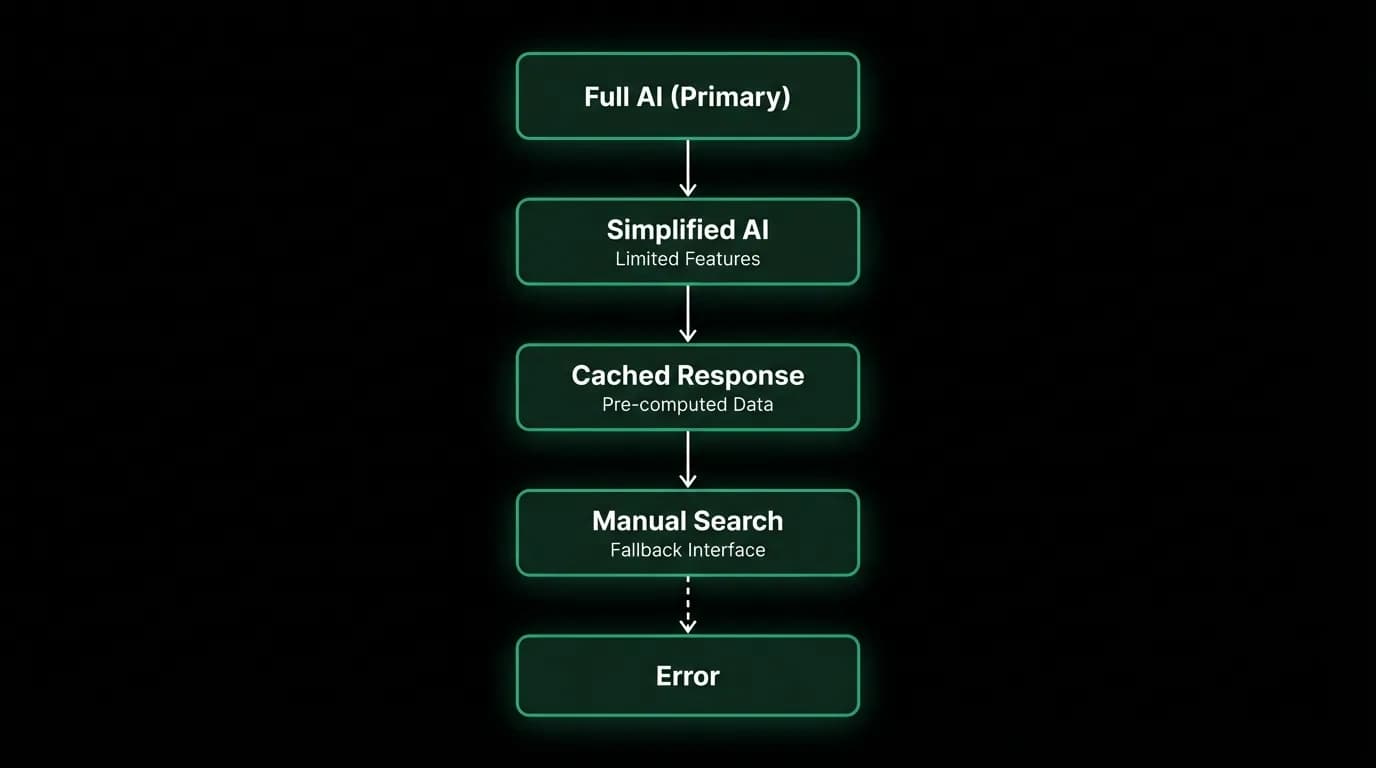
We have three timeout layers for AI inference.
The first timeout is the time-to-first-token target: under 500 milliseconds. This is the streaming contract. When a traveler sends a message, they should see something happening within half a second. If the model starts generating tokens within 500ms, we're on track. If it doesn't, we start communicating the delay.
The second timeout is the overall request timeout on the mobile client: 10 seconds. This is the hard cutoff for the HTTP connection. If the server hasn't started streaming within 10 seconds, the client's request handler gives up. This timeout exists because holding a connection indefinitely on a mobile device is unacceptable. Battery, bandwidth, and user patience all have limits.
The third timeout is the server-side processing timeout for the entire agent turn: configurable, currently 60 seconds. This accounts for multi-tool-call sequences where the agent might search flights-layer-ai-agent-search-flights), check visa requirements, look up weather, and compose a response. Each tool call takes time. The 60-second budget accommodates complex turns without allowing infinite processing.
These timeouts create a hierarchy. The client gives up at 10 seconds if streaming hasn't started. The server gives up at 60 seconds total processing time. The user-experience threshold is 500ms for first visible feedback.
Status updates that build patience
When inference is slow, the worst thing you can do is show nothing. A blank screen with a spinner tells the traveler nothing. They don't know if the system is working, stuck, or broken. They assume broken and retry, which makes everything worse.
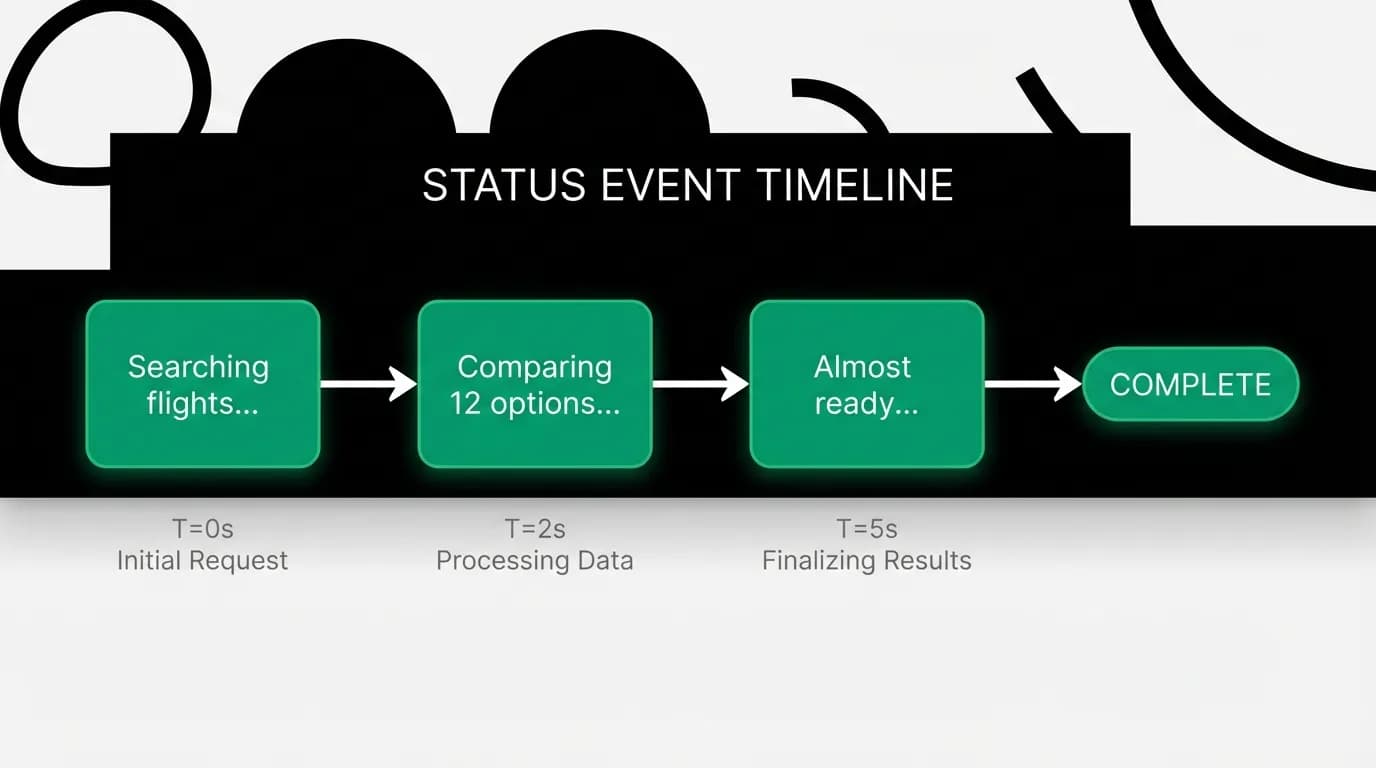
Our streaming architecture sends status events during processing. These events aren't the AI's response. They're system-generated updates that tell the traveler what's happening.
The status events follow the agent's processing stages. "Searching for flights..." when the agent calls the flight search tool. "Comparing 12 options..." when the search results return and the agent starts reasoning. "Checking visa requirements..." when the agent calls the visa tool. "Almost ready..." when the agent begins composing the final response.
These status updates serve a psychological purpose backed by real research. Users tolerate longer waits when they can see progress. A 15-second wait with five status updates feels shorter than a 10-second wait with a spinner. The updates communicate that the system is working, not stuck.
On the client side, the server streaming stream delivers these through callback handlers: onStatus for progress updates, onChunk for response tokens, onToolResult for tool outputs, and onThinking for reasoning steps. The UI renders each type differently. Status updates appear as subtle progress indicators. Chunks build the response text. Tool results render as structured cards.
Fallback model selection
When the primary model is consistently slow (not a single slow request, but sustained degradation), we can fall back to a simpler, faster model for certain query types.
Not all queries require the most capable model. "What time is my flight?" doesn't need deep reasoning. It needs a profile lookup and a formatted response. A smaller, faster model handles this perfectly. "Plan a two-week trip through Japan with daily itineraries" requires the full capabilities. No fallback model will do this well.
We classify queries into complexity tiers during the intake phase. Simple informational queries (flight status, trip details, basic facts) can route to a faster model when the primary model is degraded. Complex planning-itineraries-complex-planning) queries (multi-destination trips, comparative analysis, booking decisions) always use the primary model, even if it's slow.
The routing decision considers the current model latency. If the primary model's p50 latency exceeds a threshold (say, 3x normal), simple queries get routed to the fallback model. Complex queries continue to the primary model with extended timeouts and more frequent status updates.
This isn't a permanent split. When the primary model's latency returns to normal, all queries route back to it. The fallback is a degraded mode, not a feature. The primary model produces better results for every query type. We only sacrifice quality when speed is the more pressing concern.
Queuing non-interactive AI tasks
Not every AI task is a conversation with a waiting traveler. Background tasks like trip summary generation, notification text composition, and recommendation updates don't have a human waiting for the response.
When inference is slow, interactive queries take priority. Background AI tasks get deferred. They're placed in a lower-priority queue and processed when inference capacity is available or when latency returns to normal.
The deferral isn't unlimited. Background tasks have their own SLAs. A trip summary should be generated within an hour of booking completion. A notification should be composed within minutes of the triggering event. But these SLAs are measured in minutes or hours, not seconds. The tasks can tolerate model slowness that would be unacceptable for interactive chat.
This prioritization prevents background tasks from competing with interactive queries for inference capacity. When the model is slow, every token of throughput should go to travelers who are actively using the platform. Background work can wait.
Measuring and alerting on AI latency
AI latency monitoring is tricky because the bimodal distribution makes averages meaningless. An average of 4 seconds might mean everything is normal (simple queries at 2s, complex at 6s) or everything is degraded (all queries at 4s). The average is the same. The situation is completely different.
We monitor latency by query complexity tier. Simple queries have their own p50, p95, and p99. Complex queries have theirs. A meaningful alert is "simple query p50 latency exceeded 2 seconds for 5 consecutive minutes." A meaningless alert is "overall average latency exceeded 4 seconds."
We also monitor the time-to-first-token separately from total response time. Time-to-first-token tells you about model provider latency. Total response time tells you about response length and tool call duration. Both matter, but for different reasons. A slow first token means the model is overloaded. A slow total response means the query was complex. The remediation is different.
Alert thresholds are set relative to historical baselines, not absolute values. The model provider's normal latency shifts over time as they deploy new versions, change infrastructure, or adjust routing. An absolute threshold of "alert at 3 seconds" will either alert constantly or never alert, depending on the current baseline. A relative threshold of "alert at 2x the 7-day rolling median" adapts automatically.
Design graceful degradation for your AI product
If you're building an AI product, assume the model will be slow sometimes. Not might be. Will be. The model provider will have infrastructure issues. Your query complexity will spike. Your token budget will be strained by long conversations.
Start with status updates. They're the cheapest intervention and the highest impact. Users tolerate slow AI when they can see it thinking. They abandon silent spinners.
Add timeout layers. Client timeout, server timeout, per-tool timeout. Each layer has a different purpose and a different response when triggered. Don't use a single global timeout for everything.
Implement query classification and routing. Not every query needs the same model or the same timeout budget. Route simple queries through faster paths.
Defer non-interactive AI work. Background tasks should never compete with interactive queries for inference capacity during degraded periods.
Monitor by complexity tier, not in aggregate. The aggregate metrics will lie to you. Tier-specific metrics tell the truth.
Nowah is an AI travel agent that searches and books real flights and hotels through conversation — no filters, no thirty open tabs. Plan your next trip.