State Management for a Travel Chat Interface
How we manage the complex state of an AI travel conversation — messages, offers, bookings, and streaming — on the client with Zustand and React Query.

The chat has 30 messages. Three of them contain flight offers with interactive cards. One offer is in a booking flow: the traveler tapped "Book this flight" and is on the payment step. The server streaming stream just reconnected after a brief network drop, and a new message is arriving. Meanwhile, the app needs to remember which thread is active, what the scroll position was, and whether the keyboard is open.
A traditional chat client manages a list of messages. Our chat client manages a list of messages, a set of tool results (flight cards, hotel cards, visa information, weather data), a booking state machine, a streaming connection, ephemeral UI state, and the relationship between all of these. The state management is the hidden complexity of building an AI chat interface.
Conversation state
The core conversation state is managed by a custom hook that tracks everything the chat needs to render and respond.
The messages array is straightforward: an ordered list of messages with id, role (user or assistant), content (text), and timestamp. New messages get appended. History is loaded from the server when the thread opens. The messages array is the source of truth for what appears in the chat.
Tool results are separate from messages. When the AI agent calls a tool (flight search, hotel search, visa check), the result comes through the server streaming stream as a structured object. The client stores these tool results keyed by a result ID and renders them as interactive cards inline with the chat. A flight search result becomes a scrollable card showing departure times, airlines, and prices. A hotel search result becomes a card with photos, ratings, and nightly rates.
Streaming state tracks whether the AI is currently generating a response. When streaming is active, the UI shows a typing indicator, the current partial response builds incrementally, and the send button is disabled. When streaming completes, the full response replaces the partial one, any tool results from that turn get registered, and the UI returns to the ready state.
The active thread ID determines which conversation is displayed. A traveler might have multiple threads (one per trip, or one active and several historical). Switching threads clears the messages array and loads the new thread's history from the server.
The booking state machine
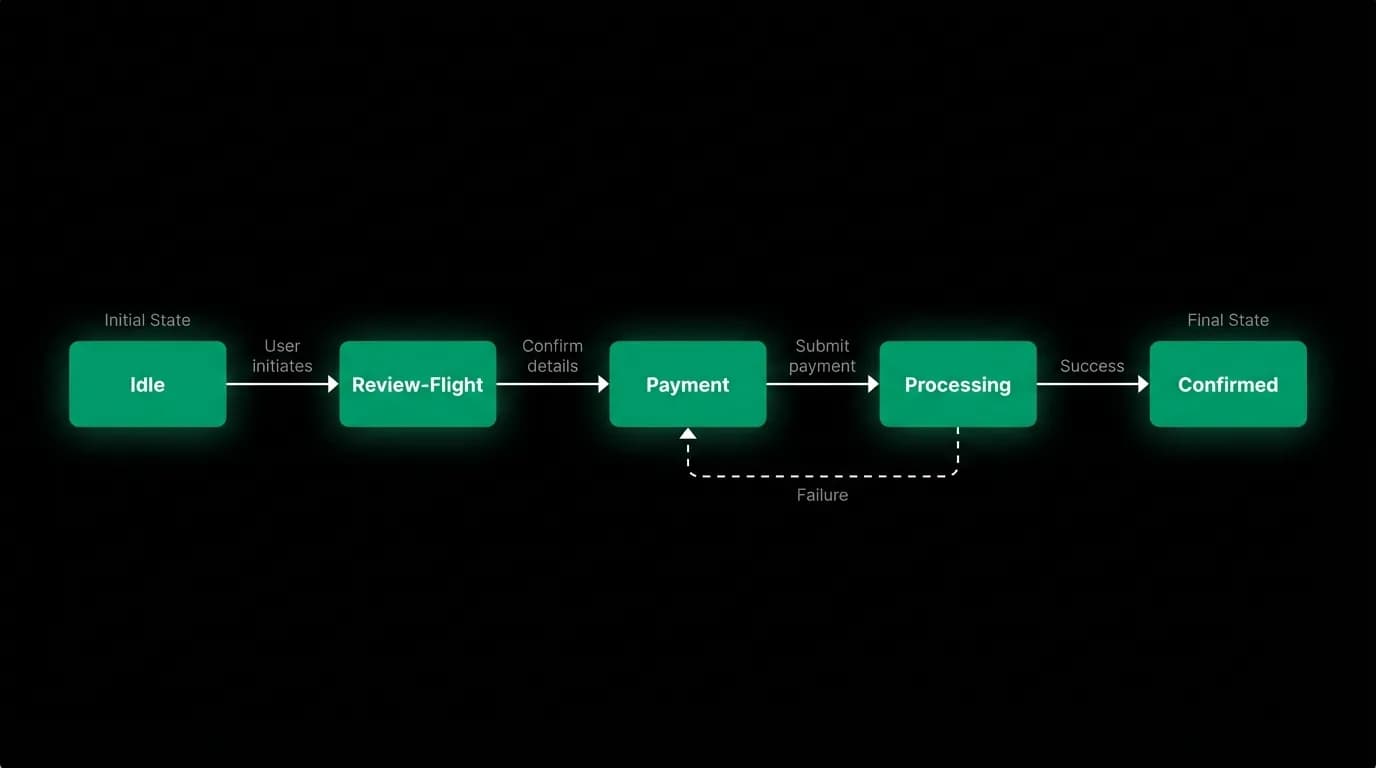
The booking flow within the chat is a state machine with defined transitions.
Idle. No booking in progress. The traveler is browsing flight or hotel offers.
Review. The traveler selected an offer. A review modal shows the details: flight times, price breakdown, traveler details, baggage options. The offer data from the tool result feeds the review modal.
Payment. The traveler confirmed the review. A payment sheet appears for card entry. The payment processing is handled by the embedded payment component, which captures card details without them ever touching our servers.
Processing. Payment was submitted. The booking is being created on the backend. The UI shows a processing modal with status updates. This state can last several seconds as the backend confirms the booking with the travel data provider.
Confirmed. The booking succeeded. A confirmation modal shows the booking reference, a summary, and next steps. The trip data refreshes to include the new booking.
Each transition is triggered by a specific user action or server event. The state machine prevents invalid transitions: you can't go from idle to payment (you must review first), and you can't go from processing back to review (the payment is already submitted).
The booking state is ephemeral. It lives in client memory, not in persistent storage. If the app crashes during a booking flow, the traveler returns to the idle state. The payment, if it was captured, is handled by the backend's idempotency logic. The traveler sees the booking appear in their trips once they reopen the app.
Client state vs. server state
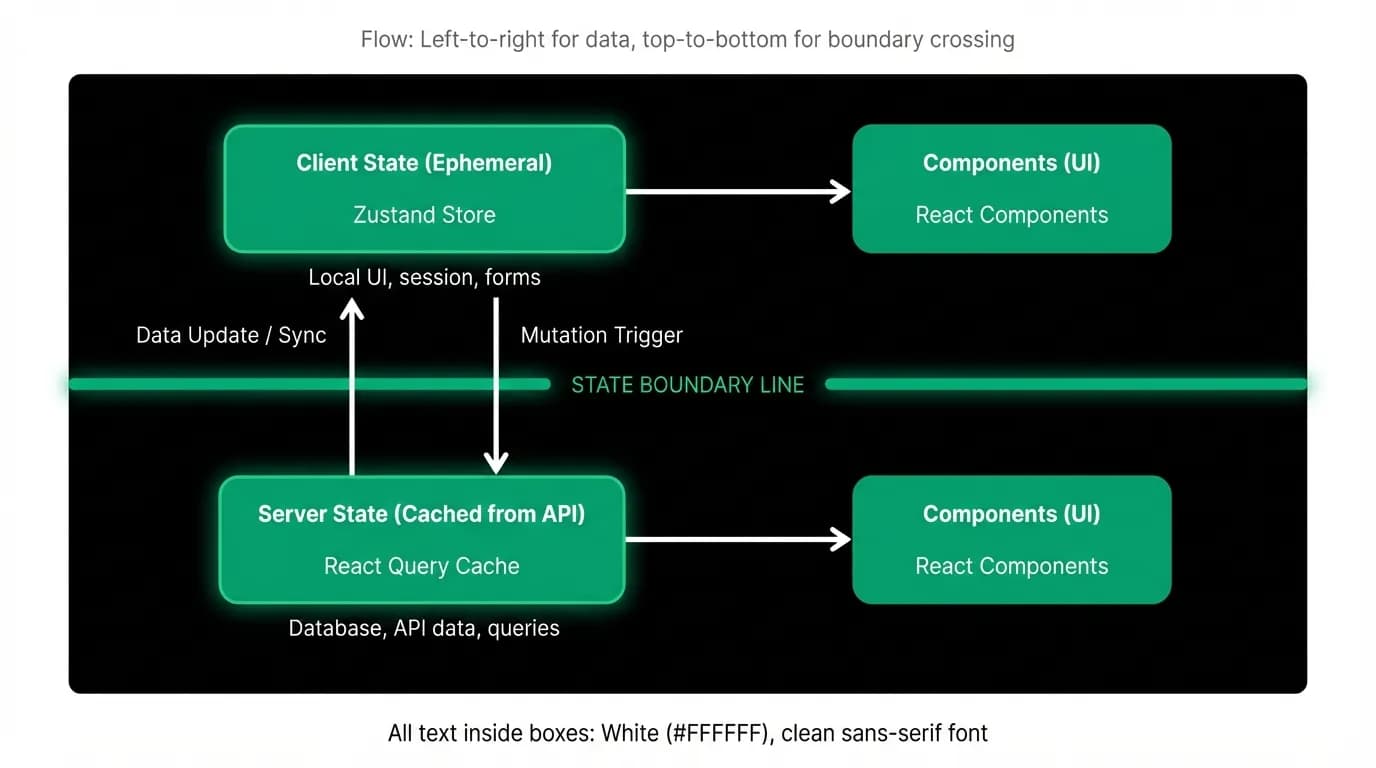
We draw a clear boundary between client state (managed by a lightweight store) and server state (managed by a query cache library).
Client state includes: the current streaming status, the ephemeral tool results from the current session, the booking state machine position, keyboard visibility, scroll position, and other UI-specific state. This state is fast, local, and doesn't need to survive app restarts.
Server state includes: the list of threads, the message history for each thread, trip data, user profile, and booking records. This state is fetched from the API, cached locally, and synchronized when it changes. The query cache handles refetching, deduplication, and stale data management.
The separation matters because the update patterns are different. Client state changes rapidly during a streaming response (every token updates the partial response). Server state changes infrequently (a new message is persisted once, then stable). Using the same mechanism for both creates performance problems. The query cache would be overwhelmed by token-level updates. The local store would be overengineered for simple data fetching.
Persistence and rehydration
When the traveler backgrounds the app and returns, the state should be close to what they left. Not identical (streaming connections are lost, partial responses are gone), but close enough that they don't feel like they restarted.
Messages are rehydrated from the server's history. The hook loads the thread's messages from the API and populates the messages array. Text content survives perfectly. But here's a significant trade-off: tool results (flight cards, hotel cards) are ephemeral. They're sent through the server streaming stream during the conversation and are not persisted to the database. When the history is rehydrated, the tool results are gone.
This means a traveler who backgrounds the app during a flight search, then returns, will see the text messages but not the interactive flight cards. The text might say "I found 8 flights to Barcelona," but the cards that showed those flights won't be there.
We made this trade-off deliberately. Persisting tool results (which can be large: a flight search returns dozens of options with detailed pricing) would significantly increase storage requirements and complicate the message schema. For now, the agent can re-run a search if the traveler asks, and the conversation text provides enough context to continue.
Memory management for long conversations
A 50-message conversation with multiple flight search results and hotel cards contains a substantial amount of data. Each flight card might include 20 options with route details, pricing, and airline information. Each hotel card might include 15 properties with photos, amenities, and rates.
Without management, a long conversation's state grows until the app's memory pressure triggers a garbage collection pause or, worse, a crash. Mobile devices have limited memory, and a chat interface that consumes 200MB is a problem.
We manage memory by limiting the number of active tool results. Only the most recent 10 tool results are kept in memory. Older ones are discarded. If the traveler scrolls back to an old message that referenced a discarded tool result, they see a placeholder: "Flight results no longer available. Ask me to search again."
Messages themselves are lightweight (just text, an ID, and a role). We keep the full message history in memory because the text data is small. But we lazy-load messages for very long threads: only the most recent 50 messages are loaded initially, with older messages fetched on scroll.
Design state management for your AI chat
If you're building an AI chat interface, here's the state shape that works for us.
Separate messages from tool results. Messages are persistent text. Tool results are ephemeral structured data. They have different lifecycles and different storage requirements. Don't try to cram them into the same data structure.
Use a state machine for multi-step flows. Booking, onboarding, or any multi-step interaction should be a state machine with explicit transitions. Free-form state management for multi-step flows leads to invalid states and impossible-to-debug UI bugs.
Draw a boundary between client and server state. Client state (streaming, UI, ephemeral) and server state (history, trips, profile) need different management strategies. Use the right tool for each.
Plan for rehydration from day one. The traveler will background the app. The connection will drop. The state will need to be reconstructed. If you assume a persistent connection, you'll be surprised by how often it breaks.
Manage memory explicitly. Long conversations accumulate data. Set limits on how much stays in memory. Discard what can be re-fetched. Your users won't scroll back to message 3 of a 50-message thread, and if they do, a re-fetch is acceptable.
Nowah is an AI travel agent that searches and books real flights and hotels through conversation — no filters, no thirty open tabs. Plan your next trip.