Structured Logging: Our First and Best Investment
Why structured JSON logging from day one saved us thousands of hours of debugging — correlation IDs, log levels, and sensitive data redaction patterns.
"Something broke in production." Those three words kick off every debugging session. What happens next depends entirely on the quality of your logs.
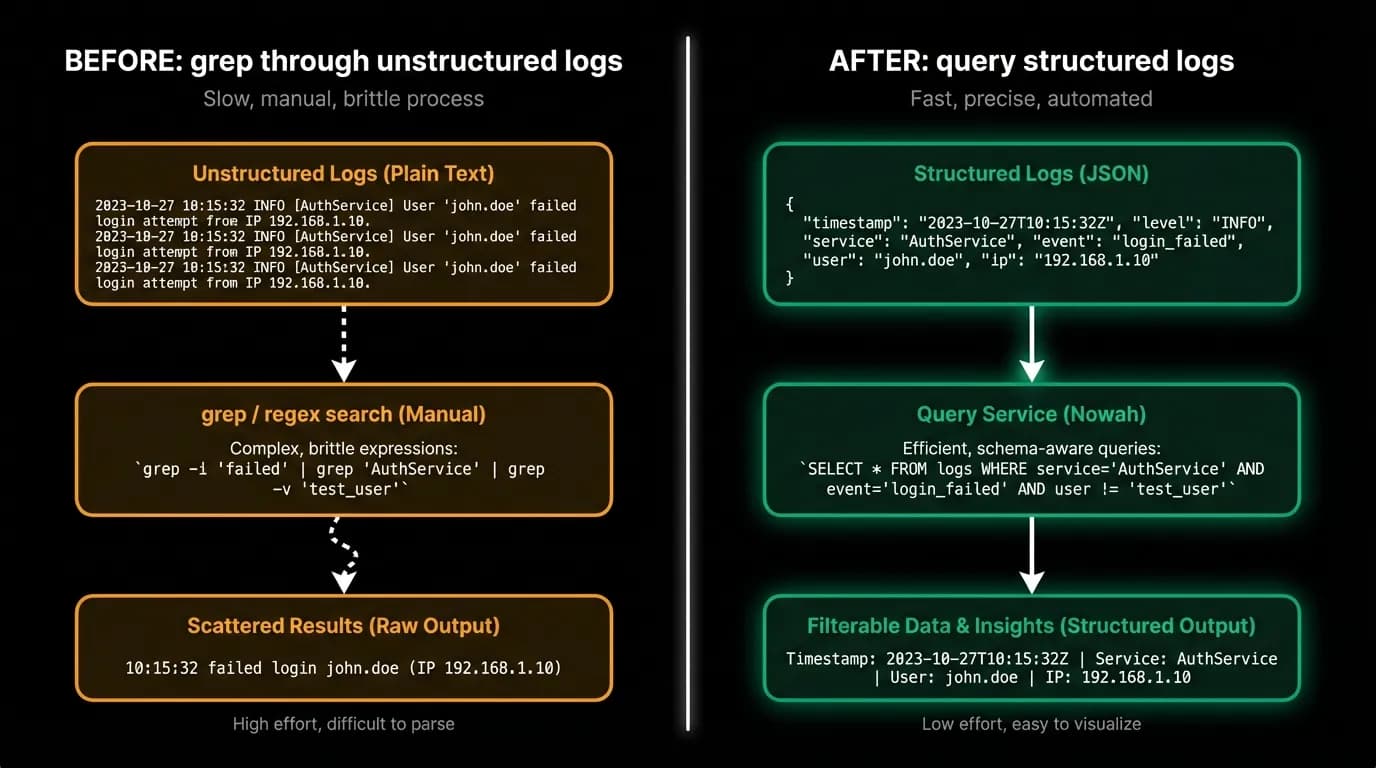
With unstructured logs (plain text strings), the debugging session goes like this: SSH into a server, grep for keywords, scroll through thousands of lines, try to correlate timestamps manually, miss the important entry because it was formatted slightly differently than what you grepped for. An hour passes. You're still looking.
With structured logs (JSON with consistent fields), it goes like this: search for the request ID, see every log entry from that request across every service, sorted by timestamp, with the error and full context. Three minutes. Done.
Structured logging from day one was the single best infrastructure investment we made. Every other observability capability builds on top of it.
JSON from the start
Every log entry in our system is a JSON object with a defined schema. The minimum fields are: timestamp, service name, log level, message, and request correlation ID. Most entries include additional context: user ID, request method and URL, response time, error details.
This structure means our log aggregation service can index every field. When we search for `user_id: "abc123"`, we get exactly that user's logs. When we search for `level: "error" AND service: "booking"`, we get exactly the booking service errors. No regex. No parsing. Just field queries.
The discipline of structured logging is harder than it sounds. It requires every developer to log objects, not strings. Not `log("Payment failed for user " + userId)` but `log({ message: "Payment failed", userId, paymentId, error: err.message })`. The second version is searchable, aggregatable, and machine-parseable. The first version is a string that requires regex to extract any useful information.
We enforce this through code review. Unstructured log statements get flagged and rewritten before merge.
Correlation IDs across services
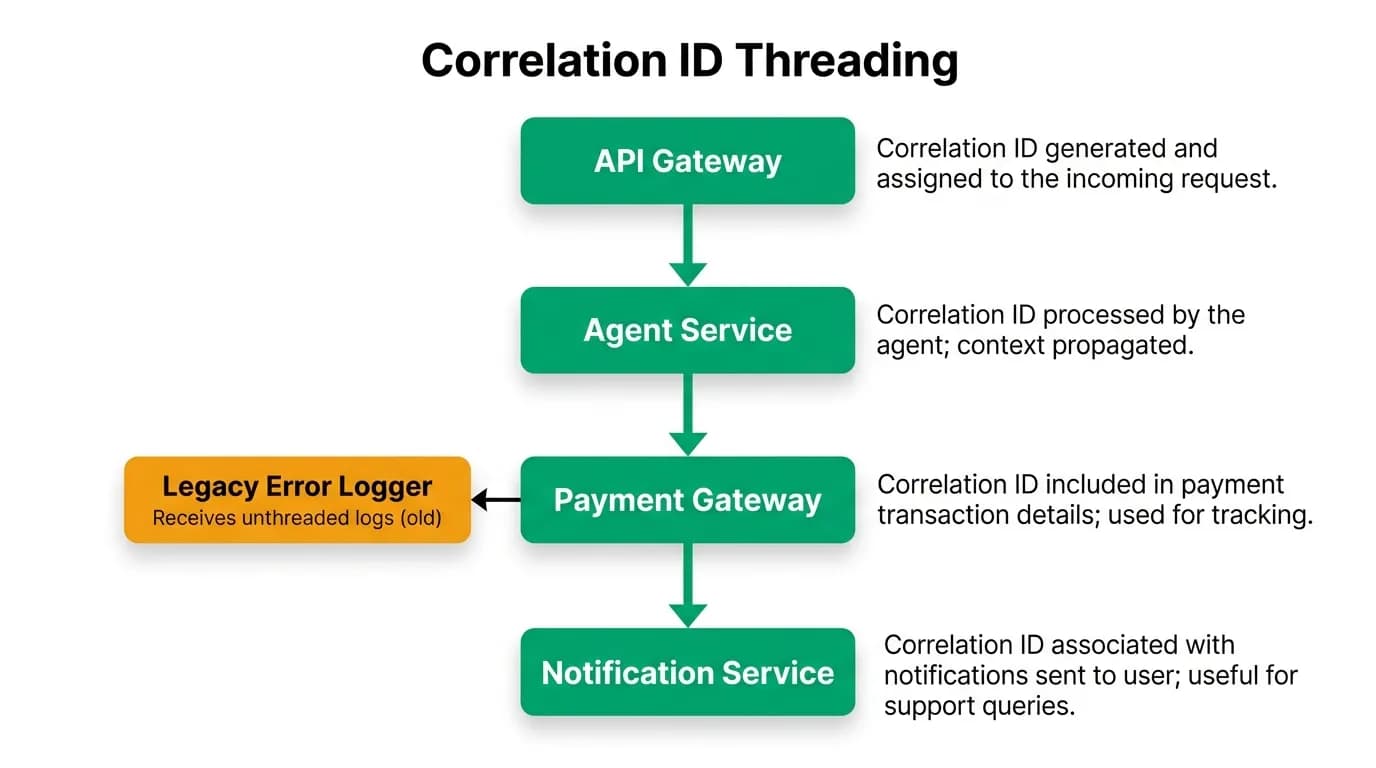
A single traveler request touches multiple services. The AI chat message hits the API server, triggers the AI agent, which calls external APIs, which generates background jobs for notifications and documents. Without correlation, the logs from each service are independent. You know the API server received a request. You know the agent made a tool call. But you can't prove they're the same request.
Correlation IDs solve this. When a request enters our system, the API server generates a unique correlation ID. This ID propagates through every downstream service call (as an HTTP header), every background job (as a job metadata field), and every log entry (as a standard field).
To trace a request end-to-end, we search for the correlation ID. Every log entry from every service that participated in handling that request appears in one query result, ordered by timestamp. We can see the complete lifecycle: authentication, AI reasoning, tool calls, payment processing, background job execution.
The ChatMessage model in our database includes a trace ID field specifically for this purpose. When a traveler reports an issue with a specific conversation, we can pull the trace ID from the message and reconstruct everything that happened.
Log levels with discipline
We use four log levels, each with a specific purpose:
Error means something failed that shouldn't have. A payment processing error, a database query failure, an external API returning an unexpected status. Errors are actionable. Every error log should correspond to something an engineer should investigate.
Warn means something unusual happened but was handled. A retry was triggered, a cache miss forced a database query, a rate limit was hit. Warnings are informational but might indicate a trend worth watching.
Info means a significant business event occurred. A booking was created, a payment was captured, a user signed up. Info logs are the narrative of what the system did, not how it did it.
Debug means detailed diagnostic information that's useful during development but noisy in production. SQL queries, full request/response bodies, intermediate processing steps. Debug is off in production by default and enabled temporarily during investigation.
The discipline is keeping each level meaningful. If errors include non-actionable noise, engineers stop reading them. If info includes implementation details, it becomes impossible to see the business events. We review log levels during code review and push back when an info log should be debug or when an error should be a warn.
Sensitive data redaction
Our logs must never contain passport numbers, full credit card numbers, session tokens, passwords, or other sensitive personal information. This isn't a guideline. It's a hard requirement enforced by automated scanning.
We redact sensitive data at the logging layer itself. Before a log entry is written, a sanitization step checks for known sensitive field patterns and replaces them with redacted placeholders. A payment token becomes `tok_*`. A passport number becomes `*REDACTED***`. An email address in error messages gets partially masked.
The redaction is configured centrally, not per-log-statement. Developers don't need to remember to redact. The logging infrastructure handles it. This is important because the logs most likely to contain sensitive data are error logs, which are written during exceptional conditions when a developer is most likely to dump everything for debugging purposes.
We audit our logs periodically by scanning aggregated log data for patterns that look like sensitive information. Credit card patterns (16-digit sequences), passport patterns (alphanumeric sequences of specific lengths), and email patterns. If the scan finds unredacted sensitive data, we fix the redaction rules and audit the exposure.
Log aggregation and search
Individual log files on individual servers are useless in a containerized environment where containers are ephemeral. Our logs flow from containers to a centralized aggregation service.
The aggregation service ingests structured JSON, indexes every field, and makes it searchable. We can query by any combination of fields: time range, service, log level, user ID, correlation ID, error type. Results are sorted chronologically and can be grouped by field values.
The search patterns we use most often during debugging:
"Show me all errors from the payment service in the last hour" catches outages quickly.
"Show me all log entries for correlation ID X" traces a single request end-to-end.
"Show me all entries for user Y in the last 24 hours" reconstructs a user's complete interaction history for a support case.
"Show me all warn-level entries where the message contains 'retry'" identifies services that are struggling with external dependencies.
Each of these queries returns results in seconds because the data is indexed. The same queries against unstructured text logs would require full-text scanning and regex matching, which is orders of magnitude slower.
Start structured logging today
If you're still using unstructured logging, here's the minimum to get started.
Pick a structured logging library for your platform. Most languages have one. Configure it to output JSON.
Define a minimum field set that every log entry must include: timestamp, level, message, service name, and correlation ID.
Inject the correlation ID in your request middleware. Generate it at the edge, propagate it downstream.
Add a redaction layer for sensitive fields. Don't wait until you have a data leak to add this.
Send logs to a searchable aggregation service. Logs that can't be searched are logs that don't exist when you need them.
Structured logging is much harder to retrofit than to implement from day one. If you're starting a new service, start with structured logging. If you're maintaining an existing service, the migration is worth the effort. Every debugging session afterwards will be faster.
Nowah is an AI travel agent that searches and books real flights and hotels through conversation — no filters, no thirty open tabs. Plan your next trip.