Voice Input Infrastructure for Travel Queries
How we let travelers speak their travel plans instead of typing them — recording pipeline, speech-to-text, accent handling, and latency optimization.

You're in a cab heading to the airport. Your hands are full with luggage and your phone. You need to ask your travel agent to change your hotel check-in time because your flight was delayed. Typing a detailed message on a bouncing screen with one free thumb is miserable. Speaking it takes five seconds.
Voice input transforms the travel chat from a typing exercise into a conversation. For a platform where the primary interface is chat with an AI agent, voice is not a nice-to-have accessibility feature. It's a core input method that matches how people naturally communicate, especially when they're traveling and their hands, attention, and patience are limited.
The recording pipeline
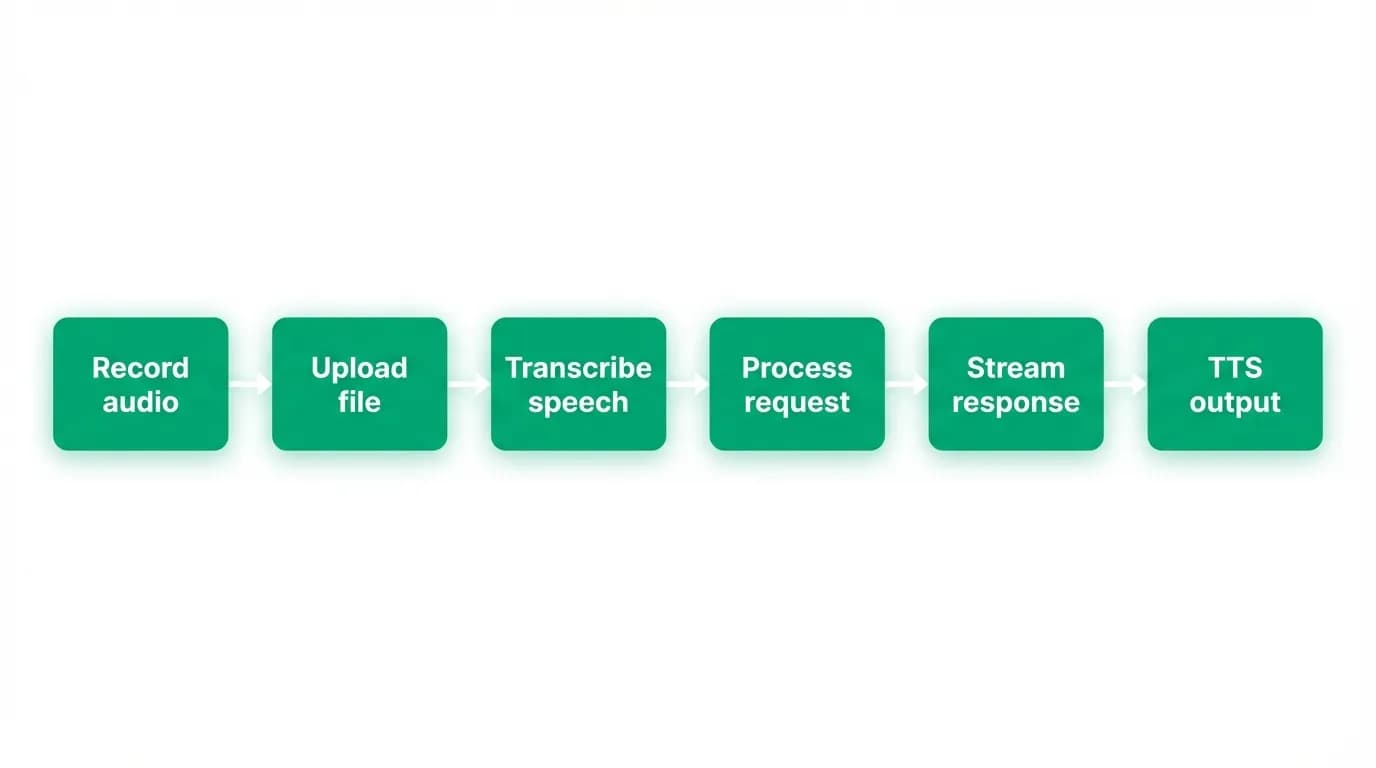
Voice input on mobile is a chain of steps: microphone capture, audio recording, upload to the server, transcription, and then the standard AI processing pipeline.
The recording hook manages the capture lifecycle. Tap to start recording. Tap again to stop. The hook handles microphone permissions, audio session configuration, recording format selection, and the state transitions between idle, recording, and processing.
Audio format matters for quality and upload speed. We record in a compressed format that balances transcription accuracy with file size. An uncompressed recording would be larger but not meaningfully better for transcription. The compressed format keeps uploads fast, which matters on mobile networks.
The recording state is visible in the UI. While recording, the send button transforms into a stop button with a waveform animation. The traveler knows the system is listening. When they stop, the UI transitions to a processing state while the audio uploads and transcribes. Then the transcribed text appears in the input field, and the traveler can edit it before sending or send it immediately.
Speech-to-text
The audio recording gets transcribed by a speech-to-text service. The transcription happens server-side to take advantage of more powerful models than what's available on-device. The trade-off is added latency (the audio must be uploaded first), but the accuracy improvement justifies it.
Transcription accuracy for general speech is excellent with modern models. But travel queries aren't general speech. They're full of proper nouns that trip up transcription: city names in unfamiliar languages, airline codes, hotel brand names, airport abbreviations. "I need a flight to Phuket" is not an obscenity, but some transcription models treat it as one. "Book me on the CDG to NRT route" requires knowing that CDG and NRT are airport codes, not random letter sequences.
We address this with post-processing. The raw transcription goes through a normalization step that identifies likely travel-related terms and corrects common misrecognitions. "Charles Degaulle" becomes "Charles de Gaulle." "Narita" spelled phonetically gets corrected. Airport codes that were transcribed as words get reformatted.
This post-processing isn't perfect. It catches the common cases but misses unusual destinations and uncommon airline names. The AI agent downstream handles the remaining ambiguity: if the traveler said "fly me to Florianopolis" and the transcription mangled it, the agent can ask for clarification.
Handling accents and travel contexts
Travel is inherently international, and our users speak with accents from everywhere. A British traveler asking about "Majorca" and an American asking about "Mallorca" are requesting the same destination. An Australian accent pronouncing "Melbourne" sounds different from a non-Australian's pronunciation.
Modern speech-to-text models handle accent variation reasonably well. The bigger challenge is code-switching: a French traveler might say "I want to fly to" in English and then say the destination name in French. Or they might use English for the request and insert travel terminology in the local language of the destination.
We don't attempt to solve this at the transcription level. Instead, the AI agent is the adaptation layer. The agent receives the transcribed text, applies its understanding of travel contexts, and interprets the intent. If the transcription is "fly to ma-jorka," the agent resolves it to Mallorca, Spain. The agent's world knowledge compensates for the transcription's limitations.
Noisy environments
Travelers use voice input in the worst possible acoustic environments. Airport terminals with announcements echoing. Train stations with platform noise. Busy streets with traffic. Hotel lobbies with background music. If voice input only works in a quiet room, it doesn't work for travelers.
We handle noise at multiple points. The recording pipeline uses the device's noise cancellation capabilities (most modern phones have multi-microphone noise cancellation). The audio is captured through the phone's voice-optimized microphone configuration, not the raw audio capture.
The speech-to-text model handles remaining noise through its training on diverse audio conditions. Modern models are trained on noisy data and perform reasonably well in moderate noise.
For extreme noise conditions (standing next to a jet engine), voice input might not work well. Rather than producing a garbled transcription that leads to a wrong booking, we surface the confidence level. If the transcription confidence is below a threshold, we show the transcribed text in the input field with a note: "Please verify this is correct before sending." The traveler can correct the text before it goes to the agent.
Latency optimization
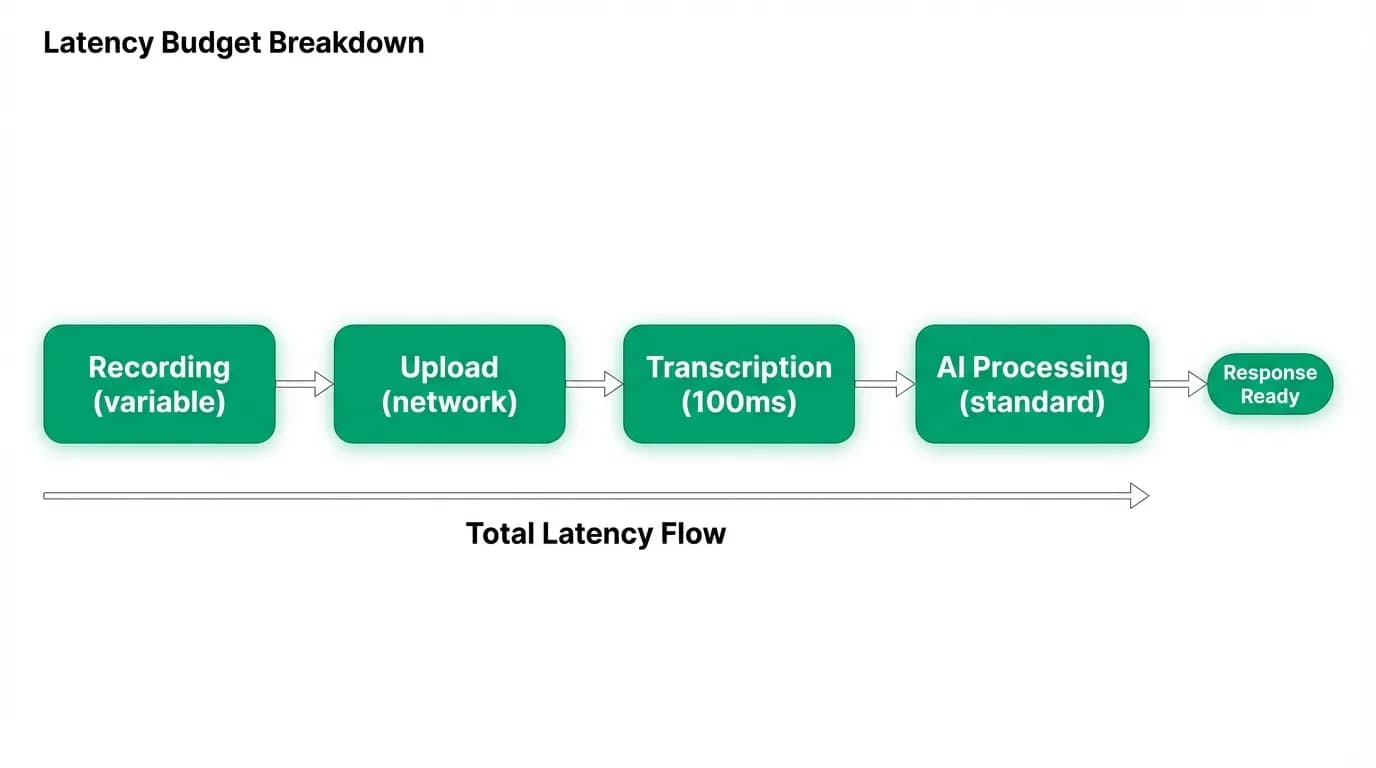
Voice input adds latency to the query pipeline. Before the AI agent even sees the message, the voice path requires: recording duration (however long the traveler speaks), audio upload (network dependent), and transcription (typically 100-300ms for short utterances).
The recording duration is fixed by the traveler's speech. We can't control this. But we can optimize what happens after.
Upload starts immediately when recording stops. We don't wait for any user confirmation to begin the upload. The audio begins transferring the moment the traveler taps stop. For short utterances (under 5 seconds of audio), the upload typically completes in under a second on a reasonable mobile connection.
Transcription begins as soon as the upload completes. The transcription service processes short audio clips quickly, typically in 100-300 milliseconds. For longer recordings, we could stream the audio to the transcription service while it's still uploading, but the added complexity hasn't been worth it at our typical utterance lengths.
The total added latency for voice versus typing is typically 1-2 seconds: upload plus transcription. For a message that would take 15 seconds to type on a phone, the voice path is still faster even with the overhead.
The AI agent's response also includes a voice-friendly text variant. The agent's standard response might include markdown formatting, bullet points, and structured data that doesn't translate well to text-to-speech. The voice text variant is a plain-language summary optimized for listening rather than reading.
Add voice input to your AI chat
If you're building an AI chat and want to add voice input, here's the approach that worked for us.
Start with the recording hook. Handle permissions, audio session, recording format, and state management. Get this working reliably before adding transcription. A solid recording experience with manual transcription is better than a flaky end-to-end voice pipeline.
Use server-side transcription. On-device models are improving rapidly, but server-side models are still more accurate for the specialized vocabulary that domain-specific applications need. The upload latency is a worthwhile trade-off.
Add domain-specific post-processing. Whatever your domain's unusual vocabulary is (medical terms, legal jargon, travel destinations), build a post-processing step that catches common misrecognitions.
Show the transcription before sending. Let the user verify and edit. This builds trust in the voice feature and prevents costly mistakes. In a booking platform, a misrecognized destination city could lead to a wrong booking.
Optimize for noisy environments. Your users aren't in a recording studio. Use the device's noise cancellation, and surface confidence scores when the transcription quality is uncertain.
Nowah is an AI travel agent that searches and books real flights and hotels through conversation — no filters, no thirty open tabs. Plan your next trip.