Rate Limiting That Developers Do Not Hate
Rate limits protect your API, but bad ones punish developers. Clear headers, actionable 429 errors, and transparent tier upgrades turn limits into a feature.

A developer demoing a travel integration to a potential client hits a rate limit mid-demo. No warning. No explanation. The API just starts returning errors. The demo fails. The deal might too.
This happened to someone integrating one of the legacy travel platforms, and they told us about it during a feedback session. It shaped a core conviction for us: rate limits are necessary, but opaque rate limits are a developer experience failure. If a developer cannot see their limit, track their usage, and predict when they will be throttled, the limit is hostile instead of helpful.
We designed our rate limiting to be transparent, informative, and constructive. When you hit a limit, the error does not just say "too many requests." It tells you which limit you hit, when you can retry, how to get more capacity, and how to optimize your current usage to stay within your limit.
The four headers every response needs
Every API response from Nowah includes rate limit headers, not just the 429 errors:
X-RateLimit-Limit: 100
X-RateLimit-Remaining: 87
X-RateLimit-Reset: 1710500000
On a 429 response, we add:
Retry-After: 30`X-RateLimit-Limit` shows the total allowed requests in the current window. `X-RateLimit-Remaining` shows how many are left. `X-RateLimit-Reset` is the Unix timestamp when the window resets. `Retry-After` tells the client exactly how many seconds to wait before trying again.
These headers appear on every response, not just errors. This means developers can monitor their usage in real time without guessing. A client library can track remaining requests and slow down before hitting the limit. An AI agent can read these headers and pace its requests accordingly.
We found that developers who can see their rate limit usage via headers file roughly 80% fewer support tickets about throttling. The transparency alone eliminates most of the frustration.
Different limits for different endpoints
Not all API calls carry the same cost. A flight search fans out to multiple providers and consumes significant compute. A booking request moves real money and creates real commitments. Reading a booking status is a simple database lookup.
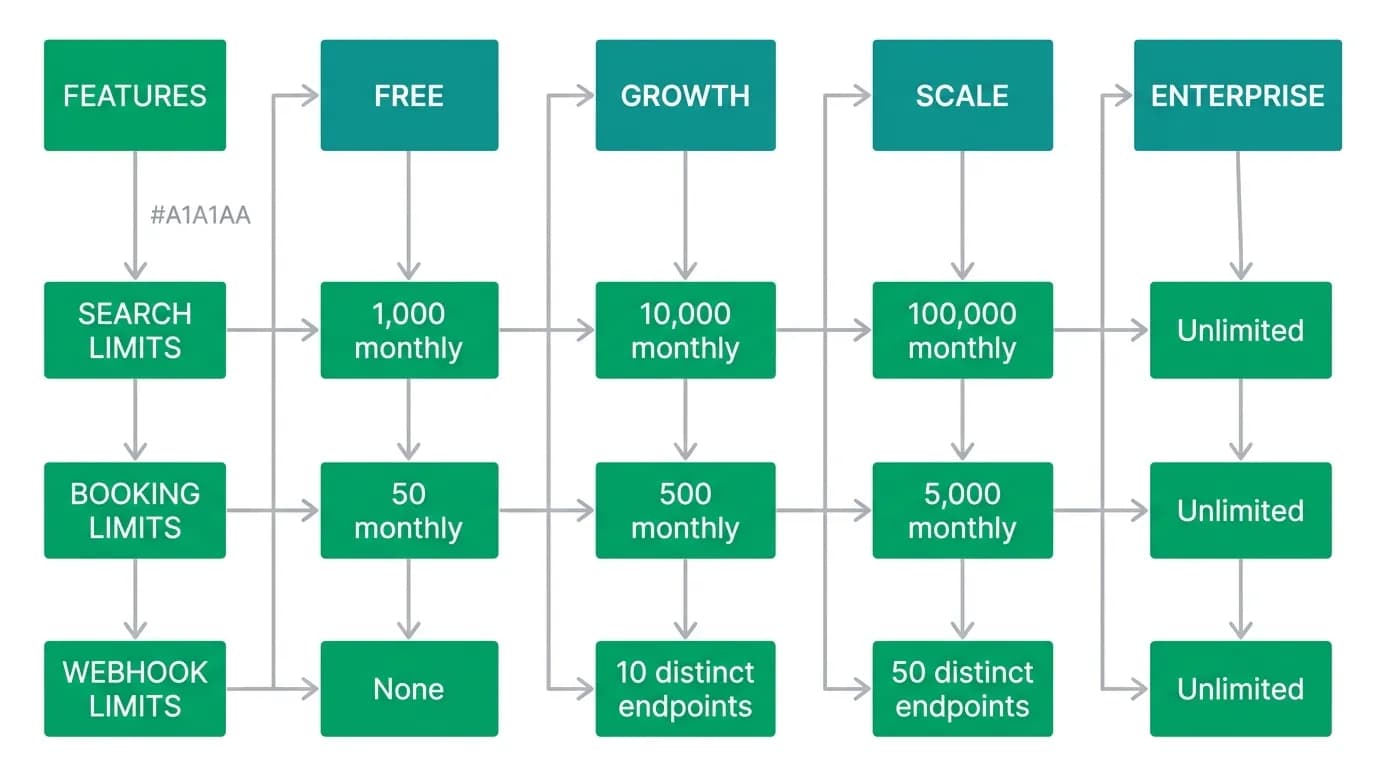
We set rate limits per endpoint category based on the actual resource cost:
Search endpoints get higher limits because developers iterate on search parameters during development and testing. Booking endpoints get much lower limits because they have real financial consequences and each booking consumes limited provider inventory. Payment endpoints have their own limits tuned for the typical booking-to-payment ratio.
Our tier structure scales with usage:
The per-endpoint approach prevents a burst of search requests from blocking a time-sensitive booking request. Each endpoint category has its own limit and its own window, so heavy search usage does not affect your ability to complete a booking.
The 429 response as a product feature
Most APIs treat the 429 response as a slap on the wrist. "Too Many Requests." Maybe a `Retry-After` header if you are lucky. That is not enough.
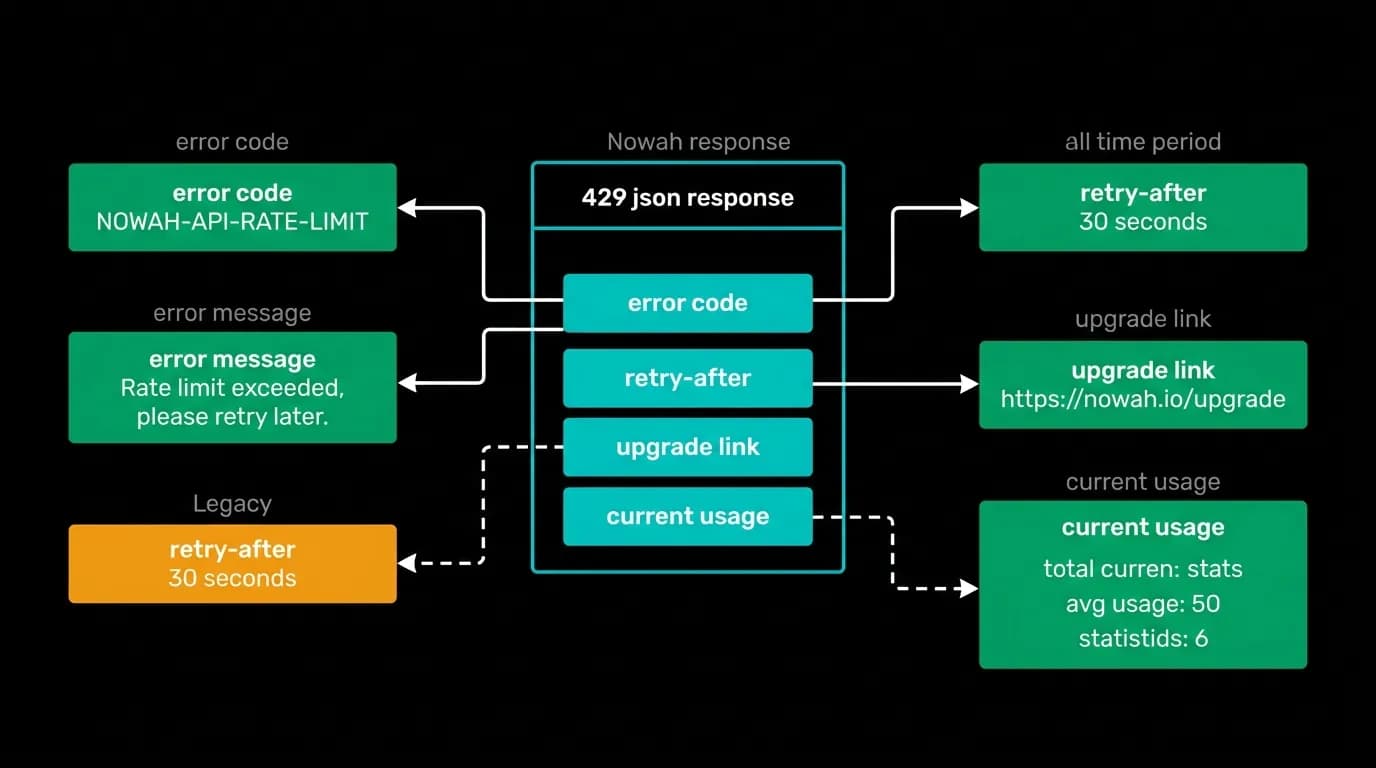
Our 429 responses include everything a developer needs to understand and resolve the situation:
{
 "success": false,
 "error": {
 "code": "RATE_LIMIT_EXCEEDED",
 "message": "Rate limit exceeded for flight search.",
 "details": "Limit: 100 requests per hour. Current: 100. Resets at 2026-03-15T15:00:00Z. Upgrade to Growth tier for 1,000 requests per hour at docs.nowah.com/pricing.",
 "docs": "https://docs.nowah.com/errors/RATE_LIMIT_EXCEEDED",
 "requestId": "req_abc123"
 }
}
The error tells you which limit you hit (flight search, not some generic API limit). It tells you the exact count and the exact reset time. It tells you the upgrade path with a direct link. And it links to a documentation page that explains common causes of rate limit issues and optimization strategies.
The documentation page is the part most APIs skip, and it is where real value lives. Common causes include polling endpoints instead of using webhooks, searching on every keystroke instead of debouncing, and not caching search results that are valid for several minutes. We provide code examples for each optimization.
Sliding windows and burst allowance
Fixed-window rate limiting has a well-known problem: a developer can use their full limit at the end of one window and the full limit at the start of the next, effectively doubling their rate for a brief period. This spike can overwhelm downstream services.
We use a sliding window algorithm for search endpoints. The window slides continuously rather than resetting at fixed intervals. This smooths out traffic patterns and prevents burst spikes at window boundaries.
For booking endpoints, we use a token bucket algorithm that allows short bursts. A developer who normally makes one booking per minute but occasionally needs to batch-process five bookings should not be penalized. The token bucket starts full and refills at a steady rate. Bursts are fine as long as the average rate stays within the limit.
We also build in a small grace margin. If a developer hits 100/100 requests, the 101st request gets a 429 with a short `Retry-After`. But it is not flagged as abuse. Consistently exceeding limits by a large margin triggers progressively longer cooling periods. The goal is to protect the system while giving legitimate developers room to breathe.
AI agents and rate limits
AI agents interact with rate limits differently than human developers. A human developer who sees a 429 reads the error, understands the situation, and adjusts their code. An agent reads the `Retry-After` header and waits that many seconds before retrying. It is more mechanical but can be more precise.
The key is making rate limit information machine-readable. Our rate limit headers and 429 error payloads are designed so that agents can parse them without understanding natural language. The `Retry-After` header is a number. The `X-RateLimit-Reset` is a timestamp. The error `code` is a deterministic string. An agent can handle all of this programmatically.
We also include rate limit information in our SDK's built-in retry logic. When the SDK receives a 429, it automatically waits for the `Retry-After` duration and retries. The developer does not need to write this logic — it is built into the client. This is especially important for agents, which are often built with SDKs and benefit from this automatic handling.
Implementation notes
If you are implementing rate limiting for your own API, a few things we learned:
Always return rate limit headers on successful responses, not just errors. Developers need to see their usage trending before they hit the limit.
Use separate limits per endpoint category. A generic "100 requests per minute across the entire API" is too blunt. Developers end up self-rationing on cheap endpoints to save capacity for expensive ones.
Include the specific limit information in 429 error bodies, not just headers. Headers are easy to miss in debugging tools. A clear error body catches the developer's attention.
Provide a direct path from the error to the upgrade. If the developer needs more capacity, do not make them navigate to a pricing page and figure out which tier matches their needs. Tell them in the error.
Log rate limit events internally. Track which API keys are hitting limits and how often. This data feeds into product decisions about tier pricing and limit adjustments. If most developers on the Growth tier are consistently hitting their search limit, the limit might be too low for the tier's intended audience.
Rate limiting is a constraint. But with transparency, good communication, and developer-friendly design, it becomes a constraint that developers understand and respect rather than one that frustrates and confuses them. The goal is not to punish usage — it is to protect the system while keeping the developer experience smooth.
Nowah is an AI travel agent that searches and books real flights and hotels through conversation — no filters, no thirty open tabs. Plan your next trip.