Securing Travel Documents in the Cloud
How we store and serve passport scans, boarding passes, and visa documents without compromising traveler privacy — signed URLs, encryption, and audit logs.
A passport scan in the wrong hands is identity theft. Full name, date of birth, nationality, passport number, photo. That's enough to open bank accounts, apply for credit cards, or cross borders fraudulently. When a traveler uploads their passport to our platform, they're trusting us with one of the most sensitive documents a person has.
We take that seriously. Our document storage infrastructure is built around the principle that travel documents are sensitive personal data that deserves the same protection as financial credentials. Not blog posts. Not profile pictures. Sensitive personal data.
No permanent public links. Ever.
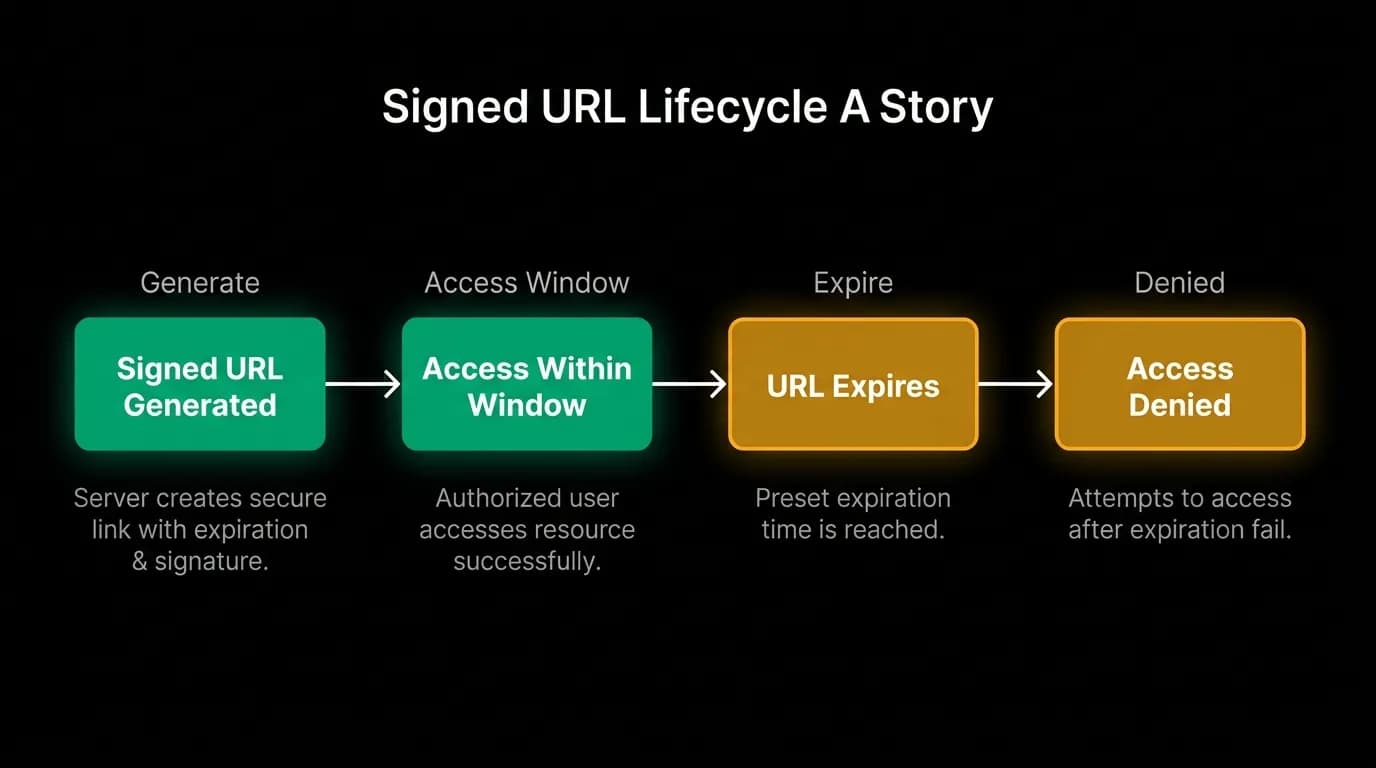
The single most important security decision in our document storage: we never generate permanent public URLs for personal documents.
When a traveler needs to view their boarding pass, we generate a time-limited signed URL. This URL works for a short window, enough time to view or download the document. After that, the URL expires and returns an access denied error.
This means there are no permanent links to passport scans floating around in browser history, chat logs, email chains, or bug reports. If someone intercepts a document URL, they have minutes to use it, not forever.
The signing mechanism uses a cryptographic signature tied to the URL, the expiration time, and the requesting user's identity. You can't extend the URL's lifetime by modifying the expiration parameter because the signature would be invalid. You can't access a different document by modifying the path because the signature covers the full path.
Static assets (app icons, marketing images, generic content) get normal CDN caching and permanent URLs. Personal documents get signed URLs with short TTLs. The two categories never mix.
Encryption at rest and in transit
Documents are encrypted at rest in our object storage. The storage layer handles encryption transparently. Documents are encrypted when written and decrypted when read. The encryption keys are managed by the cloud provider's key management service, rotated automatically, and never accessible to application code.
In transit, everything is TLS. The upload from the traveler's device to our server is over HTTPS. The storage of the document from our server to object storage is over HTTPS. The retrieval via signed URL is over HTTPS. There's no point in the document's lifecycle where it's transmitted unencrypted.
We also don't cache personal documents on the CDN. Static assets go through CDN for global low-latency delivery. Personal documents bypass CDN and are served directly from the object storage origin with signed URLs. Caching a passport scan on edge servers around the world would expand the attack surface for no meaningful benefit (these documents aren't accessed frequently enough to benefit from caching).
Access control
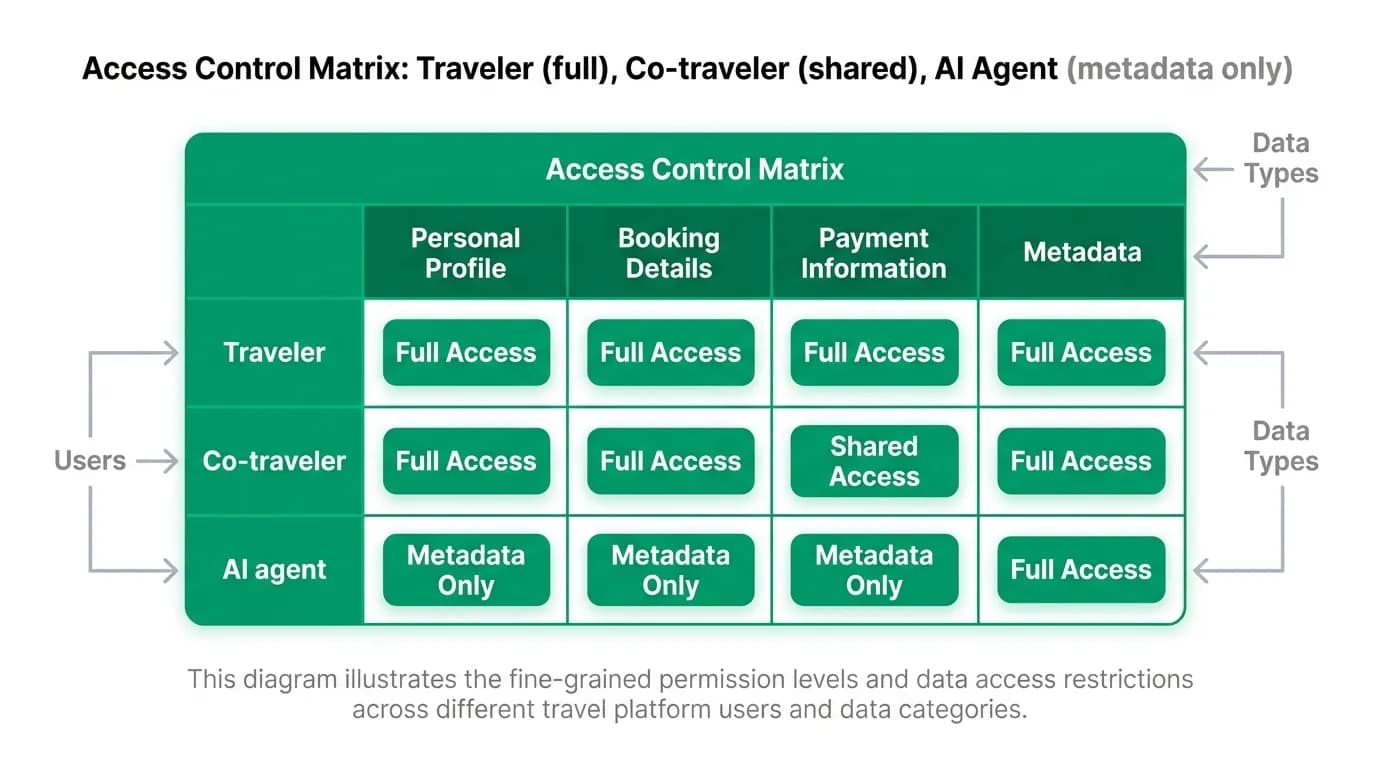
Who can see a document? The answer depends on the document type and the relationships between travelers.
The traveler who uploaded the document always has full access. They can view, download, and delete their own documents.
Co-travelers on the same trip can access shared trip documents if the primary traveler has granted sharing permissions. A family trip where one person manages all the documents means other family members can view boarding passes and itineraries. But they can't view each other's passport scans unless explicitly shared.
The AI agent can access document metadata but not document contents. When the agent needs to reference a traveler's passport expiration date, it reads the metadata extracted during upload. It doesn't download and parse the actual passport image. This limits the information available in the AI conversation context to what's strictly necessary.
Customer support can access documents only through an audited support tool with explicit justification and a time-limited session. No standing access.
Audit logging
Every document access is logged. The audit log records who accessed the document, when, from what IP address, and why (user request, agent query, support investigation, system process).
This isn't just for security incident investigation. It's for trust. If a traveler asks "who has seen my passport scan?" we can give them a complete, honest answer.
The audit log also powers anomaly detection. An unusual pattern of document access (one user viewing many other users' documents, access from an unusual geographic location, bulk downloads) triggers alerts for investigation.
Audit logs are immutable. Once written, they can't be modified or deleted by application code. They're stored separately from operational data with restricted access. Even database administrators can't alter them without triggering separate alerts.
Data retention and deletion
Travel documents don't live forever. A boarding pass for a flight that happened six months ago doesn't need to be stored indefinitely. A visa document for a completed trip has diminishing utility over time.
We implement a retention policy: documents are retained for a defined period after the associated trip ends. After that, they're marked for deletion and removed from storage. The traveler can download their documents before the retention period expires.
Travelers can also request immediate deletion at any time. A deletion request removes the document from storage and purges the metadata from our database. The audit log retains a record that the document existed and was deleted (for compliance), but the document content is gone.
This retention policy reflects a real tension. Travelers sometimes appreciate having old boarding passes and itineraries available for reference. But storing sensitive documents indefinitely increases risk. We err on the side of deletion and make it easy for travelers to download their documents during the retention window.
Upload processing
When a document is uploaded, several things happen before it's stored:
Format validation. We accept specific file types (PDF, PNG, JPEG) and reject everything else. This prevents executable files or other dangerous content from being stored.
Size limits. Documents have a maximum file size. A 500MB "boarding pass" is almost certainly not a boarding pass. Size limits prevent abuse of storage resources.
Metadata extraction. For supported document types, we extract metadata on upload. Passport numbers, expiration dates, traveler names. This metadata is stored in the database and made available to the AI agent. The agent can answer "When does my passport expire?" without accessing the actual document file.
Virus scanning. Uploaded files are scanned for malware before being stored. This protects both our infrastructure and other travelers who might access shared trip documents.
Building secure document storage
If you're storing sensitive personal documents, here's the minimum security posture:
Signed URLs with short TTLs. Never permanent public links for personal data. The extra engineering effort is small compared to the security benefit.
Encrypt at rest and in transit. This is table stakes. Use your cloud provider's managed encryption. Don't roll your own.
Log every access. You need to know who accessed what and when. Without audit logs, you can't investigate incidents, and you can't answer travelers' questions about who has seen their data.
Implement retention and deletion. Don't store sensitive documents forever. Define a retention period, communicate it clearly, and delete on schedule.
Separate personal documents from static assets in your CDN strategy. Static assets benefit from aggressive caching. Personal documents should never be cached on edge servers.
Nowah is an AI travel agent that searches and books real flights and hotels through conversation — no filters, no thirty open tabs. Plan your next trip.