The Anatomy of a Perfect Error Message
A great error message turns a 30-minute debugging session into a 30-second fix. Here is the structure, content, and philosophy behind errors that actually help.
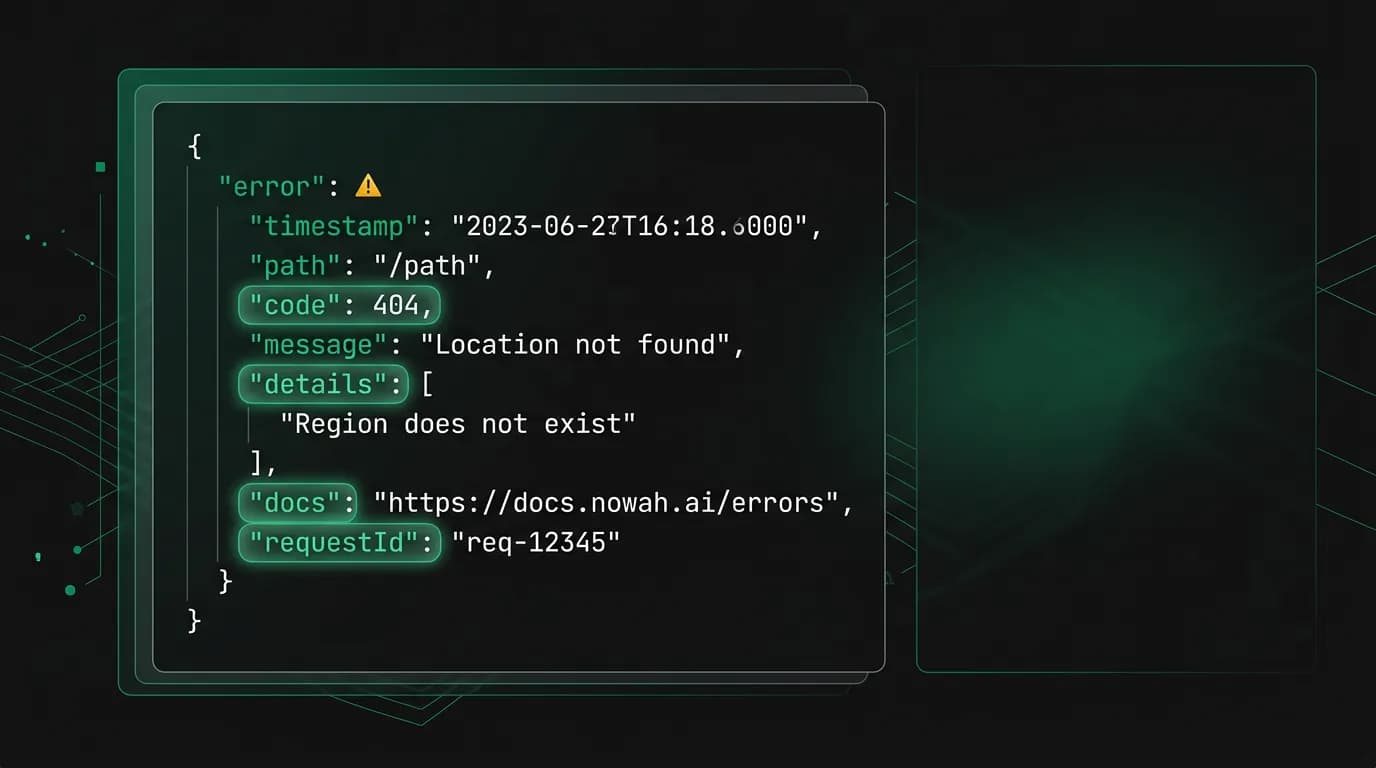
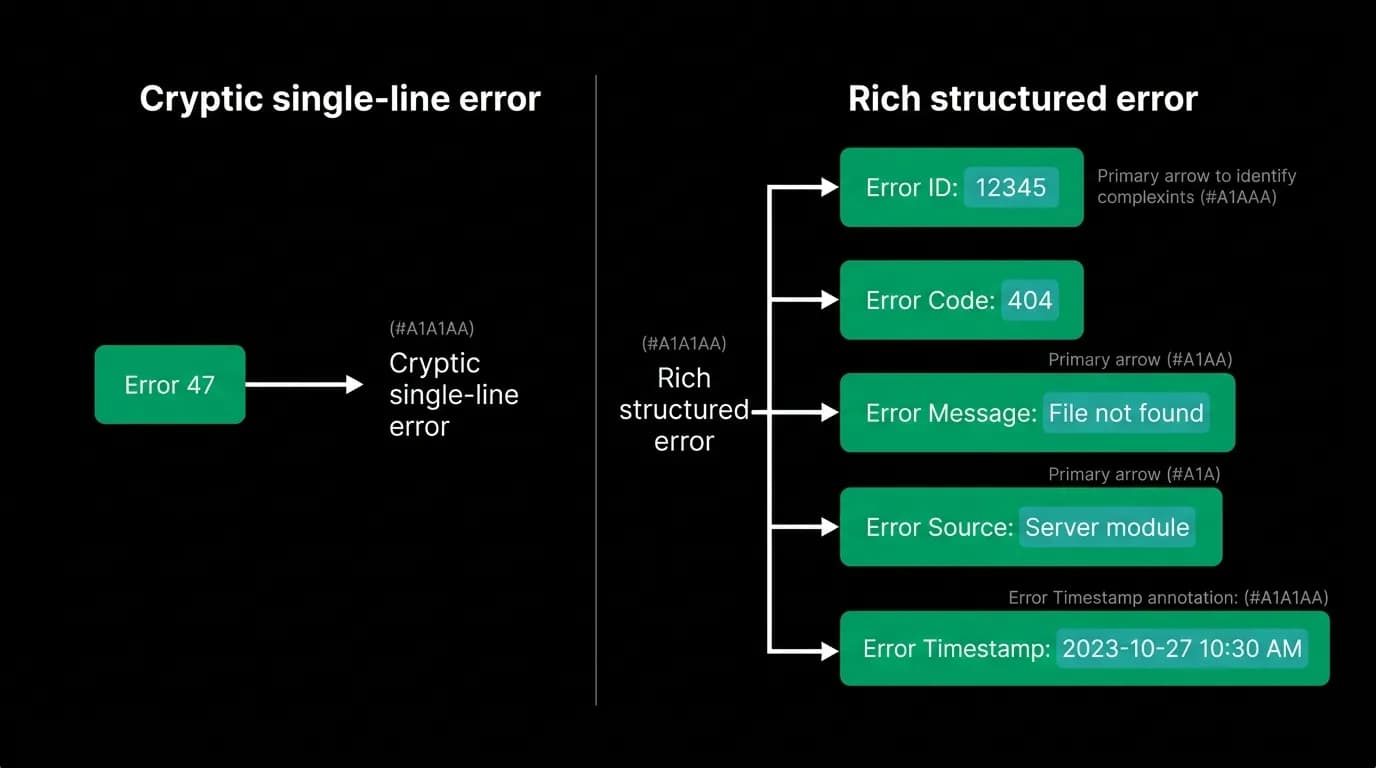
A developer on our team once spent three days debugging an integration failure. The API returned a single line: `Error 47`. No context. No explanation. No suggestion for what to do next. Eventually they found the problem — an expired authentication token — by reading source code they should never have needed to read. Three days for a problem that should have taken thirty seconds.
That experience shaped how we think about errors at Nowah. Error messages are one of the highest-leverage investments in developer experience. Companies with excellent error design report support ticket volumes 60-80% lower than their peers. Comprehensive error documentation alone can reduce repeat support queries for the same issue by over 70%.
We decided early on that every error in our API would contain five specific fields, and that every single error code would get its own documentation page with causes, solutions, and examples. Here is how we structured it and why each piece matters.
The five-field error envelope
Every error response from the Nowah API follows this exact structure:
{
 "success": false,
 "error": {
 "code": "OFFER_EXPIRED",
 "message": "The selected flight offer has expired.",
 "details": "Offer flt_abc123 expired at 2026-03-15T14:00:00Z. Search again for current pricing.",
 "docs": "https://docs.nowah.com/errors/OFFER_EXPIRED",
 "requestId": "req_xyz789"
 }
}
Five fields. Every time. No exceptions. Let me walk through why each one exists.
The `code` field is machine-readable. It is a stable, unique string that programs can switch on. `OFFER_EXPIRED` will always mean the same thing. It will never be renamed or repurposed. Code that handles this error today will still handle it correctly a year from now.
This matters more than you might think. Many APIs return error codes as integers (error 47, error 1003) with no inherent meaning. Developers have to maintain a lookup table to understand what each number means. String codes like `OFFER_EXPIRED` are self-documenting. You can read the code and understand the problem without consulting a reference.
The `message` field is human-readable. It explains what happened in plain language. This is what a developer sees in their console when something goes wrong. We write these messages as complete sentences with enough context to understand the situation immediately.
A bad message: "Invalid request." A good message: "The selected flight offer has expired." The difference is specificity. The good message tells you what happened. The bad message tells you nothing.
The `details` field adds specific context. This is where we include the IDs, timestamps, limits, and other concrete data that eliminates guesswork. "Offer flt_abc123 expired at 2026-03-15T14:00:00Z" tells you exactly which offer expired and exactly when. You do not need to cross-reference logs or make additional API calls to figure out the context.
The details field is the one most APIs skip, and it is the one that saves the most time. Without it, the developer knows what type of error occurred but has to investigate which specific thing caused it. With it, they can go directly to the fix.
The `docs` field links to a dedicated documentation page for this error code. That page lists common causes, step-by-step solutions, code examples, and related errors. When a developer encounters an unfamiliar error, they click the link and get everything they need without searching.
We generate these docs pages for every error code we define. The template includes three sections: what this error means, common causes with likelihood ranking, and code examples showing the fix. It takes effort to maintain, but the reduction in support tickets is worth it many times over.
The `requestId` field ties the error to a specific API request. This is a `req_`-prefixed identifier that traces through our internal systems. When a developer contacts support, they paste this ID and the support engineer can see the full request lifecycle — what was sent, what each internal service did, where it failed, and why.
Without a request ID, support conversations start with "can you tell me more about what happened?" and devolve into a back-and-forth that wastes everyone's time. With a request ID, the engineer looks up the trace and has the answer in seconds.
Error taxonomy: why categories matter
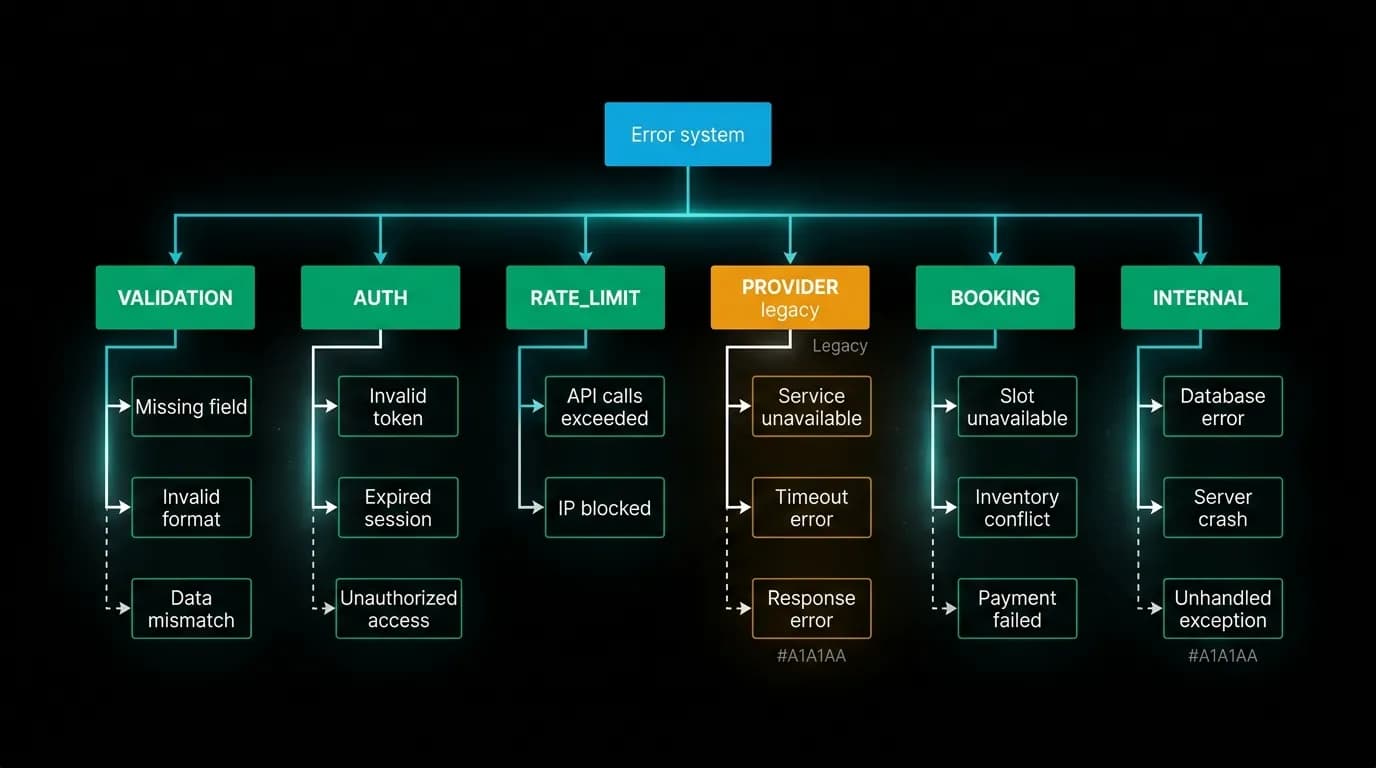
We organize errors into six categories, each with a consistent prefix:
VALIDATION_* errors mean the developer sent bad input. Missing required fields, invalid formats, out-of-range values. These are fixable by the developer immediately.
AUTH_* errors mean authentication or authorization failed. Expired tokens, invalid API keys, insufficient permissions. The fix is always about credentials or access rights.
RATE_LIMIT_* errors mean too many requests. These include a `Retry-After` header so the client knows exactly when to try again.
PROVIDER_* errors mean something went wrong with our upstream travel data sources. These are not the developer's fault. The error tells them what happened and whether retrying is likely to help.
BOOKING_* errors are specific to the booking flow. Expired offers, sold-out inventory, payment failures. Each one maps to a specific booking state and a specific recovery path.
INTERNAL_* errors mean we messed up. These trigger internal alerts automatically. The developer does not need to do anything except retry later. We include the request ID so they can reference it if the problem persists.
These six categories cover every failure mode in our travel booking flow. The category prefix tells the developer — or an AI agent — which broad class of problem they are dealing with before they even read the message. A `VALIDATION_` error always means "fix your input." A `PROVIDER_` error always means "not your fault, maybe retry." This consistency lets developers write generic error-handling logic per category and specific handlers for individual codes where needed.
Writing the details field well
The details field is where most of the craft lives. A bad details field restates the message. A good one adds information that makes the fix obvious.
Consider the difference:
Bad: "The offer has expired." Good: "Offer flt_abc123 expired at 2026-03-15T14:00:00Z. Search again for current pricing."
The good version includes the specific offer ID (so you know which one), the exact expiry time (so you can check if your timing logic is wrong), and a concrete next step (search again). Three pieces of information that turn a debugging session into a copy-paste fix.
For validation errors, the details field lists exactly which fields failed validation and why:
{
 "code": "VALIDATION_INVALID_FIELDS",
 "message": "Request contains invalid field values.",
 "details": "Field 'departureDate' must be a future date in ISO 8601 format. Received: '2024-01-15'. Field 'passengers.adults' must be between 1 and 9. Received: 0.",
 "docs": "https://docs.nowah.com/errors/VALIDATION_INVALID_FIELDS",
 "requestId": "req_def456"
}
Every invalid field is named. The expected format is stated. The actual value received is shown. The developer can fix every issue in one pass instead of fixing one, resubmitting, discovering the next, and repeating.
For rate limit errors, the details include the specific limit that was hit, the current count, and when the window resets:
{
 "code": "RATE_LIMIT_EXCEEDED",
 "message": "Rate limit exceeded for flight search.",
 "details": "Limit: 100 requests per hour. Current: 100. Resets at 2026-03-15T15:00:00Z. Upgrade to Growth tier for 1,000 requests per hour.",
 "docs": "https://docs.nowah.com/errors/RATE_LIMIT_EXCEEDED",
 "requestId": "req_ghi789"
}
The upgrade path is right there in the error. No need to navigate to a pricing page and figure out which tier gets more capacity. The information is at the point of need.
Serving two audiences in one payload
Our error messages serve both human developers and AI agents. This dual audience shapes the design in specific ways.
Human developers read the `message` and `details` fields in their console. They click the `docs` link when they need more context. They paste the `requestId` in support tickets.
AI agents parse the `code` field and use it to make decisions. An agent that receives `OFFER_EXPIRED` knows to search again. An agent that receives `RATE_LIMIT_EXCEEDED` reads the `Retry-After` header and waits. An agent that receives `VALIDATION_MISSING_FIELD` can check which field it missed and resend with the correct parameters.
The key insight is that machine-readable codes and human-readable messages are not competing concerns. They complement each other in the same payload. The code is for programs. The message is for people. The details serve both — agents can parse structured information from them, and humans can read them naturally.
We tested what happens when agents encounter errors without recovery guidance. Agents without structured error codes and recovery suggestions show three to five times higher retry rates on unrecoverable failures. They just keep retrying the same bad request because the error does not tell them that retrying will not help. Adding a `code` that maps to a specific recovery action cuts wasteful retries dramatically.
Template for auditing your own errors
If you want to improve the error messages in your API, here is a checklist:
Does every error include a stable, machine-readable code that will not change or be reused? Can a developer understand the problem from the message alone, without looking at documentation? Does the details field include the specific IDs, values, timestamps, or limits involved? Is there a documentation link that goes to a page with causes, solutions, and examples? Is there a request ID that traces through your internal systems for support escalation?
If any of those answers is no, that is your starting point. You do not need to fix every error at once. Start with the errors that generate the most support tickets. Improve those five fields for your top ten error codes and measure the impact on ticket volume.
The investment pays for itself quickly. Every minute a developer does not spend debugging a cryptic error is a minute they spend building their product. And every support ticket that never gets filed is time your team can spend on features instead of answering questions that a better error message would have prevented.
Error messages are not an afterthought. They are a product feature. Treat them like one and your developers will notice the difference immediately.
Nowah is an AI travel agent that searches and books real flights and hotels through conversation — no filters, no thirty open tabs. Plan your next trip.