Changelog as Communication: Keeping Developers Informed
A changelog is not a git log. It is a communication channel. Structure it for scanning, explain the why, link migration guides, and deliver it where developers already are.
I reviewed a competitor's changelog recently. It was a verbatim dump of their git log. Commit hashes, branch merge messages, internal ticket numbers. Three hundred lines of text that communicated nothing useful to an external developer.
A changelog is not a record of what your team did. It is a communication channel to your developers. The audience is different. The purpose is different. And the writing should be different.
Structure for scanners

Developers do not read changelogs. They scan them. They are looking for one of three things: something that breaks their code, something that adds a capability they need, or confirmation that a bug they reported got fixed.
We structure every changelog entry around the Keep a Changelog format with six categories: Added, Changed, Deprecated, Removed, Fixed, and Security. Each category gets a heading. Within each category, entries are bullet points.
This structure supports scanning because the categories map directly to developer concerns. Breaking your code? Check "Removed" and "Changed." New capability? Check "Added." Bug fix? Check "Fixed."
Each entry follows a pattern: bold the action, lead with the impact, link the details. Not "Updated the search endpoint to accept a new parameter for flexible dates." Instead: "Flight search now supports flexible dates. Pass `flexibleDates: true` to search +/- 3 days from your specified dates. Migration guide | API reference."
The developer scanning this changelog sees the bold text, understands the impact in one sentence, and has links to learn more if they need to.
Breaking changes get special treatment
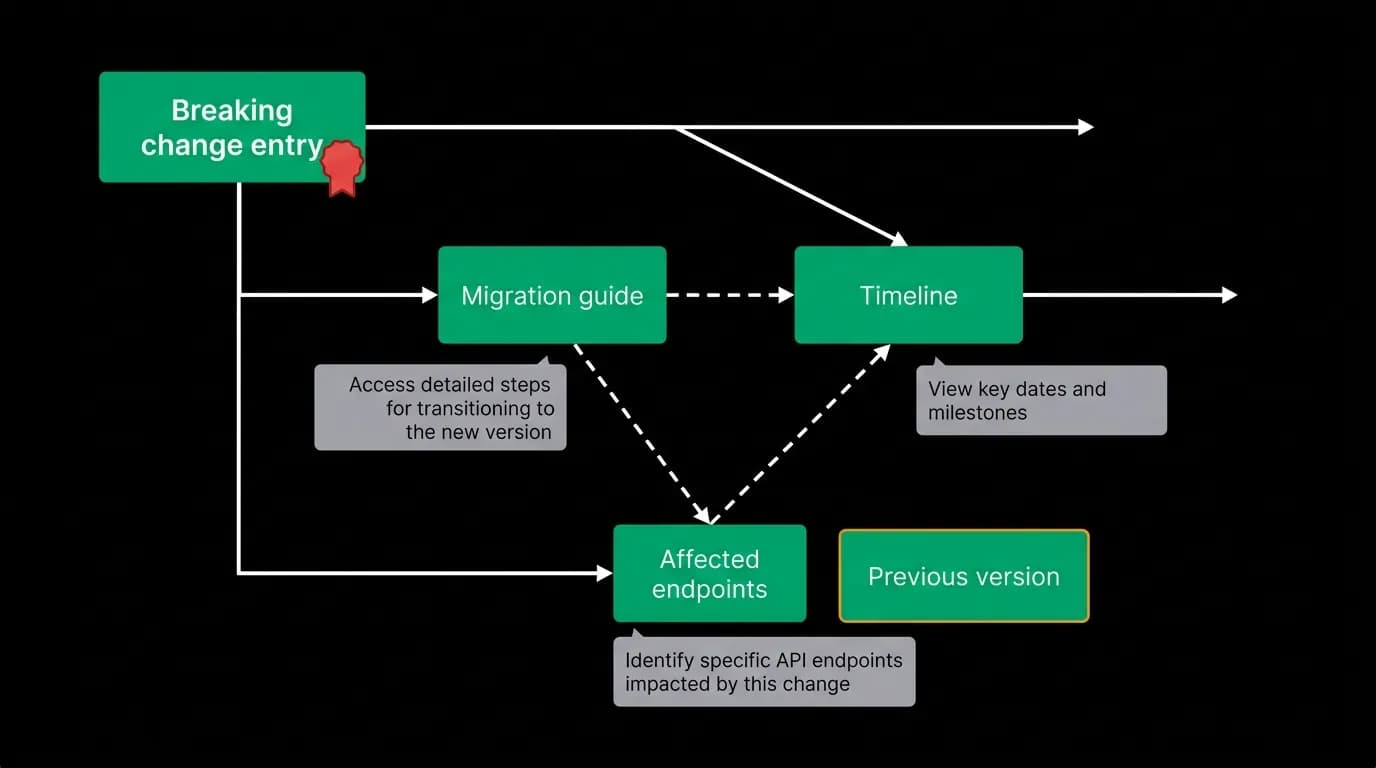
A breaking change buried in a regular changelog entry is a betrayal of developer trust. Breaking changes need to be visually distinct, impossible to miss, and accompanied by everything a developer needs to migrate.
Our breaking changes get a red badge, a separate section at the top of the release, and mandatory links to a migration guide and a timeline.
The migration guide is not optional. It is a step-by-step document showing the old code, the new code, and the reasoning behind the change. We write the guide before we ship the change, because if we cannot explain the migration clearly, we are not ready to ship.
Breaking changes also trigger direct email notifications to every developer whose API key has called the affected endpoint in the last 90 days. Not a generic blast to all developers. A targeted notification to the specific people who will be impacted. The email includes a summary of what changed, a link to the migration guide, and the deprecation timeline.
We maintain a minimum 12-month overlap between old and new API versions. Developers have a full year to migrate. No surprise cutoffs.
Delivery channels: meet developers where they are
A changelog on your website that developers must remember to check is a changelog that most developers will miss. We deliver changelog content through five channels.
Web page. The canonical changelog, versioned and searchable. This is the reference copy.
RSS feed. For developers who use feed readers, this is the low-friction way to stay informed. Every new release generates a feed entry.
Email digest. A weekly email summarizing all changes from the past week. Developers can opt in or out. Breaking changes bypass the opt-out because they are too important to miss.
Dashboard banner. When a developer logs into the dashboard, relevant changelog entries appear as a banner. If they are using an endpoint that has been deprecated, the banner mentions the deprecation specifically. This contextual delivery surfaces the right information at the right time.
CLI notification. Running any CLI command checks for relevant updates and shows a brief notification. "New: flight search now supports flexible dates. Run `nowah changelog` for details."
Five channels might sound like overkill. But developers use different tools at different times. The RSS reader catches weekday updates. The email digest covers what they missed during a vacation. The dashboard banner catches them when they are actively working on the integration. The CLI notification reaches them in their terminal.
Cadence and batching
Not every change needs its own changelog entry. We batch minor changes into weekly summaries and publish immediately for anything that affects developer behavior.
The immediate-publish criteria: breaking changes, security fixes, new endpoints, and significant behavior changes. Developers need to know about these as soon as they ship.
The weekly-batch criteria: bug fixes that do not change behavior, performance improvements, documentation updates, and internal changes that have no external impact. These get bundled into a weekly release note that is comprehensive but not urgent.
This cadence prevents changelog fatigue. A developer who gets a notification for every minor patch will start ignoring notifications entirely. A developer who gets one notification per week for minor updates and immediate notifications only for important changes will actually read them.
Automating generation while keeping it human
We generate changelog drafts from pull request labels. Each PR is labeled with a category (added, changed, deprecated, removed, fixed, security) and a one-line summary written for external consumption.
The automation collects labeled PRs since the last release, groups them by category, and generates a Markdown draft. A human reviews the draft, rewrites entries that are too technical or too vague, adds links to migration guides and documentation, and publishes.
The human review step is non-negotiable. Automated changelogs read like automated changelogs -- technically accurate but devoid of the context that makes entries useful. "Added flexible date parameter to flight search" becomes "Flight search now supports flexible dates, letting users discover better fares by searching across a date range instead of a single day."
The review takes fifteen to thirty minutes per week. For the quality improvement it produces, that is time well spent.
A good changelog is a communication tool that builds trust. It tells developers "we respect your time enough to explain what changed and why." A bad changelog is noise that erodes trust. There is no middle ground.
Nowah is an AI travel agent that searches and books real flights and hotels through conversation — no filters, no thirty open tabs. Plan your next trip.