Mobile Performance: 1000 Messages Without Lag
Virtualized lists, lazy media loading, and memory management for long AI chat conversations on mobile. Here is how we keep scrolling smooth.

AI conversations grow in ways that traditional chat apps do not prepare you for. A typical messaging conversation has short text messages. An AI travel conversation has text interspersed with flight cards containing airline logos and pricing, hotel cards with photo carousels, maps, booking confirmations, and itinerary summaries. A conversation with 100 messages might have the DOM complexity of 500 simple text messages.
On mobile devices with limited memory and processing power, this creates real performance challenges. Here is how we keep things smooth.
The 1000-message problem
In testing, we found that conversations with our AI agent frequently reach 50-100 messages in a single session. Power users doing complex trip planning hit 200+. Over multiple sessions on the same thread, message counts climb higher.
Each message has a different rendering cost. A text bubble is cheap. A flight card with three options, each containing airline logos, time calculations, and pricing, is 10x more expensive. A hotel card with a lazy-loaded photo carousel is even heavier.
The naive approach (render everything in a FlatList) starts struggling around 80-100 rich messages on a mid-range phone. Scroll jank appears. Memory warnings fire. On older devices, the app crashes.
Virtualized list rendering
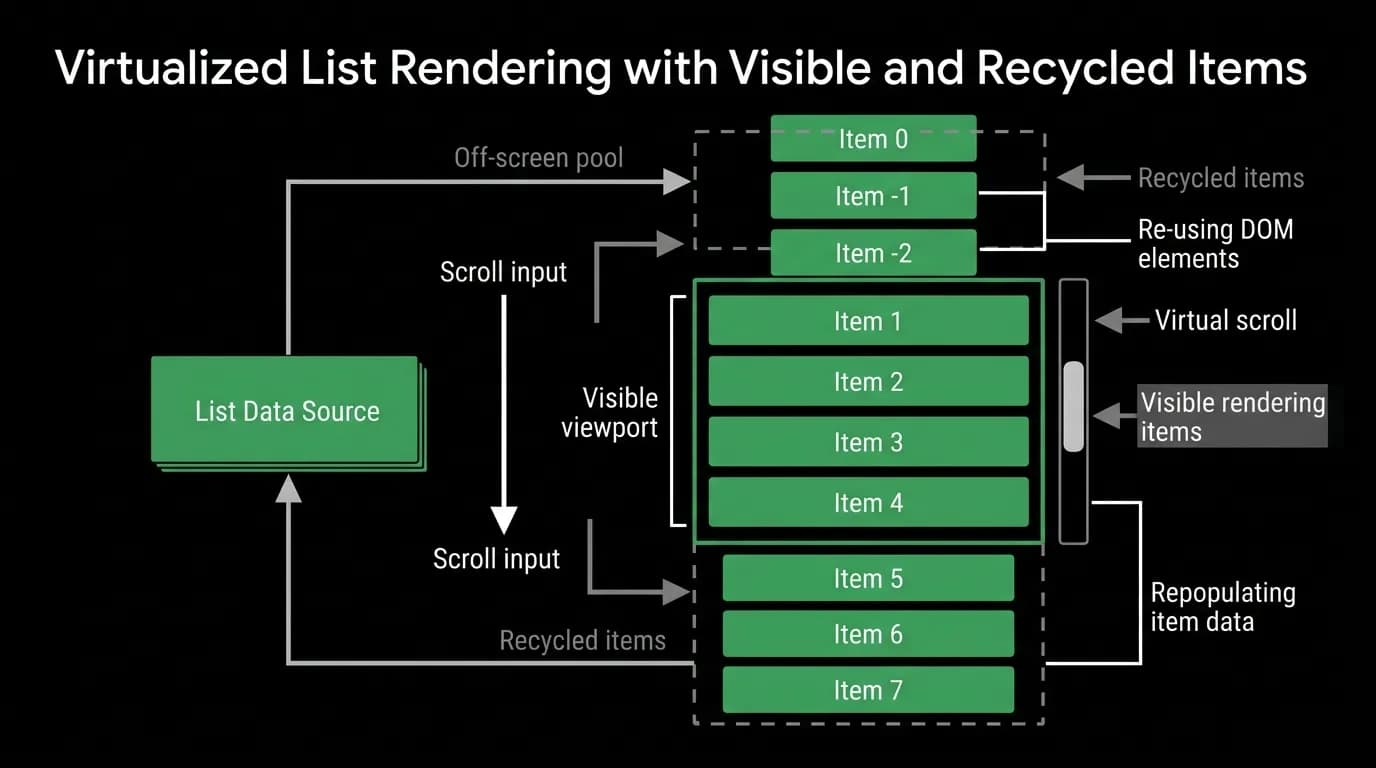
Virtualization is the foundation of our solution. We render only the messages that are visible on screen, plus a buffer of about 10 messages above and below the viewport. Everything else is unmounted.
When the user scrolls, we mount messages entering the viewport and unmount messages leaving it. The recycled components are not destroyed; they are returned to a pool and reused for new messages with different data. This means mounting a message as you scroll to it is fast because we are hydrating an existing component tree rather than creating one from scratch.
The challenge with virtualization in a chat context is that messages have variable heights. A text message might be 60 pixels tall. A flight card set is 400 pixels. The list needs to know approximate heights for off-screen messages to calculate scroll position accurately. We solve this by caching measured heights after a message is first rendered. For messages that have never been rendered, we estimate based on message type.
This estimation is not perfect. When you scroll quickly to a distant part of the conversation, you sometimes see a brief layout adjustment as estimated heights are replaced by measured heights. We minimize this by using type-specific height estimates (text messages average 70px, flight cards average 380px, hotel cards average 420px) which are accurate enough that the adjustment is rarely noticeable.
Memory management for rich media
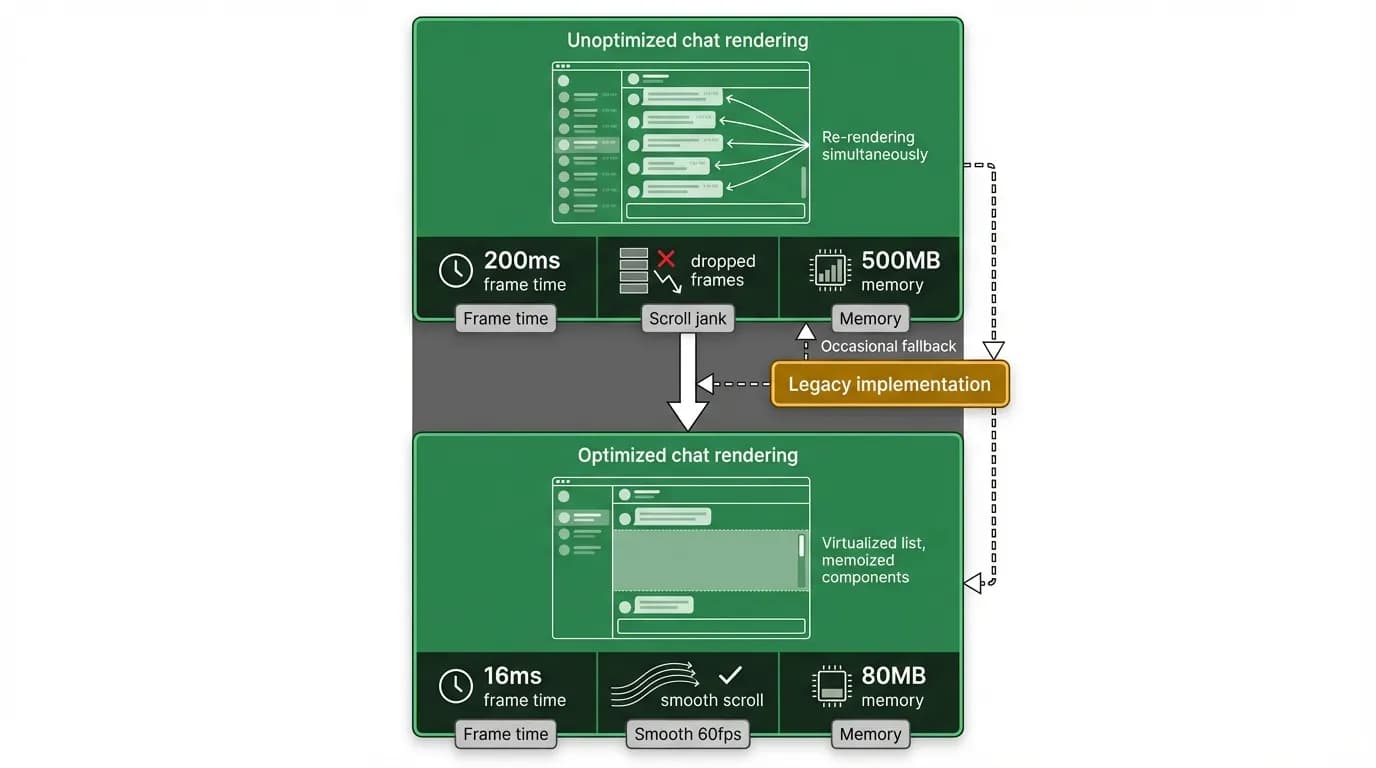
Virtualization handles rendering performance, but memory is a separate concern. Images and media that have been loaded stay in memory even when their components are unmounted, consuming RAM.
We implement a memory budget for loaded images. When total image memory exceeds a threshold (roughly 100MB on a standard device, adjustable based on device capabilities), we evict the least recently viewed images. If the user scrolls back to those messages, the images reload from cache or network.
Hotel photo carousels are particularly aggressive consumers. A single hotel card might have 8-10 photos. If you scroll through a conversation with five hotel searches, that is 50 photos potentially in memory. Our carousels only load the visible photo plus one on each side. The rest load on demand as the user swipes.
Maps are another memory concern. We do not embed live map views in the chat. Instead, we render a static map snapshot (a single image) and open a full map view only when the user taps it. The static snapshot is small in memory and fast to render.
Lazy loading strategies
Not everything in a message needs to load immediately. We prioritize text content first, then structured data (prices, times), then images, then heavy media.
When a flight card enters the viewport, the text renders first: airline name, times, price. The airline logo loads asynchronously. This means the card is readable within one frame of appearing, even if the logo takes another 100-200ms to pop in.
For images that are near the viewport but not yet visible (in our buffer zone), we start loading them at low priority. This means by the time the user scrolls to them, they are often already loaded. The experience is that images "just appear" without visible loading.
We handle loading failures gracefully. If an airline logo fails to load, we show the airline code as text. If a hotel photo fails, we show a placeholder with the hotel name. The card is always usable even if some visual elements are missing.
Animation performance
Smooth animations are important for perceived performance. The chat has several animations: message appearance, card expansion, streaming text cursor, scroll-to-bottom indicator, and modal transitions.
We run all animations on the native driver when possible. This means the animation runs on the device's UI thread rather than the JavaScript thread. The difference is dramatic on lower-end devices. JS-driven animations compete with React rendering for CPU time. Native animations run independently.
The one place we cannot use native animations is streaming text, because the content changes on every frame. For this, we minimize the rendering cost per frame through the batching techniques described in our streaming UI post.
Profiling and optimization
We profile regularly on a set of reference devices that includes a current iPhone, a current Samsung flagship, a mid-range Android from two years ago, and a budget Android. The budget Android is our target device for performance. If it is smooth there, it is smooth everywhere.
Our key performance metrics:
Scroll FPS. We target 60fps sustained scrolling. Drops below 50fps are investigated.
Message mount time. Time from a message entering the viewport to it being fully rendered. Target is under 16ms for text, under 50ms for cards.
Memory ceiling. Total app memory should stay below 300MB even in long conversations with rich media.
JS thread utilization during scroll. If the JS thread is busy during scrolling, the user might experience input lag (tapping a button while scrolling does not register). We keep JS thread utilization below 70% during active scrolling.
These metrics feed into our CI pipeline. Performance regression tests run on every release build and flag degradations before they ship. We have caught several regressions this way, including one where a new card animation increased mount time by 40ms on older devices.
Mobile performance is not a feature you build once. It is a continuous practice. Every new card type, every new feature in the chat, every library update gets measured against our performance budget.
Nowah is an AI travel agent that searches and books real flights and hotels through conversation — no filters, no thirty open tabs. Plan your next trip.