Notification Preferences Done Right
How we let travelers control exactly what notifications they receive, through which channels, and when — per-category, per-channel, with quiet hours enforcement.
47 travel deal emails in a week. The traveler goes to settings, disables all email notifications, and moves on with their life. Three weeks later, they book a flight. The booking confirmation email doesn't arrive because they disabled all emails. They panic, contact support, and discover the toggle they hit in frustration also killed their transactional emails.
This is the failure mode of binary notification preferences. An all-or-nothing toggle doesn't match how travelers actually want notifications to work. They want booking confirmations always. Departure reminders probably. Gate changes absolutely. Marketing emails never.
Granular preferences are harder to implement and harder to design as a UI. But they're what travelers actually need, and getting them wrong either floods people with unwanted notifications (they disable everything) or silences critical alerts (they miss their gate change).
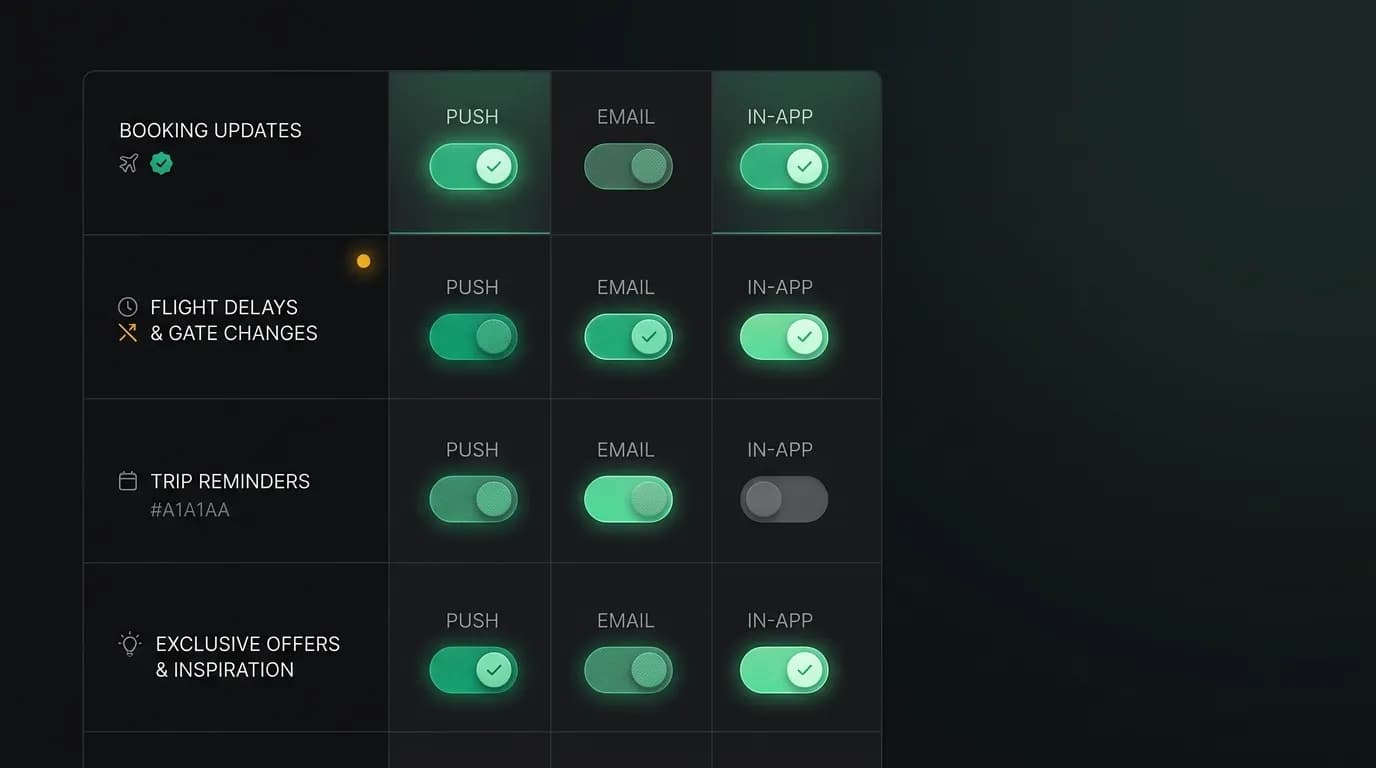
Per-category, per-channel
Our notification preference model has two dimensions: category and channel.
Categories are the types of notifications: booking confirmations, flight alerts (delays, gate changes, cancellations), departure reminders, check-in reminders, trip updates, travel tips, and marketing.
Channels are the delivery methods: push notification, email, and in-app.
Every combination of category and channel is independently configurable. You can enable push notifications for flight alerts but disable email for them. You can enable email for booking confirmations but disable push. Each combination is a separate toggle.
The preference model in our database stores these as individual records: user ID, category, channel, enabled/disabled. The notification pipeline looks up the relevant preference before sending and respects the setting.
Sensible defaults
Most travelers won't customize their preferences. They'll use whatever defaults we set. So the defaults need to be right.
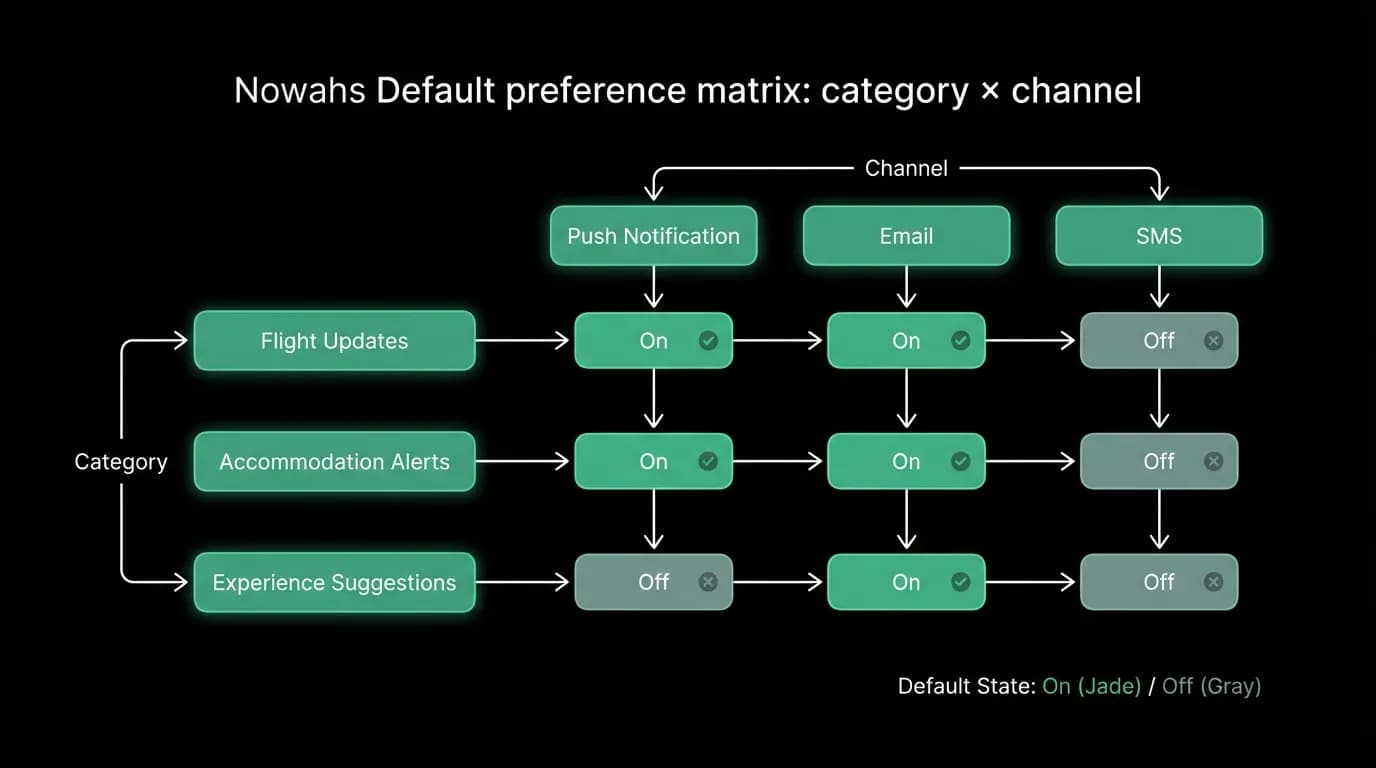
Our defaults:
Booking confirmations: push and email enabled, cannot be disabled. When you book a $1,200 flight, you're getting a confirmation. This isn't negotiable. The legal and trust implications of a suppressed booking confirmation are too severe.
Flight alerts: push and email enabled. Gate changes and delays are safety-relevant. Defaulting these to on ensures travelers get critical information without opting in.
Departure reminders: push enabled, email disabled. A push reminder 2 hours before the flight is useful. An email is redundant (and probably unread at that point).
Check-in reminders: push enabled, email disabled. Same reasoning as departure reminders.
Trip updates: push and email enabled. When something changes about your trip, you want to know.
Travel tips: push disabled, email enabled. Nice-to-have information about your destination, delivered by email where it doesn't interrupt.
Marketing: push disabled, email disabled (opt-in). Never default marketing notifications to on. Travelers who want travel deals will enable them. Travelers who don't will resent you for sending them.
Quiet hours
Even for enabled notifications, there are times when delivery is unwelcome. Nobody wants a marketing email at 3 AM. Nobody wants a non-urgent departure reminder at midnight.
Quiet hours are user-configurable with a default of 10 PM to 7 AM in the traveler's local time. During quiet hours, notifications are held and delivered when the window ends.
The exception is critical notifications. Gate changes, flight cancellations, and significant delays override quiet hours. If your flight is canceled at 2 AM, you need to know immediately, not at 7 AM when you're supposed to be at the airport.
The quiet hours calculation uses the traveler's current time zone, not their home zone. A traveler in Tokyo (UTC+9) who set quiet hours based on their New York habits will have those hours applied to Tokyo time. This prevents the case where a traveler sets quiet hours for their home zone and then travels to a zone where those hours don't make sense.
Preference enforcement in the pipeline
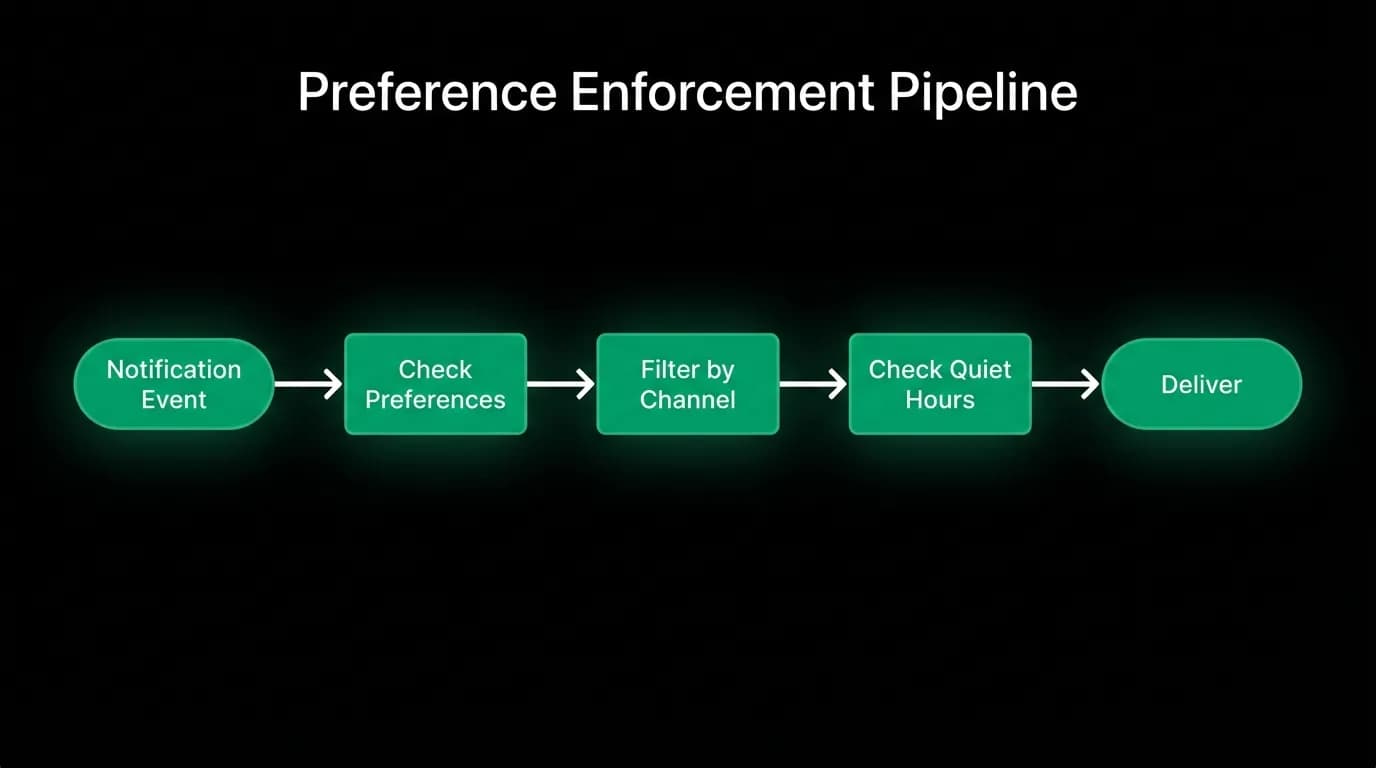
The notification pipeline enforces preferences as a filter step. When a notification is ready to deliver, the pipeline checks:
- Is this category enabled for the target user?
- Is this channel enabled for this category?
- Are we in the user's quiet hours?
- Does this notification's priority override quiet hours?
If any check fails (category disabled, channel disabled, quiet hours active without priority override), the notification is suppressed for that channel. It might still be delivered through another enabled channel.
The enforcement is centralized. Individual notification producers (the booking flow, the flight alert system, the marketing engine) don't check preferences. They produce notification events, and the pipeline handles the filtering. This ensures consistent enforcement regardless of where the notification originates.
Preference sync across devices
A traveler changes their notification preferences on the web settings page. The change should be respected immediately on their mobile device.
Preferences are stored server-side, not device-side. The notification pipeline reads preferences from the server at delivery time. So a change made on web is immediately effective for the next notification, regardless of which device it's delivered to.
The mobile app also reads preferences from the server to display the correct toggle states. If the traveler changes a preference on web and then opens the mobile settings, the mobile UI reflects the web change.
This server-side approach avoids sync conflicts. There's one authoritative source for preferences, and all clients read from it.
Designing notification preferences
If you're building notification preferences for your platform:
Model preferences as category-channel pairs. A boolean per category isn't granular enough. A boolean per channel isn't either. The combination gives travelers real control.
Set defaults that favor safety over engagement. Default booking and safety notifications to on. Default marketing to off. You can always grow opt-in. You can't recover trust after opt-out-via-frustration.
Make some notifications un-disableable. Booking confirmations, security alerts, and billing notifications should always arrive. The traveler's right to control notifications has a floor defined by legal and safety requirements.
Enforce preferences in a centralized pipeline. Don't let individual notification producers implement preference checks. Centralize for consistency.
Support quiet hours from launch. Adding them later means either waking people up for months or building and migrating a feature under pressure.
Nowah is an AI travel agent that searches and books real flights and hotels through conversation — no filters, no thirty open tabs. Plan your next trip.