Payment Sheets in Chat: Booking Flows Inside Conversation
Users confirm and pay without ever leaving the chat thread. Here is how we embedded secure payment flows inside a conversational interface.
Traditional travel booking works like a funnel. Search page, results page, detail page, traveler form, payment page, confirmation page. Every page transition is a potential exit point. Industry data puts OTA booking abandonment rates between 80% and 90%. A lot of that abandonment happens at the payment step, often because the user has to re-orient to a completely different page with different navigation, and the momentum of their decision evaporates.
We do not have pages. We have a conversation. When you choose a flight, you pay for it right there in the chat. No navigation, no context switch, zero page transitions. Here is how we made that work.
Why redirects break conversational flow
Imagine you are having a conversation with a travel agent. You have discussed your trip, compared options, and decided on a flight. The agent says "Great, let me book that for you." Then the agent stands up, walks to a different room, and asks you to follow them to a desk with a completely different setup to enter your credit card.
That is what it feels like when a chat interface redirects you to a payment page. The conversational context is gone. You are in a different mental model. Some users never come back.
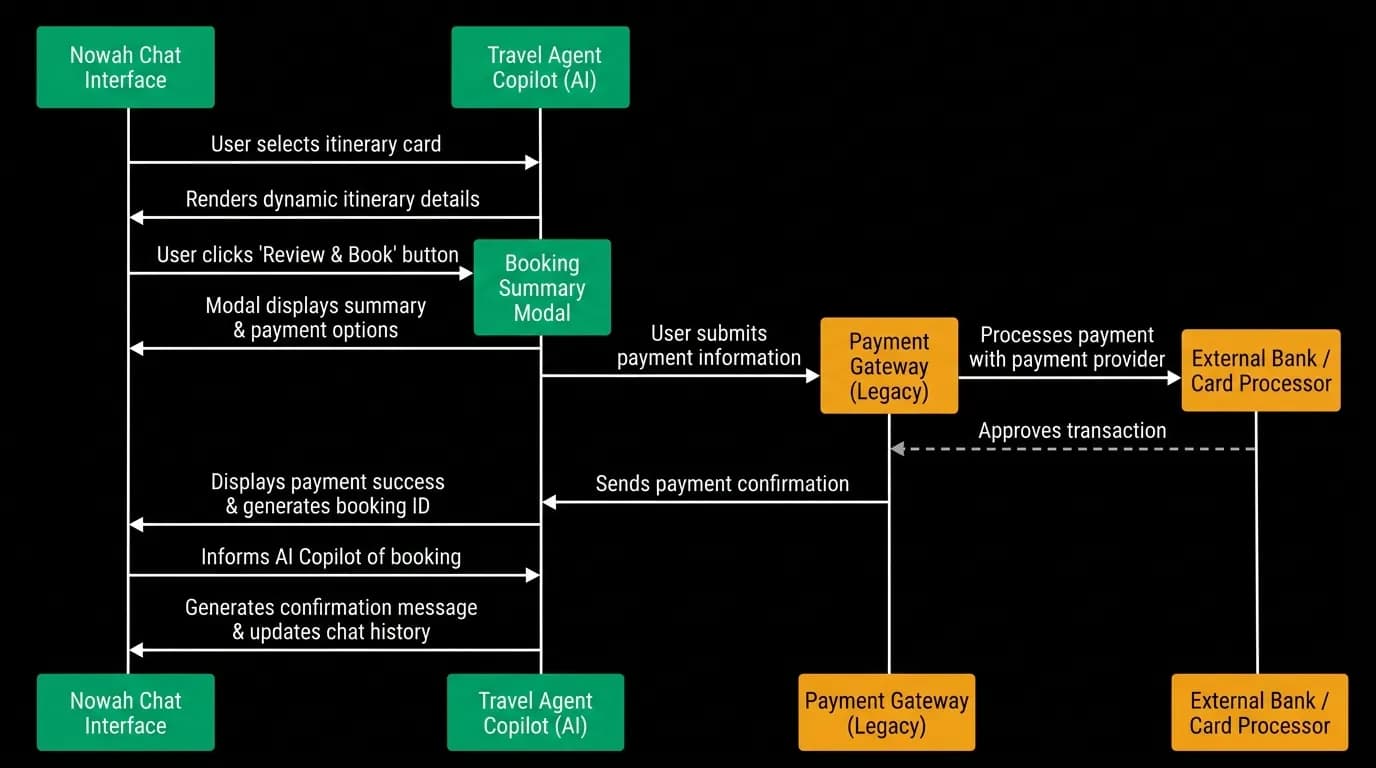
We keep everything in the conversation. The booking review, the payment capture, and the confirmation all happen as overlays on top of the chat. The chat is always visible in the background. You never lose sight of the conversation that led to this booking.
Modal-based booking review
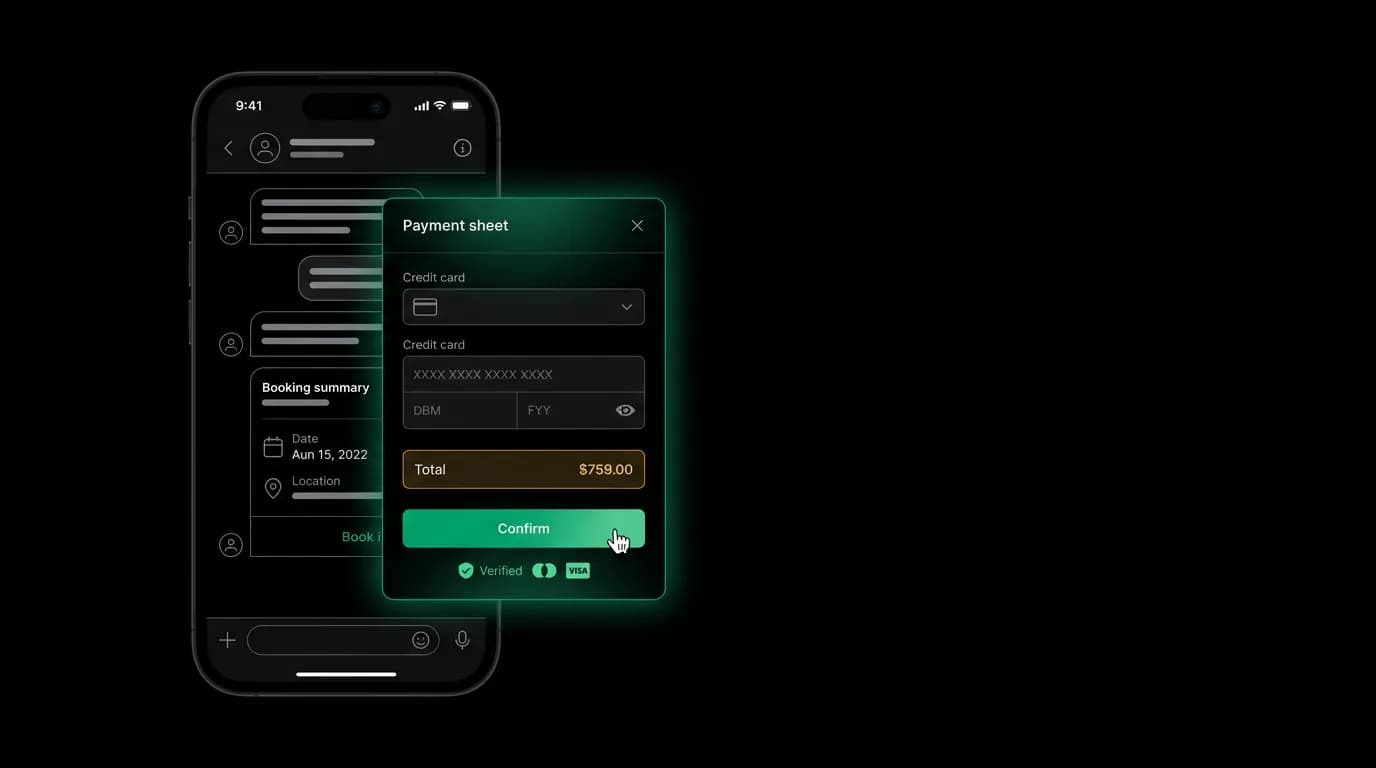
When you select a flight from the options the agent presents, a review modal slides up from the bottom of the screen. On mobile, it covers about 80% of the screen with the chat thread visible behind it. On web, it is a centered modal with the chat dimmed in the background.
The review modal shows your complete trip summary: flight details, traveler information (pre-filled from your profile and past bookings), fare breakdown, and total price. You can edit traveler details or add special requests. Everything the agent discussed in the conversation is reflected in the review.
The traveler form is pre-populated using data from your profile and our memory system. If you have booked before, we already know your passport details, your seat preference, and your frequent flyer numbers. The agent might have also collected information during the conversation ("I'll be traveling with my wife, her name is Sarah Chen"). All of this flows into the form, so most users confirm rather than fill out.
This pre-population is one of the advantages of the AI-native approach. The agent has been having a conversation with you. It knows things about your trip that a form never could. Traditional OTAs start from blank forms every time.
Secure payment handling
Payment processing in a conversational interface has to be secure without feeling clunky. We use tokenized payment where the actual card details never touch our servers. The payment sheet uses a secure, PCI-compliant component that handles card capture and returns a token. Our backend uses that token to process the charge.
On mobile, we support platform-native payment methods. Apple Pay and Google Pay let users authenticate with biometrics (face or fingerprint) instead of typing card numbers. This is faster and feels more secure. Over half of our mobile payments use a digital wallet rather than manual card entry.
On web, we present a payment form with saved card support. Returning users see their stored payment method and can confirm with a click. New users enter their card details in a standard form with browser autofill support.
The key engineering decision was embedding the payment component inside our modal rather than redirecting to a hosted payment page. This required extra compliance work, but it preserves the conversational context that makes our booking flow feel natural. The payment component is sandboxed and does not have access to conversation data, so the security boundary is clean.
Confirmation as a chat message
After payment processes successfully, two things happen simultaneously. The review modal closes with a success animation. And a booking confirmation message appears in the chat from the agent.
The confirmation message is not a generic "booking confirmed" text. It is a rich card with the flight details, booking reference, a link to the trip details page, and any relevant next steps ("Your confirmation email is on its way. Would you like to search for hotels in Barcelona?").
This is a small detail that matters a lot. The confirmation appearing in the conversation thread means the user does not have to go looking for it. It is right where they were. And the agent's follow-up prompt keeps the conversation going naturally. Maybe they want to book a hotel. Maybe they want to add travel insurance. The agent is ready to continue.
Mobile-specific payment UX
Mobile payment flows have platform-specific requirements that we handle differently from web.
Biometric confirmation (Face ID, fingerprint) provides both security and speed. The user taps "Confirm," authenticates with their face or finger, and the payment processes. The entire confirm-and-pay step takes about 2 seconds.
Digital wallets handle the payment method selection and security in one step. The user does not enter card details or even see a card form. They see a wallet prompt, authenticate, done.
For manual card entry on mobile, we optimize the keyboard experience. The card number field triggers the numeric keyboard. Expiry fields use a date picker. The CVC field auto-advances on completion. These are small things, but they reduce friction at the highest-friction moment of the booking flow.
Error handling without breaking the conversation
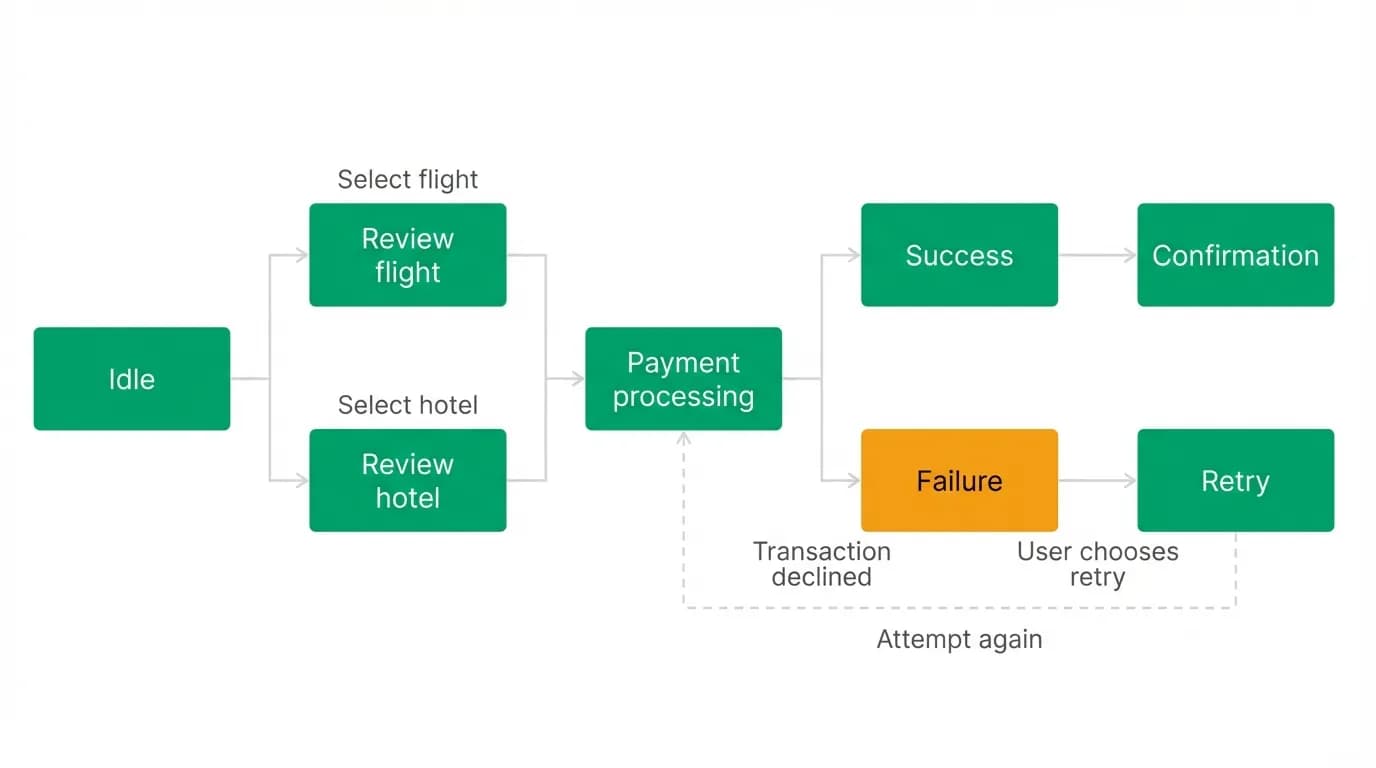
Payments fail. Cards get declined. Network connections drop. Price changes between selection and confirmation. All of these have to be handled without destroying the conversation.
Our approach is to keep error handling conversational. If a payment fails, the modal shows a clear error message and the agent follows up in the chat: "Looks like that card was declined. Would you like to try a different payment method?" The user can try again without re-selecting the flight or re-entering traveler details.
If the price changed between when the agent showed options and when the user tries to book, the agent explains the change: "The price went up by $23 since I showed you that option. The new total is $872. Want to proceed or should I look for alternatives?"
This conversational error handling is better than a traditional error page because it maintains context and offers immediate recovery. The user is still in the conversation. The agent is still engaged. The booking attempt is not lost, just paused.
Payment sheets embedded in the chat reduce context switches to zero. That is not a minor UX improvement. It is a structural change to how the booking funnel works, and we believe it is a major reason why conversational booking flows see lower abandonment than page-based ones.
Nowah is an AI travel agent that searches and books real flights and hotels through conversation — no filters, no thirty open tabs. Plan your next trip.