Background Jobs in AI Travel Platforms
Price monitoring, delay alerts, document processing — the async work that makes AI travel feel magical happens in background job queues.

The most impressive things our AI travel agent does happen when the user is not looking.
A price drops on a flight the user saved. The agent sends a notification. A flight is delayed and the connection is at risk. The agent identifies alternatives before the user knows there is a problem. A passport photo is uploaded. The agent extracts the data and fills in traveler profiles automatically.
None of this happens in real-time conversation. It all happens in background job queues, the async processing layer that makes AI travel feel magical. And it is, I think, the most underappreciated layer of the entire architecture.
The sync/async divide
In a real-time conversation, speed is everything. The user sends a message and expects a response within seconds. Anything that cannot complete in that window should not happen synchronously.
Some operations are fast enough: LLM inference (streaming starts in under 500ms), memory retrieval (under 100ms), and cached search results (instant). These belong in the synchronous conversation path.
Other operations are too slow, too expensive, or too independent to block the conversation: price monitoring across hundreds of routes (would take minutes), email confirmation generation (involves template rendering and delivery), document parsing (involves OCR and extraction), and analytics aggregation (involves batch processing). These belong in background jobs.
The principle is simple: if it blocks the user, do it synchronously. If it does not, do it asynchronously.
Job queue architecture
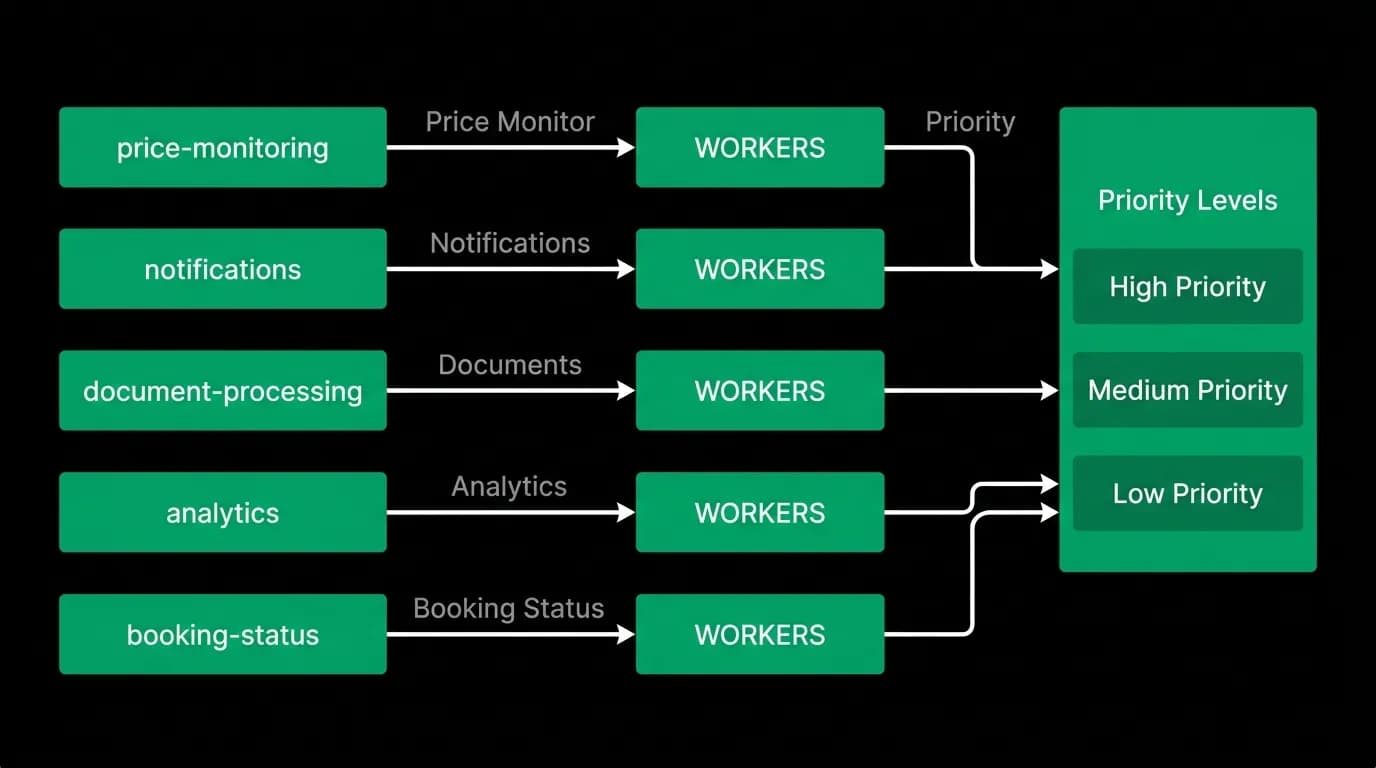
Our background processing runs on a job queue system with named queues, worker pools, and priority levels.
Named queues separate different types of work:
- price-monitoring: watches saved routes for price changes. High volume, low urgency. Runs continuously.
- notifications: generates and delivers push notifications, emails, and in-app alerts. Medium volume, medium urgency.
- document-processing: parses uploaded passports, boarding passes, and receipts. Low volume, low urgency.
- booking-status: monitors active bookings for delays, cancellations, and schedule changes. Medium volume, high urgency.
- analytics: aggregates user behavior data for reporting. High volume, lowest urgency.
Each queue has its own worker pool sized to its throughput needs. The price monitoring queue has more workers than the document processing queue because it processes more jobs.
Priority levels ensure urgent jobs preempt less urgent ones. A flight delay alert is more important than a weekly analytics summary. The booking-status queue processes at high priority. The analytics queue processes at low priority and yields resources when higher-priority queues have work.
Retry policies handle transient failures. External API calls fail occasionally. A price check that fails retries after 30 seconds with exponential backoff. A notification that fails delivery retries three times. A document parsing job that fails (bad image quality, unsupported format) is moved to a dead-letter queue for manual review.
Price monitoring
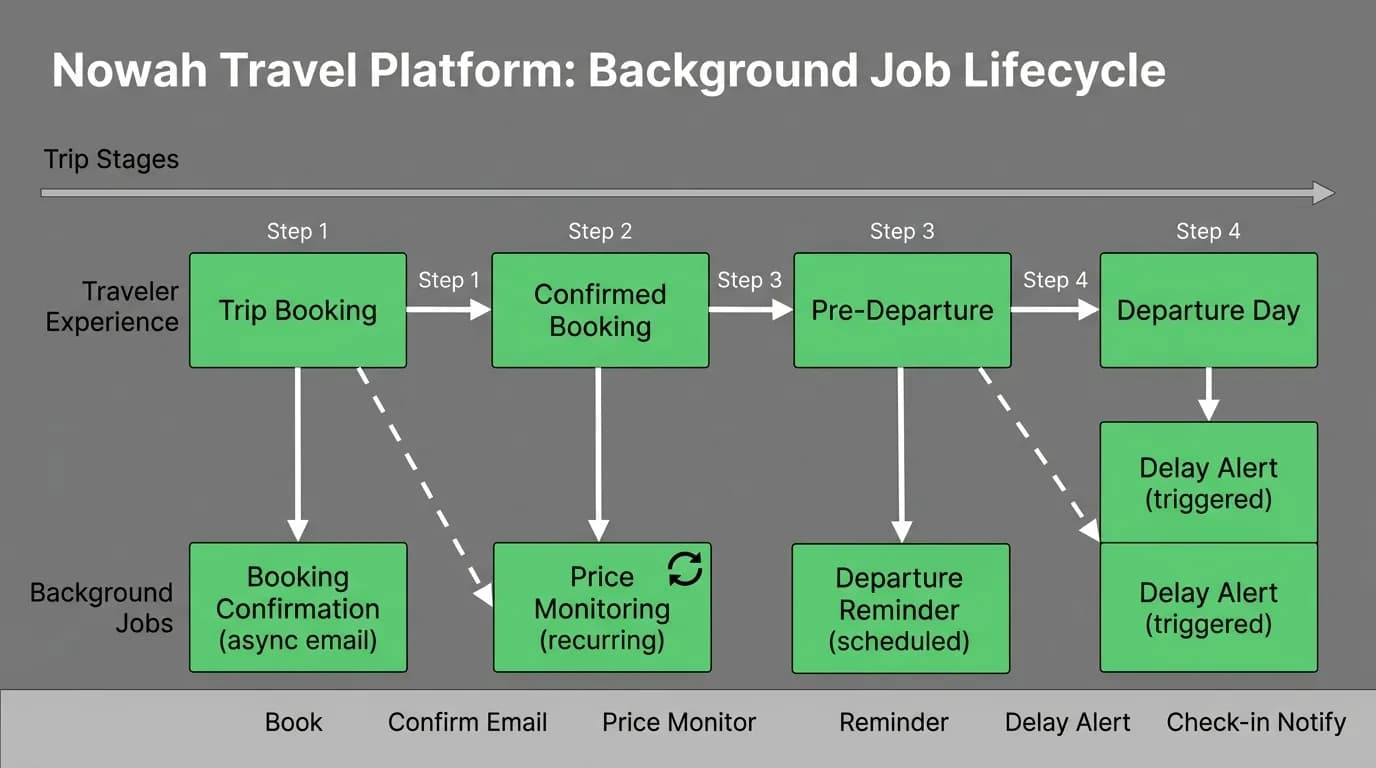
Price monitoring is the background job that most directly affects user experience. Users save routes they are interested in. The price monitoring system checks those routes at regular intervals and alerts the user when prices change significantly.
The implementation:
- Each saved route becomes a recurring job in the price-monitoring queue
- The job calls the flight search API for the saved route and dates
- Results are compared against the last known price
- If the price drops more than 5% or crosses below a user-specified threshold, a notification is generated
- The notification job is added to the notifications queue
Roughly 3% of flights experience disruptions daily, and prices fluctuate continuously. Price monitoring catches opportunities that users would miss if they only checked manually. The notification might say: "Flights to Tokyo in April dropped $87 since you last searched. The direct JAL flight is now $825."
Async processing keeps the real-time conversation latency under 500ms first-token by offloading this monitoring work entirely.
Notification triggers
Background jobs generate most of the notifications users receive:
Delay alerts. The booking-status queue detects a schedule change for an active booking. A notification is generated immediately: "Your SFO-NRT flight tomorrow is delayed 45 minutes. New departure: 8:45 PM. Your connection in NRT is still fine."
Booking confirmations. After a synchronous booking completes, a background job generates the confirmation email with full itinerary details, renders it from a template, and delivers it.
Document reminders. A background job checks all upcoming trips against user document status. "Your passport expires in 6 months. Some destinations on your interest list require 6+ months validity."
Price alerts. As described above, the price monitoring system generates price drop notifications.
Trip reminders. Scheduled jobs fire reminders before departure: "Your trip to Tokyo starts in 3 days. Check-in opens tomorrow at 6 AM."
Each notification type has its own generation logic but shares a common delivery pipeline: generate message, determine delivery channel (push, email, in-app), deliver via the appropriate service, log delivery for analytics.
Document processing
Document processing is a background task because it involves compute-intensive operations that should not block the conversation:
Passport parsing. The user uploads a passport photo. A background job runs OCR on the image, extracts the machine-readable zone data, validates the fields, and updates the traveler profile. The user sees a notification when processing completes: "I have extracted your passport details. Please verify: [name, number, expiry]."
[Boarding pass](/blog/boarding-pass-problem-documents-chat) extraction. Users forward booking confirmation emails or photograph boarding passes. Background processing extracts flight number, gate, seat, and boarding time, then links the information to the appropriate trip.
Receipt management. For expense tracking, users can photograph receipts. Background processing extracts vendor, amount, date, and category. These are attached to the trip's expense record.
Document processing takes 2-10 seconds depending on image quality and document complexity. Running it synchronously would create an awkward pause in conversation. Running it asynchronously lets the user continue chatting while the processing happens in the background.
Scaling background AI
As the user base grows, background job volume grows faster than linearly. More users means more saved routes to monitor, more active bookings to check, more documents to process, and more notifications to deliver.
Scaling strategies:
Horizontal scaling. Add more workers to queues that are falling behind. The job queue system distributes work across workers automatically.
Batch processing. Instead of checking each saved route individually, batch routes to the same destination into a single API call. This reduces external API costs and improves throughput.
Smart scheduling. Not all routes need the same monitoring frequency. A trip departing tomorrow needs price checks every hour. A trip three months out needs checks once a day. Adaptive scheduling reduces total job volume without sacrificing timeliness.
Resource isolation. Background jobs run on separate infrastructure from the real-time conversation path. A spike in background processing does not affect conversation latency. This isolation is non-negotiable.
The magic of a great AI travel agent is not just the conversation. It is the invisible work happening between conversations. The agent that alerts you to a price drop at 3 AM. The agent that rebooks your connection during a weather disruption while you are asleep. The agent that has your passport details ready before you ask.
All of it happens in the background. All of it is powered by job queues. And all of it makes the product feel less like software and more like having a person who is always watching out for you.
Nowah is an AI travel agent that searches and books real flights and hotels through conversation — no filters, no thirty open tabs. Plan your next trip.