Building a Chat-First UI for AI Travel Booking
Text, voice, flight cards, hotel cards, payment sheets — all in one conversation thread. Here is the frontend architecture behind chat-first travel.
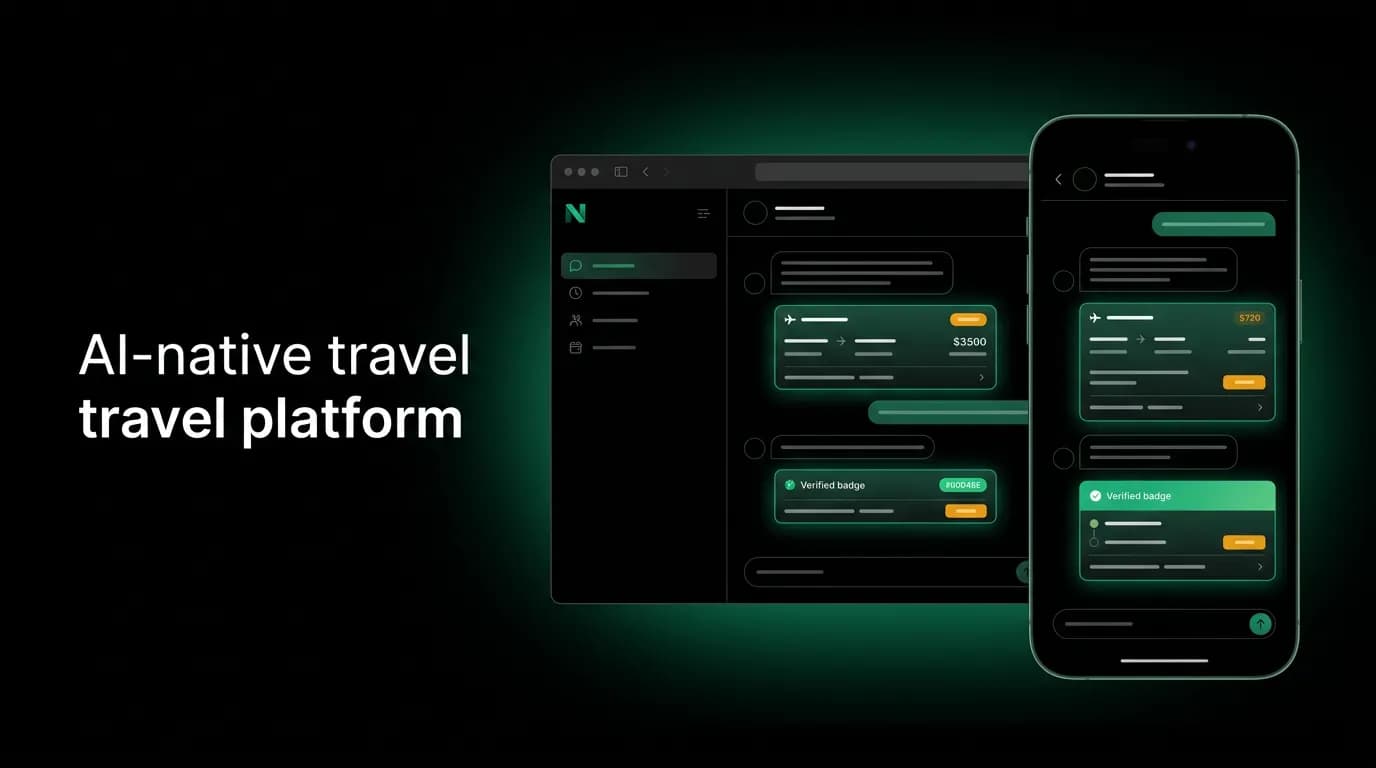
Most apps have a navigation structure. Tab bar at the bottom, pages you move between, forms you fill out. Our app has a conversation. That is the product. One thread where you search, compare, decide, pay, and get your confirmation. Everything happens in the chat.
This is a fundamentally different frontend architecture than what most engineers are trained to build. It took us a while to figure out what works, and we made plenty of wrong turns along the way. Here is what we learned.
Chat as the primary navigation pattern
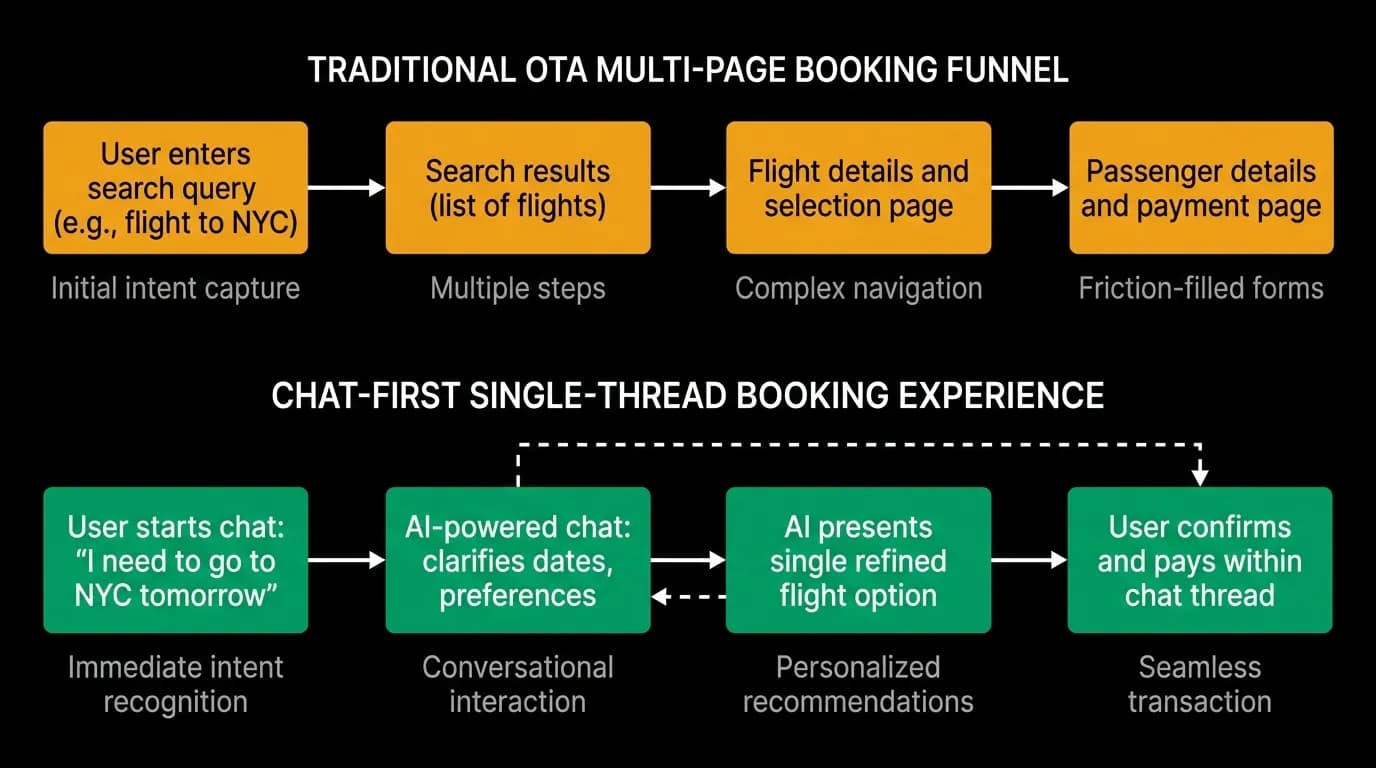
In a traditional travel app, you have a search page, a results page, a detail page, a traveler information form, a payment page, and a confirmation page. That is six pages with navigation between them. Each transition is a potential drop-off point. Industry data shows booking abandonment rates of 80-90% on traditional OTAs, and a significant chunk of that abandonment happens during page transitions.
Our app has one page. The chat. When you want to search for flights, you type or say what you want. When the AI finds options, they appear as interactive cards in the conversation. When you pick one, the booking review opens as a modal overlay. When you pay, the payment sheet slides up. When the booking is confirmed, the confirmation appears as a message in the chat. You never navigate away.
This collapses a 6-page funnel into a single continuous experience. Conversational AI reduces booking time by 3-5x compared to form-based search. But it creates frontend engineering challenges that are genuinely novel.
The biggest one: everything has to coexist in a single scroll view. Text messages, rich interactive cards, modal overlays, payment forms, loading indicators, error messages. All of these need to render correctly together, in sequence, without breaking the scroll position or confusing the user about what state they are in.
Rendering heterogeneous message types
A chat message in our app is not just text in a bubble. It might be:
- A text response from the AI agent
- A flight search result card with airline logos, times, prices, and a select button
- A hotel card with photos, ratings, amenities, and pricing
- A booking summary with passenger details and total cost
- A payment confirmation with booking reference
- A map showing hotel location
- A loading indicator while the agent searches
- An error message with recovery options
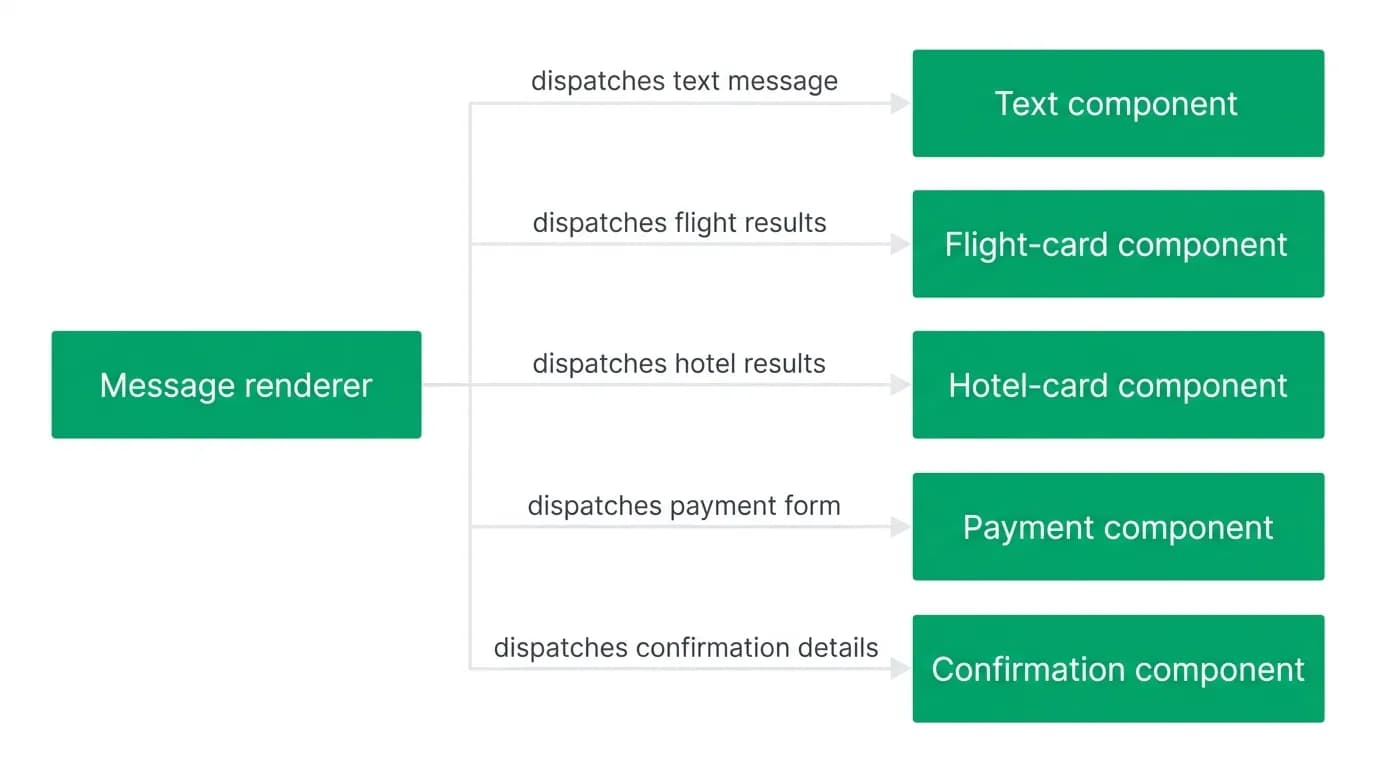
Each of these has different layout requirements, different interaction patterns, and different accessibility needs. We handle this with a message renderer that dispatches to specialized components based on message type.
The renderer receives a message object with a type field and content. It looks up the appropriate component and renders it. Text messages get a simple bubble. Flight results get a FlightCard component. Hotels get a HotelCard. Booking confirmations get a ConfirmationCard.
This dispatch pattern is straightforward in concept, but the complexity is in the details. Each card type needs to handle its own loading states, error states, and interaction states. A flight card needs to show a selected state when the user taps it. A hotel card needs to expand to show more photos. A payment sheet needs to capture card details securely. All within the chat scroll.
State management for unbounded conversation
A traditional page-based app has bounded state at any given screen. The search page has search parameters. The results page has a list of results. Each page's state is well-defined and finite.
A chat conversation has unbounded state. A user might have 5 messages or 500. There might be zero booking flows in progress or three (the user asked about flights, then hotels, then changed their mind about flights). The AI might be streaming a response while the user is scrolling back to look at earlier results.
We split state into three domains:
Conversation state tracks messages, their order, and their content. This is the core data model. Messages are immutable once they arrive; new content only adds to the list.
Booking state tracks any active booking flow. This is a state machine: idle, reviewing flight, reviewing hotel, processing payment, confirmed, or failed. Only one booking flow can be active at a time, which simplifies things considerably.
Streaming state tracks the current AI response as it arrives token by token. This is the most volatile state. It updates many times per second during streaming and merges into conversation state when the response completes.
Keeping these three domains separate is what makes the system manageable. When streaming state updates 30 times per second, only the streaming display component re-renders. The rest of the chat stays stable.
Scroll management and performance
Long conversations with rich cards create a real performance challenge on mobile devices. A conversation with 200 messages, including flight cards with images and hotel cards with photo carousels, has significant DOM weight.
We use virtualized list rendering. Only the messages visible on screen (plus a small buffer above and below) are actually rendered. As the user scrolls, off-screen messages are unmounted and on-screen messages are mounted. This keeps memory usage bounded regardless of conversation length.
The tricky part is scroll behavior during streaming. When the AI is responding, the chat should auto-scroll to follow the new content. But if the user has scrolled up to look at earlier messages, auto-scrolling should stop. And when a new message arrives after the user has scrolled up, we show a "new message" indicator instead of yanking them to the bottom.
Getting this right required more iteration than almost any other feature. The physics of scroll behavior are surprisingly important to how natural the conversation feels.
We target sub-second rendering for all message types, including rich cards with images. Lazy loading handles images and maps. Flight cards render their layout immediately with placeholder spaces for images that fill in as they load. The user never sees a blank card waiting for data.
Keyboard, touch, and accessibility
Chat-first is a novel UI paradigm, and that means there are no established accessibility patterns to follow. We had to figure out a lot of this ourselves.
Keyboard navigation requires careful focus management. When a flight card appears in the chat, keyboard users need to tab into it, navigate between options, select one, and tab back to the chat input. The focus trap has to be smart enough to know when the user is interacting with a card versus navigating the conversation.
Touch interactions on mobile need to be precise. Tapping a flight card to select it, swiping to see more hotel photos, long-pressing for details. These gestures need to work without interfering with the chat scroll.
Screen readers present the biggest challenge. When the AI streams a response, the screen reader needs to announce the new content without re-reading the entire conversation. When a flight card appears, it needs to be announced with all its relevant details in a logical order. We use live regions and careful ARIA labeling, but this is an area where we are still improving.
Why traditional OTA frontends cannot be retrofitted
I have talked to engineers at other travel companies who are trying to add chat to their existing frontends. The approach is usually: add a chat widget to the sidebar or bottom of the page, have it generate search queries that feed into the existing results page, and maybe show some cards in the chat that link to the existing detail pages.
This does not work well because it creates a split experience. The user is in a conversation but keeps getting ejected from it to look at traditional pages. The context of the conversation is lost when they navigate away. The booking flow reverts to the old multi-page funnel.
Building chat-first from scratch is harder upfront but produces a coherent experience. Every interaction stays in the conversation. Every piece of information appears in context. The user never has to remember where they came from or figure out how to get back.
The component architecture
Our component tree for the chat looks roughly like this:
The ChatScreen is the root. It contains a MessageList (virtualized), a ChatInput (text + voice), and a ModalLayer (for booking review and payment sheets).
The MessageList renders MessageBubbles, each of which dispatches to the appropriate content component. Content components include TextContent, FlightOffersCard, HotelOffersCard, BookingConfirmation, ToolStatus (for search progress), and ErrorContent.
The ModalLayer sits above the chat and handles the booking review modal, hotel booking modal, and payment sheet. These modals are contextual: they reference the content in the chat that triggered them. When you dismiss a modal, you are right back in the conversation where you left off.
This architecture works across both our mobile app (the mobile app framework) and web app (the web framework). The component interfaces are the same; the rendering implementations differ where platform-specific behavior is needed. A payment sheet on mobile uses the native payment UI. On web, it is a styled modal. But the state management and data flow are identical.
We maintain multi-platform consistency across iOS, Android, and web because the chat paradigm naturally translates across platforms. A conversation looks and works the same everywhere. This is one of the underappreciated advantages of chat-first architecture: the interaction model is inherently cross-platform in a way that form-heavy UIs are not.
Nowah is an AI travel agent that searches and books real flights and hotels through conversation — no filters, no thirty open tabs. Plan your next trip.