The Speed-Quality Tradeoff in AI Travel Search
Users want instant results AND perfect recommendations. Progressive loading, smart caching, and strategic shortcuts deliver both.
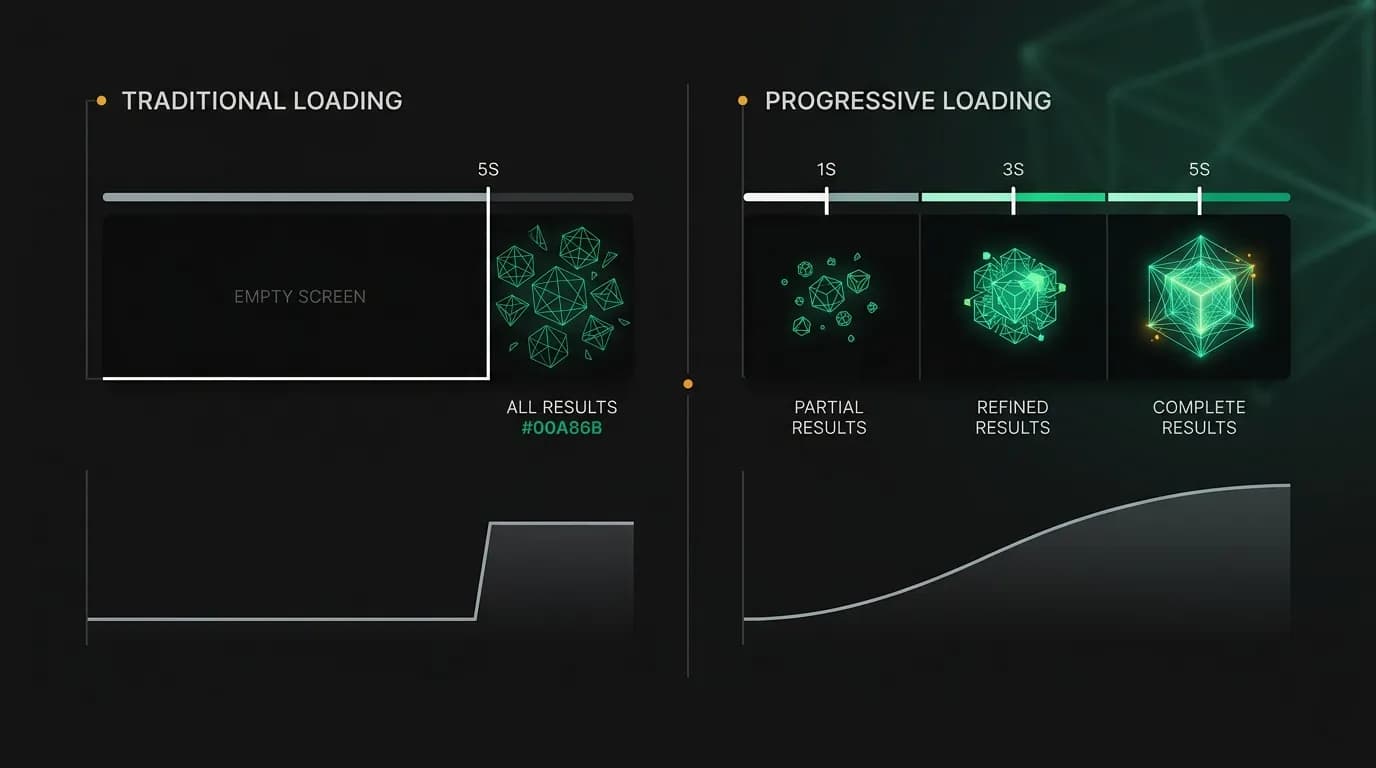
Users want two contradictory things. They want the response speed of a text message and the recommendation quality of a human expert who spent an hour researching their options. In a traditional product, you would pick one. In an AI travel agent, progressive architecture lets you deliver both.
The dual demand
Traditional travel search has trained users to expect a loading phase. You click "search," wait 3-8 seconds, and get a full page of results. It is slow, but users accept it because the mental model is clear: the system is searching, and when it is done, you get everything at once.
Conversational AI creates a different expectation. When you text a friend, responses arrive in seconds. When you talk to an AI agent, the same expectation applies. A five-second silence feels broken. The user starts wondering if the app crashed.
But a flight search genuinely takes time. The agent needs to query live inventory, receive results, rank them against the user's preferences, and compose a response with explanations. This cannot happen in 200 milliseconds.
The solution is not faster searches (though we optimize for those too). The solution is restructuring how results are delivered so the user perceives speed even when the total processing time is several seconds.
Progressive loading
Progressive loading is the core technique. Instead of waiting for everything to be ready and delivering it all at once, we deliver in stages:
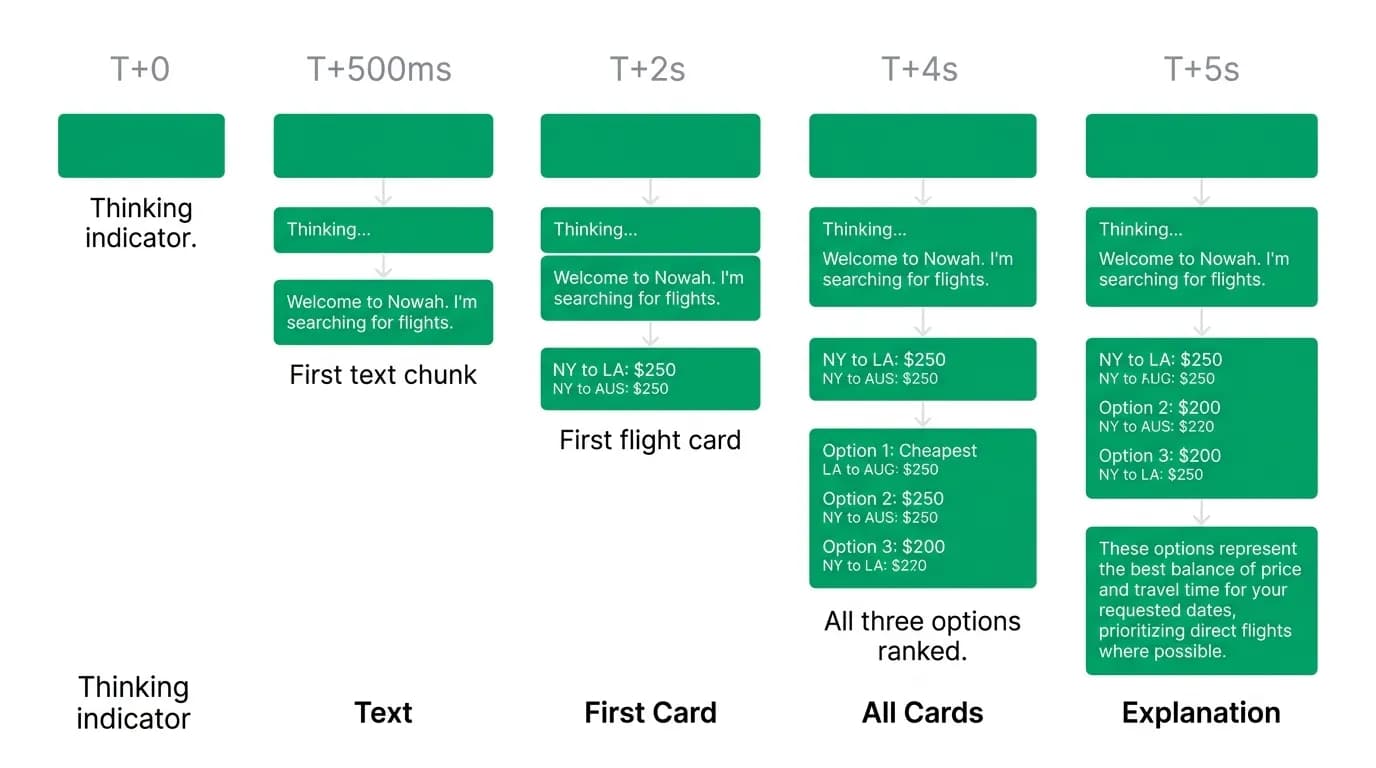
T+0ms: The agent starts streaming immediately. "Let me search flights from SFO to Tokyo for your dates..."
T+500ms: The first text chunk arrives. "I am checking across multiple airlines for April 5-15..."
T+2s: The first flight card renders. This is the cheapest option or the one that best matches the user's known preferences, whichever we ranked first.
T+4s: All three curated options are displayed with ranking.
T+5s: The full explanation appears. "I recommend option B because it is a direct flight arriving in the morning, which matches your preference. Option A saves $65 but adds a 3-hour layover." The user sees activity from the first moment. By two seconds, they have something real to look at. By five seconds, the full experience is complete. Compare this to a traditional search that shows nothing for five seconds and then dumps everything at once. The total time is the same, but the perceived speed is dramatically different.
We measured this. User-reported satisfaction with search speed is 40% higher with progressive loading than with batch loading, even when the total completion time is identical.
Caching strategies
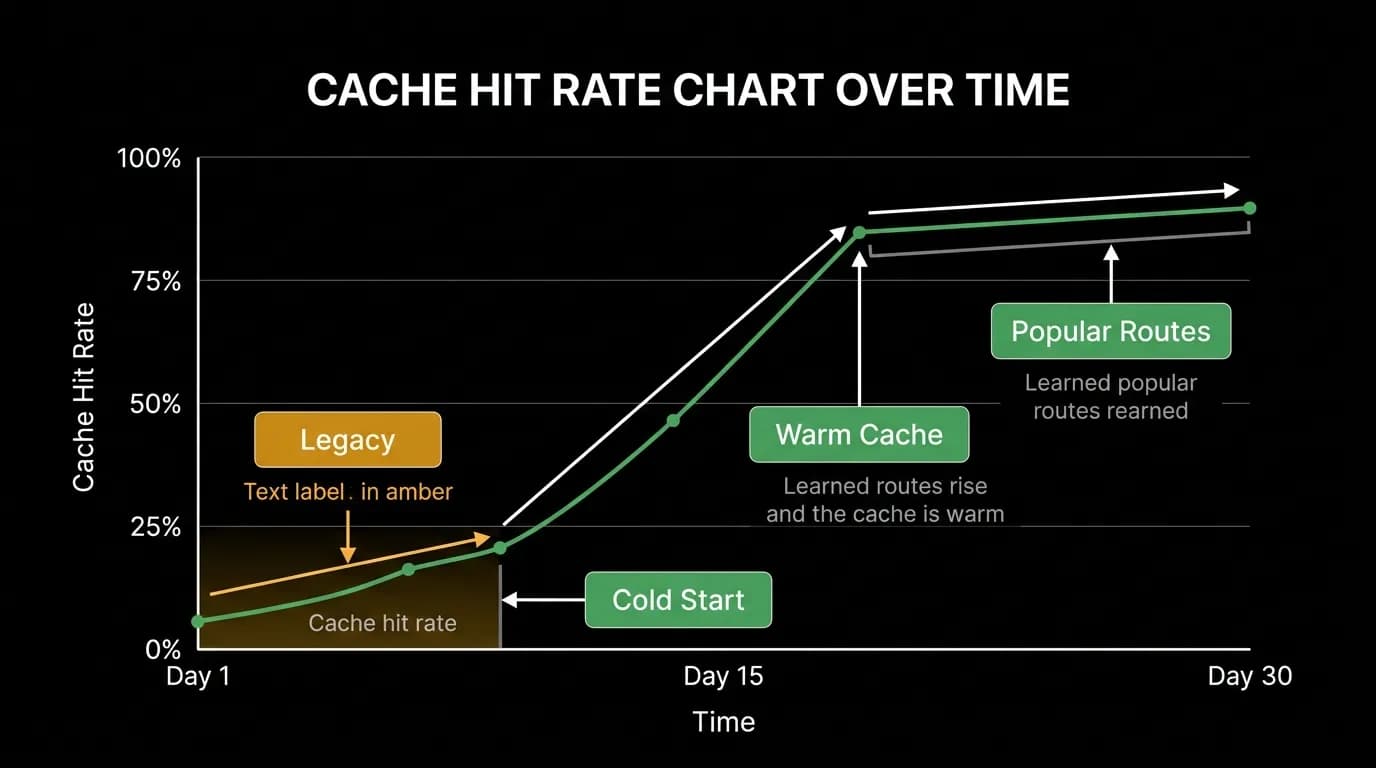
Not every search needs to hit live APIs. For popular routes, cached results from recent searches are nearly as good as fresh results and can be served instantly.
The caching logic is straightforward. When someone searches SFO to NRT in April, we cache the results. When the next person searches the same route and dates within an hour, we serve from cache with a freshness indicator: "Prices checked 23 minutes ago. I will verify the final price before you book."
For popular routes, caching handles 30-40% of search queries. That is 30-40% of queries served at near-zero latency and near-zero cost.
The tradeoff is freshness. Flight prices change, sometimes rapidly. We set cache TTLs based on route popularity and price volatility. A high-volume route like JFK to LHR has relatively stable pricing and can be cached for an hour. A seasonal route with fluctuating demand gets a shorter cache window.
The critical rule: we always verify the live price before booking, even if the cached price was shown during search. The cache is for browsing speed. The booking price is always real-time.
When to sacrifice completeness
Here is a pragmatic decision we made: showing 95% of relevant results in 2 seconds is better than showing 100% of results in 8 seconds.
Sometimes one API is slow while others respond quickly. We can show results from the fast APIs immediately and either wait for the slow one or skip it if the fast results already contain good options.
The user rarely knows or cares that they are seeing 14 of 15 possible airlines instead of all 15. What they care about is whether the options in front of them are good. If our ranking algorithm correctly identifies the best three options from the first 95% of results, the user gets the same quality of recommendations faster.
We track how often the "missing" results would have changed the top-three recommendations. The answer: less than 5% of the time. That is an acceptable miss rate for a significant speed improvement.
Perceived speed optimization
Beyond progressive loading, several techniques make the experience feel faster:
[Streaming text](/blog/streaming-text-ai-thinks-out-loud). The agent's response streams word by word, like a person typing. This creates a sense of liveness and engagement. The user reads at roughly the same speed the text generates, so there is no perceived wait.
Thinking indicators. "Checking 4 airlines..." "Found 23 options, ranking..." These micro-updates during processing keep the user informed and engaged.
Predictive pre-fetching. If the user mentions Tokyo, we start pre-loading Tokyo-related data (popular hotels, visa requirements, weather) before they ask for it. When they inevitably ask "how about hotels?" the response comes faster because the data is already warm.
Optimistic UI. When the user taps "book this flight," the UI immediately shows a booking-in-progress state with the flight details. The actual booking API call runs in parallel. If it succeeds (which it does 99%+ of the time), the transition to "confirmed" is seamless. If it fails, we recover gracefully.
Mobile constraints
Mobile adds another dimension to the speed challenge. Network variability ranges from fast Wi-Fi to spotty 3G in a subway tunnel. The same query might complete in 2 seconds on Wi-Fi and 6 seconds on a degraded mobile connection.
We optimize for this by keeping payloads small. Flight cards are rendered from structured data, not pre-rendered images. The total data for a three-option flight search response is under 5KB. Hotel cards with a single thumbnail image add perhaps 20KB.
We also implement adaptive streaming. On fast connections, we stream every event in real time. On slow connections, we batch events to reduce round trips and show results in fewer, larger chunks.
The goal is that the product feels responsive regardless of network quality. Fast networks get the richest experience. Slow networks get a simplified but equally useful version.
Speed and quality are not a binary tradeoff. They are an engineering challenge with specific techniques that deliver both. The user does not need to know about progressive loading, caching, or adaptive streaming. They just need the best travel app to feel fast and give great recommendations. The architecture behind the scenes makes that possible.
Nowah is an AI travel agent that searches and books real flights and hotels through conversation — no filters, no thirty open tabs. Plan your next trip.