The Five Tabs of Nowah: AI-First Information Architecture
Tools, Trips, Chat, Passport, Profile — five tabs designed around one principle: the AI agent is the center of gravity for everything.
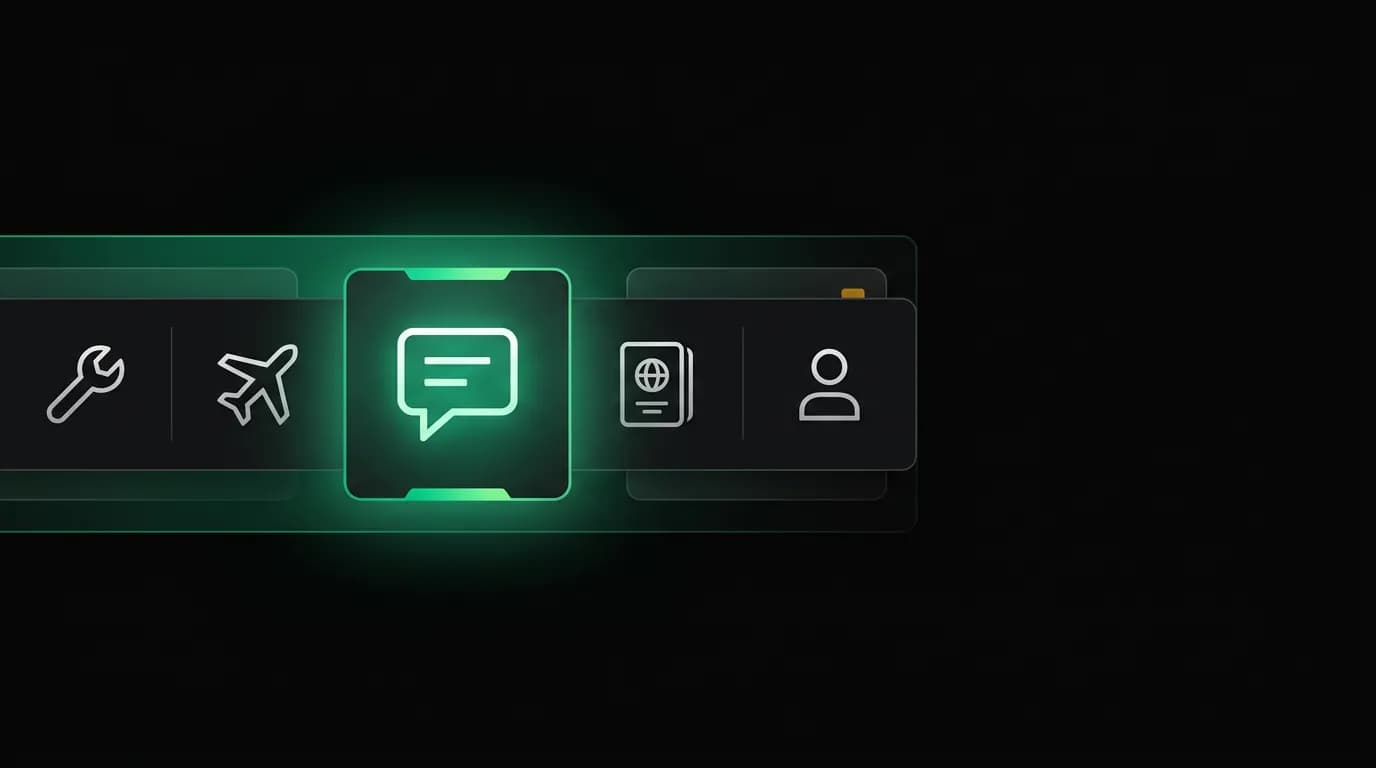
Every travel app has a tab bar. Expedia has: Shop, Trips, Account. Booking.com has: Search, Saved, Bookings, Profile. Kayak has: Flights, Hotels, Cars, More. Hopper has: Explore, Trips, Wallet, Price Freeze.
They all follow the same pattern: organize tabs around the things users can browse, search, or manage. The primary tab is always a search or exploration surface. The architecture assumes the user knows what they want and needs tools to find it.
Nowah's tabs are: Tools, Trips, Chat, Passport, Profile.
Chat is the center tab. There's no Search tab. There's no Explore tab. And the two tabs that might seem unusual — Tools and Passport — exist for strategic reasons that have nothing to do with travel search.
This information architecture tells you everything about what kind of product Nowah is.
Why Chat is the center tab
On a five-tab mobile bar, the center position has two advantages. First, it's the natural thumb target. Hold your phone normally — your thumb rests near the center of the bottom edge. The center tab requires the least movement to tap. Second, it's the visual anchor. The eye naturally gravitates to the center of a horizontal row.
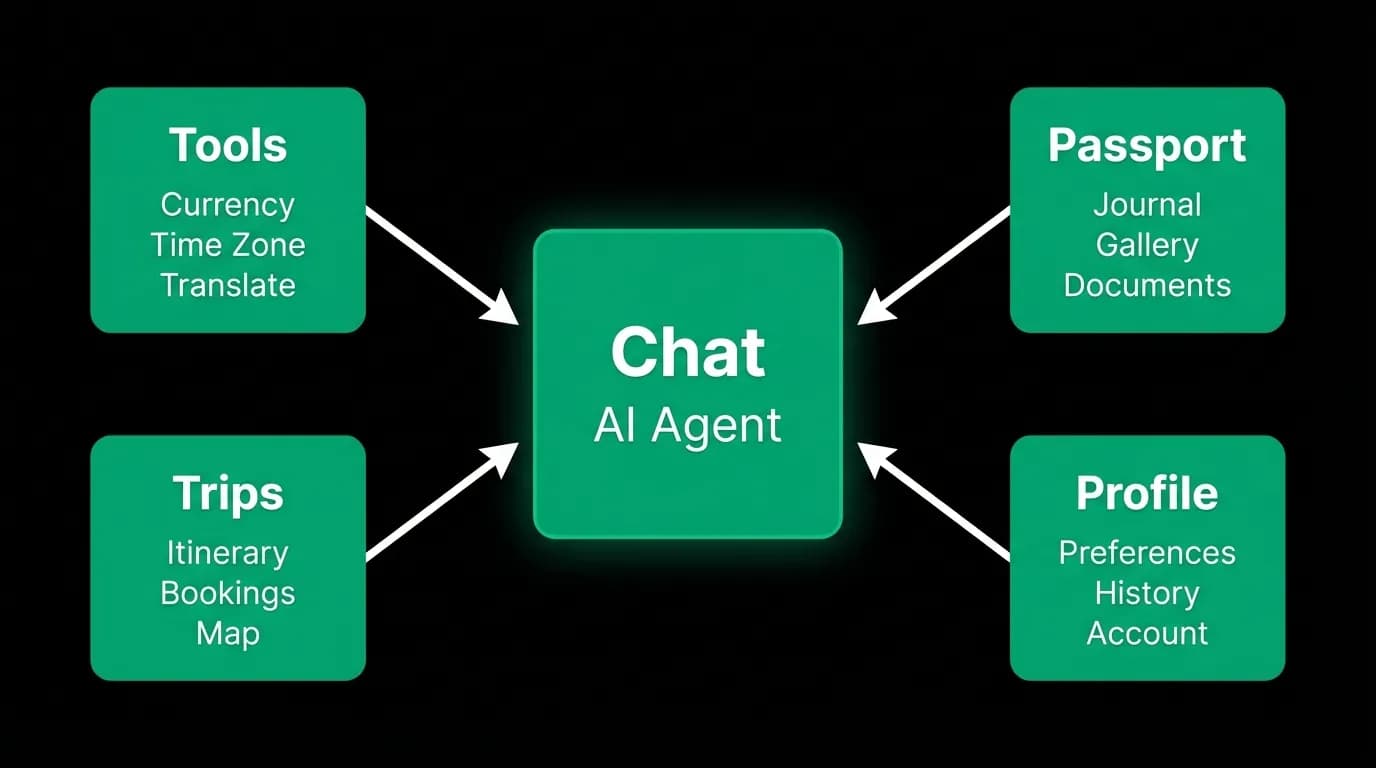
We put Chat in the center because the conversation is the primary interaction. When you open Nowah, the default action is to talk to the agent. Everything else radiates outward from that conversation.
This is an architectural statement. Expedia puts Search in the first tab position because searching is their primary user action. Kayak puts Flights first because flight search is their core product. We put Chat in the center because the conversation is ours.
The center tab also receives a visual treatment — it's slightly larger with a distinct icon style — that signals "start here." New users opening the app for the first time understand immediately where the primary action lives. They don't need to explore multiple tabs to find the main feature.
Tools: utility that keeps the app on your home screen
The Tools tab, on the far left, contains standalone utilities: a currency converter, a tip calculator with local customs data, and a bill splitter. These are not core travel booking features. They're everyday utilities that travelers use constantly.
Here's the strategic logic. Travel booking is infrequent — most people book a few trips per year. Between those booking moments, a travel app sits dormant on the home screen, slowly drifting toward the "delete to free up storage" zone. The Tools tab creates ongoing utility. Currency conversion is useful whenever you're abroad, which might be weeks at a time. Tip calculation is useful at every meal in a foreign country. Bill splitting is useful any time you're traveling with friends.
These tools keep Nowah on the home screen and keep users opening the app. Each tool session is a touchpoint. Each touchpoint is an opportunity for the AI to be useful. "Need help with anything else while you're here? Your upcoming flight to Madrid has a gate change, by the way."
The tools are simple and fast — you don't need the AI agent to convert currencies. But they coexist with the agent. You can ask the agent "how much is 500 euros in dollars" and get the same answer. The tools tab is a shortcut for common utilities, and the agent is always available as the flexible alternative.
Travel app average session durations run five to eight minutes. Tools sessions are shorter — maybe 30 seconds for a quick currency conversion. But those micro-sessions add up to meaningful engagement over a trip, and they keep the app relationship alive between bookings.
Trips: the post-booking command center
The Trips tab shows your active and past trips. Upcoming trips have itineraries, documents, flight status, hotel details, and a direct line to the AI agent for trip-specific questions. Past trips have a timeline of where you went and what you did.
In a traditional OTA app, the trips/bookings section is a receipt drawer. Confirmation numbers, booking details, maybe a link to the airline's website. It's static reference information.
In Nowah, the Trips tab is an active management surface. Your upcoming Tokyo trip shows the AI-generated itinerary with day-by-day activities. Your boarding passes are accessible. The flight status updates in real time. And you can tap into the trip-specific chat to ask the agent anything about that trip — "what time is checkout at my hotel?" or "what's the weather like in Tokyo next week?"
The Trips tab is where the app proves its ongoing value. During the trip itself, this tab becomes the most-used part of the product. Push notification engagement rates for travel apps run 8-12%, but in-trip notifications about actual flight changes or itinerary updates have much higher open rates because they contain immediately actionable information.
Passport: the emotional product
The Passport tab is the least obvious and the most deliberate. It's a travel journal. Places you've visited. Photos from trips. Stats (countries visited, flights taken, miles traveled). Milestones.
This is the emotional layer of the product. Booking is transactional. Itinerary management is practical. But travel itself is emotional — it's about experiences, memories, and identity. The Passport tab gives that emotional dimension a home inside the app.
It works as a retention mechanism in a subtle way. The more trips you take with Nowah, the richer your Passport becomes. It's a personal travel history that you build over time. Deleting the app means losing that history. Not because we lock the data — you can export everything — but because the curated, visual travel journal is something you'd miss.
The Passport tab also feeds back into the AI. Your travel history is part of what makes the agent smarter. "I've already been to Rome and Barcelona" isn't something you have to tell the agent. It already knows because it's in your Passport. When you ask for European city recommendations, it naturally excludes places you've been (unless you ask to revisit).
Profile: preferences that feed the AI
The Profile tab in most apps is an afterthought. Name, email, password, notification settings, maybe payment methods. It's account management — the least exciting part of any product.
In Nowah, the Profile tab is where you teach the AI about yourself. Your seat preference. Your airline preferences. Your hotel style. Your dietary restrictions. Your travel pace (relaxed vs. packed). Your budget range. Your passport details and expiration date.
Every preference you set in your profile directly affects how the agent behaves. Set "aisle seat" and the agent factors that into flight recommendations. Set "boutique hotels" and chain hotels get deprioritized. Set "I'm a vegetarian" and restaurant recommendations adjust accordingly.
This makes the Profile tab feel different from a typical settings page. You're not managing an account. You're customizing your travel agent. There's a tangible payoff to filling in preferences — the very next conversation with the agent will be noticeably better.
The Profile also displays your loyalty tier, travel stats, and subscription status. But these are secondary. The primary purpose is to be the explicit input channel for the AI's preference model, complementing the implicit learning the agent does through conversations.
The deliberate absence of Search and Explore tabs
Every other travel app has some version of a Search or Explore tab. Expedia has "Shop." Booking.com has "Search." Kayak has separate tabs for Flights, Hotels, and Cars. Hopper has "Explore" with deals and price predictions.
We don't have either. No Search. No Explore. No Browse Deals. No Discover Destinations.
This omission is the most visible signal that Nowah is a different kind of product. Search tabs exist because traditional travel apps are search tools. Explore tabs exist because traditional apps want users to browse inventory without a specific intent.
Nowah doesn't need a search tab because search happens through conversation. You don't navigate to a search page. You tell the agent what you want. The agent does the searching.
Nowah doesn't have an explore tab because we don't want to encourage aimless browsing through deals and destination photos. That's a different product with a different business model — one that makes money by showing you lots of options and hoping you buy something. Our product makes money by helping you find the right thing efficiently.
The absence of browse-and-discover functionality is a trade-off. Some users enjoy scrolling through destination inspiration. Some people open Hopper just to see where they could go for cheap. We're choosing not to serve that use case because it would dilute the core experience. If you want destination inspiration, ask the agent. "Where should I go for a beach vacation under $1,500 in April?" That's a better starting point than scrolling a grid of stock photos.
How AI-first thinking reshapes information architecture
The five-tab structure — Tools, Trips, Chat, Passport, Profile — looks simple, but the logic behind it reveals how AI changes information architecture fundamentally.
In a traditional app, tabs map to features. One tab for search, one for bookings, one for account settings. Each tab is a self-contained functional area with its own screens and workflows.
In an AI-first app, tabs map to relationships with the agent. Chat is the primary relationship — active conversation. Trips is the agent's output — trips it helped you plan. Tools is the agent's utility — quick tasks it can help with. Passport is the agent's memory — your shared travel history. Profile is the agent's configuration — how you want it to behave.
The agent is the center of gravity. Every tab connects back to it. This is fundamentally different from an app where each tab is its own world with its own navigation hierarchy. In Nowah, the navigation hierarchy is flat because the AI is the hierarchy. You don't drill down through screens. You talk, and the agent surfaces what you need.
Five tabs, one agent, zero search pages. That's the information architecture of an AI-first travel app. And once you've used it for a few trips, the traditional tab structure — with its search forms, filter panels, and results grids — feels like a relic of an era when the user had to do all the work.
Nowah is an AI travel agent that searches and books real flights and hotels through conversation — no filters, no thirty open tabs. Plan your next trip.