Suggested Prompts: Designing Discovery for AI Capabilities
Users cannot use what they do not know exists. Chip-based suggested prompts, contextual hints, and rotating examples teach AI capabilities without a tutorial screen.
An AI travel agent with dozens of tools — flight search, hotel comparison, weather lookup, visa requirements, currency conversion, itinerary generation — is only as useful as the user's awareness of what it can do. A user who thinks the AI can "only search flights" will only ask it to search flights. The rest of the capability goes unused.
This is the discovery problem. And the worst way to solve it is a tutorial screen that lists features. Nobody reads tutorial screens. They tap through them, close them, and forget them.
The better solution is suggested prompts: tappable chips that demonstrate capabilities through example, positioned where the user is most likely to see them, and rotated to introduce new possibilities over time.
Chip-based prompts below the input bar
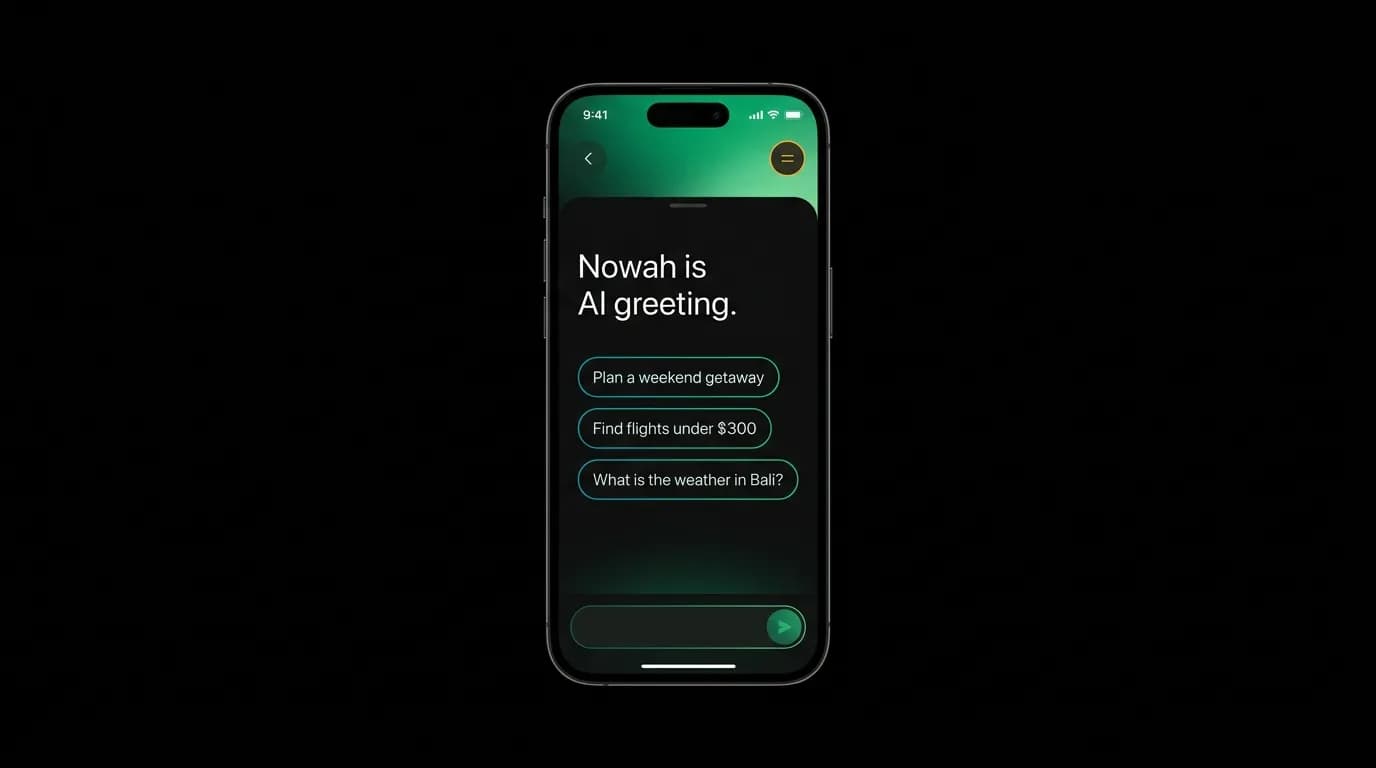
Suggested prompts appear as small, tappable chips below the AI's greeting message or below the input bar. Each chip is a complete query that the user can send with a single tap: "Plan a weekend getaway," "Find flights under $300," "What is the weather in Bali?"
The chip design is deliberately compact — rounded rectangles with text, no icons, no descriptions. The visual footprint is minimal because the chips should feel like suggestions, not a menu. A row of three chips communicates "here are some things you could say" without the formality of a feature list.
Tapping a chip immediately sends it as a message, exactly as if the user had typed it. The AI responds normally. The user sees a live demonstration of the AI's capability through an actual interaction, not through a description of what the interaction would look like.
This learn-by-doing approach is dramatically more effective than documentation. The user does not read about flight search — they see the AI search for flights in response to their (tapped) request. The capability is demonstrated, not described.
Contextual prompts based on user state
Static prompts get stale. A user who has already booked three trips does not need "Plan a weekend trip" as a suggestion. They need prompts that reflect their current situation.
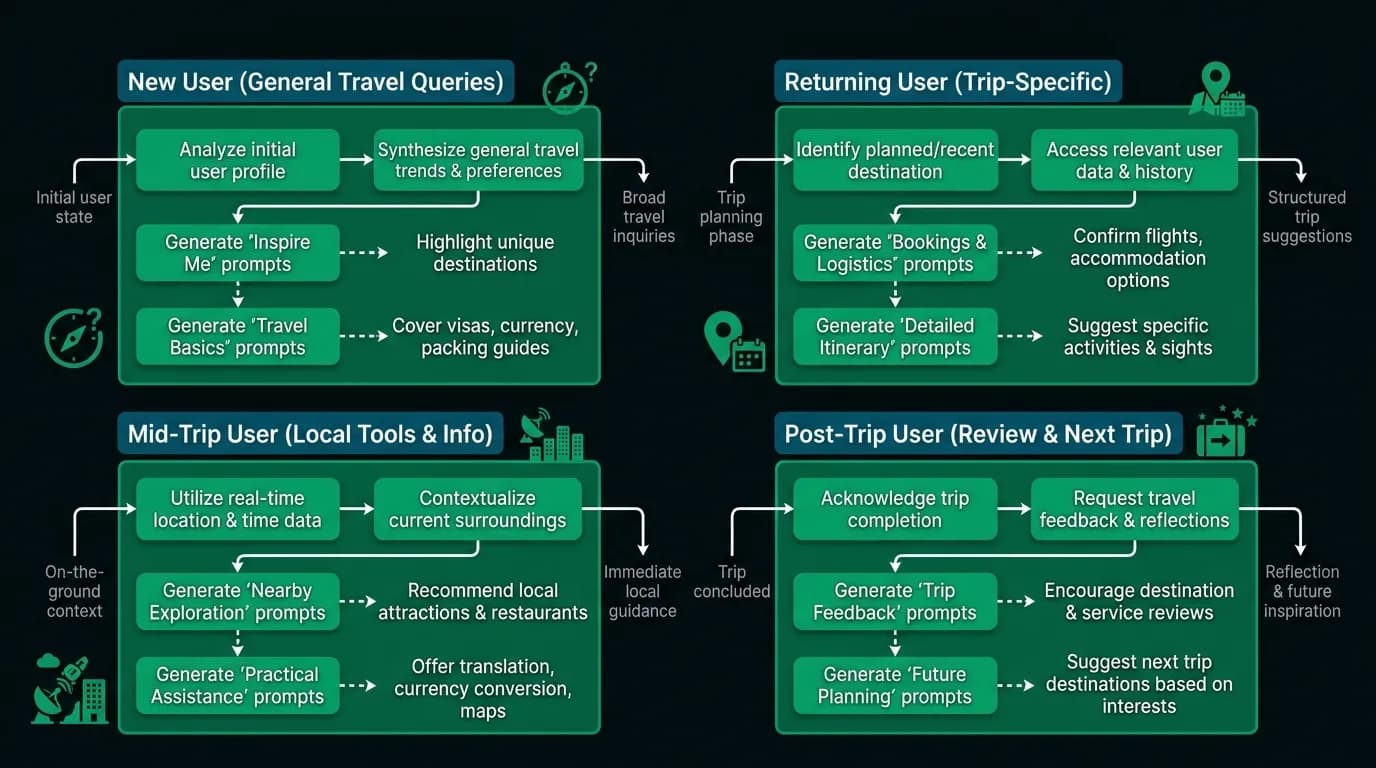
We vary prompts across four user states. New users see broad, introductory prompts that showcase different capability categories: a trip planning example, a specific search example, and an exploratory question. These cover the breadth of what the AI can do.
Returning users see context-aware prompts. If they were researching flights to Barcelona yesterday, a prompt might be "Continue planning Barcelona trip" or "Check Barcelona hotel options." This references their existing context and offers a seamless way to resume.
Mid-trip users see in-the-moment prompts: "Find restaurants near my hotel," "What is the weather tomorrow," "Currency converter for EUR." These reflect the immediate needs of a traveler who is actively on a trip, not planning one.
Post-trip users see reflective prompts: "Start planning your next trip," "Rate your hotel stay," "View trip summary." These acknowledge the completed trip and suggest natural next steps.
Rotating examples
Within each user state, prompts rotate across sessions. A new user does not see the same three prompts every time they open the app. The rotation introduces different capabilities gradually, expanding the user's mental model of what the AI can do.
The rotation is managed through a pool of prompts per user state, with three selected per session based on what has not been shown recently. Over the course of a week of daily use, a new user might see fifteen different prompts, covering flight search, hotel search, weather, visa information, trip planning, and travel tools.
The rotation also prevents prompt fatigue. Static suggestions that never change become invisible — the user's eye learns to skip over them. Fresh prompts maintain visual attention and continued engagement.
Progressive disclosure of advanced capabilities
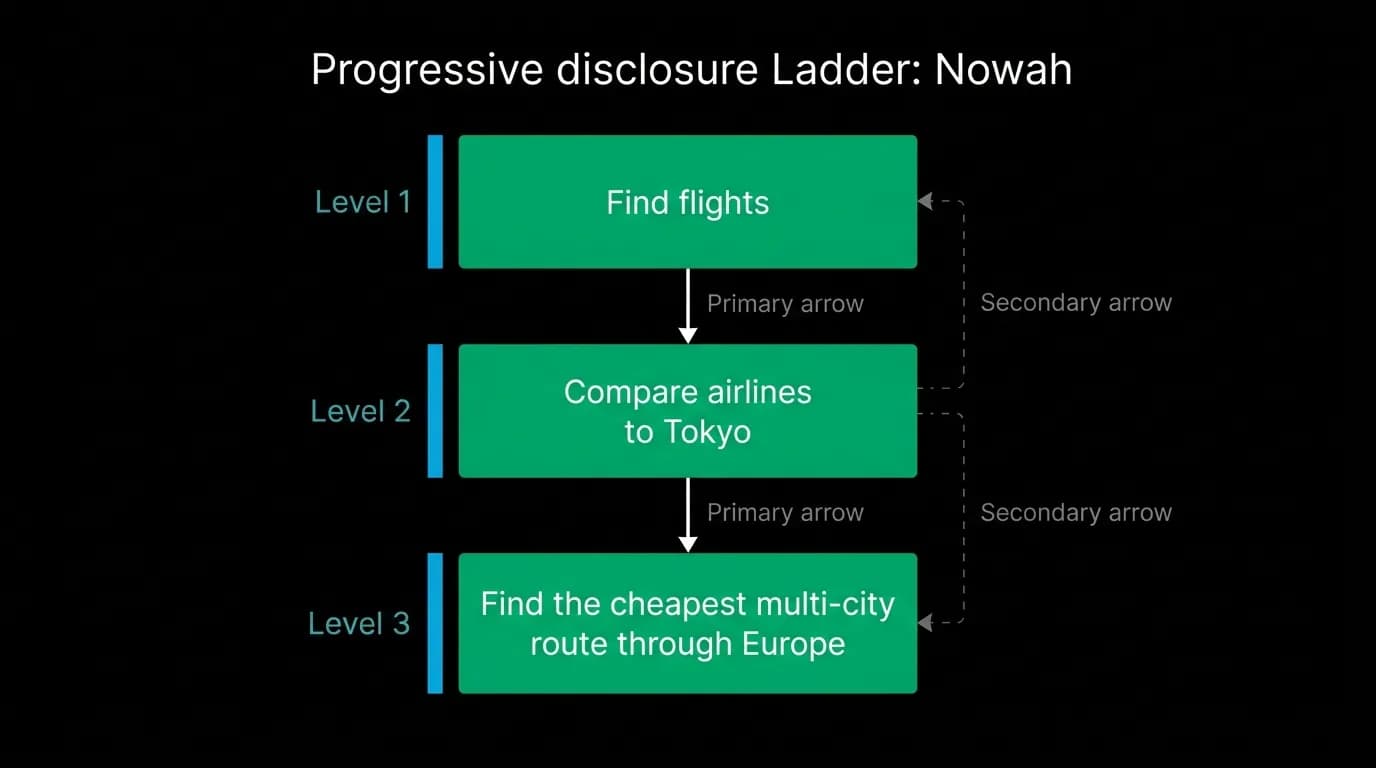
Not all capabilities should be suggested to new users. A prompt like "Find the cheapest multi-city route through Europe with open-jaw flights" is powerful but overwhelming for someone who has never used the app. It reveals complexity before the user has built confidence in the basics.
We layer prompts by sophistication. Level one prompts are simple, single-intent requests: "Find flights to Tokyo," "What is the weather in Rome." Level two prompts introduce intermediate complexity: "Compare airlines to Tokyo," "Find a hotel near Shibuya Station." Level three prompts showcase advanced capabilities: "Plan a two-week Europe trip with trains between cities," "Find the cheapest way to visit three Asian cities in March."
New users see level one prompts. As they complete conversations and bookings, the system introduces higher-level prompts. The progression is based on usage, not time — a user who has completed three booking conversations sees level two prompts on their fourth visit, while a user who has only browsed still sees level one.
The "show me what you can do" escape hatch
Despite all the progressive disclosure and contextual prompting, some users will simply want to know the full scope of the AI's capabilities. For these users, we provide an explicit query path: they can ask "What can you do?" and the AI responds with a structured overview of its capabilities, organized by category.
This is not a feature list — it is a conversational response that explains capabilities with examples. "I can search flights and hotels, compare options based on your preferences, handle multi-city trips, check visa requirements, convert currencies, look up weather forecasts, and manage your complete booking from payment to confirmation."
The response itself includes inline suggestion chips for each mentioned capability, so the user can immediately try any one of them. The escape hatch is both informational and actionable.
Users cannot use what they do not know exists. Prompt suggestions, contextual rotation, and progressive disclosure teach capabilities through example and usage rather than through documentation that nobody reads. In eight seconds of scanning three chips, the user learns more about the AI than they would from eight pages of feature documentation.
Nowah is an AI travel agent that searches and books real flights and hotels through conversation — no filters, no thirty open tabs. Plan your next trip.