The Anatomy of a Perfect AI Travel Booking
From \\\"I want to go to Japan\\\" to booking confirmation in one conversation — the complete walkthrough of what ideal AI-powered booking looks like.
I want to walk through what a perfect AI-powered travel booking looks like, step by step, from the moment the user opens the app to the moment they have a confirmed trip with an itinerary. Not the theoretical version. The actual version we built.
This matters because most people haven't experienced AI travel booking. They've experienced AI travel chatting, which is different. Every major OTA has a chatbot that can discuss destinations and offer planning suggestions. None of them complete the loop. The conversation starts strong and then hands you off to the same old search form to actually buy something.
A perfect AI booking never breaks the conversation. The user starts talking and ends with a booking confirmation, and every step in between happens in the same thread. Here's how.
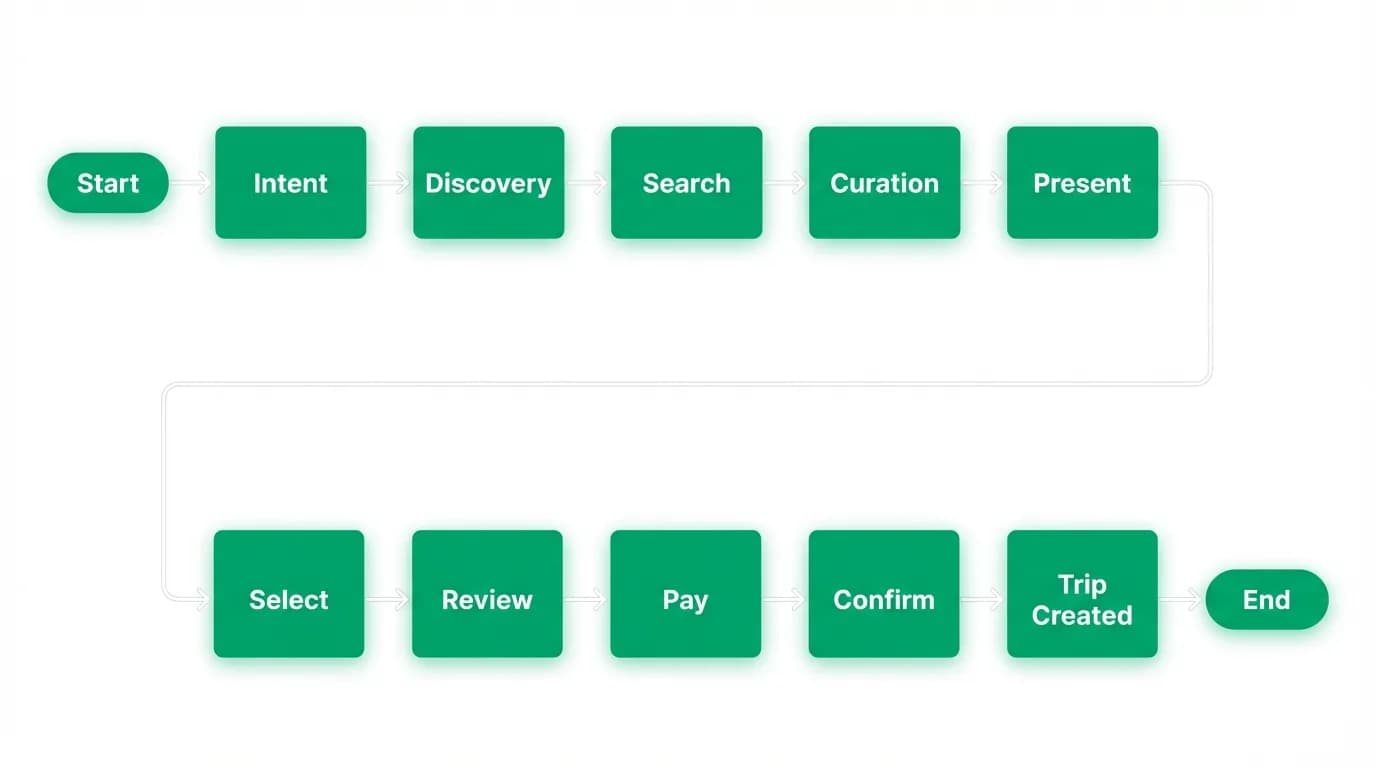
Step one: the opening
The user opens Nowah and types: "I want to go to Japan."
Four words. No dates. No airports. No passenger count. No budget. Just a desire and a destination. On a traditional OTA, this input is unusable. The search form requires origin, destination, departure date, return date, passenger count, and cabin class as minimum fields. "I want to go to Japan" fills one of those fields, partially.
For an AI agent, this input is a starting point. A good one, actually. The agent knows the user wants to travel. It knows the destination is Japan. And it knows what it doesn't know yet, which is everything else. The conversation begins.
Step two: the discovery
This is the step most people don't think about, and it's the one that separates a good AI booking from a bad one.
The agent needs to fill in the gaps: when, for how long, from where, how many people, what budget, what preferences. A bad AI agent asks all of these at once, which feels like filling out a form verbally. A good AI agent asks only what it can't infer and asks one thing at a time.
If the agent already knows the user (from previous bookings or profile data), it already has their home airport, their typical travel style, and their budget range. It might already know their passport nationality, which matters for Japan visa requirements.
The conversation might go like this:
"Japan is great. When are you thinking?"
"Maybe April."
"Nice timing, cherry blossom season. How long are you thinking?"
"A week, maybe ten days."
"Got it. Just you, or are you traveling with someone?"
"Just me."
At this point, the agent has enough to search. It knows the destination (Japan, likely Tokyo as the entry point), the approximate dates (April, flexible), the duration (7-10 days), the party size (1), and if it has memory, the home airport, budget range, and preferences.
Notice what the agent didn't ask: cabin class (it knows from history), seat preference (already in memory), baggage needs (inferred from trip length and past behavior), airline preference (stored). Each question not asked saves time and reduces friction. By the fifth booking, the discovery step might be a single exchange: "When?" "April." Search.
Step three: the search
This is where most AI travel chatbots fall apart. They can talk about flights. They can suggest airlines. They can tell you that April is cherry blossom season. But they can't actually search live inventory and return real, bookable options with real prices.
Nowah's agent queries live flight APIs in real time. When the user says "April" and the agent understands the parameters, it fires off searches across available carriers for flights to Tokyo (and potentially Osaka, if it knows the user's plans include Kyoto).
While searching, the agent shows visible progress. Not a spinner that says "please wait." Actual streaming status: "Searching flights to Tokyo... found 47 options... comparing prices and schedules... selecting the best matches for you."
This streaming matters. It maintains engagement during the 5-8 seconds the search takes. It builds trust by showing the agent is doing real work. And it manages expectations: the user sees that the agent is comparing dozens of options, which gives context for the curated results that follow.
Step four: the curation
Out of 47 (or however many) results, the agent selects three.
This is the most important step in the entire flow, and it's where AI adds the most value over traditional search.
The three options aren't random. They're strategically selected to cover different value dimensions:
Best price. The cheapest option that meets the basic quality thresholds. Not the absolute cheapest (which might be a 30-hour multi-stop odyssey), but the cheapest option that the agent judges to be a reasonable experience for this user. If the user has never booked ultra-budget carriers, the cheapest option will still be on a reputable airline.
Best schedule. The option with the most convenient timing: reasonable departure hour, shortest total travel time, best arrival time at the destination. This might cost more than the budget option, and that's the point.
Best overall. The option the agent thinks is the best total value, balancing price, schedule, airline quality, and user preferences. For a user who values nonstop flights and morning departures, this might be a mid-price nonstop departing at 10 AM.
Each option appears as a card in the conversation. The card shows the airline, departure and arrival times, total duration, number of stops, price, and a brief note from the agent explaining why this option was selected: "Cheapest nonstop I found. Departure is early but saves you $180 vs. the afternoon flight."
Step five: the decision
The user evaluates three options. Three. Not three hundred.
This is where the paradox of choice evaporates. With three options, the user can hold all of them in working memory simultaneously. They can compare directly without scrolling, filtering, or opening new tabs. The decision becomes manageable.
Most users respond in one of three ways:
"Book option two." Direct selection. No further discussion needed. This happens about 40% of the time.
"What about nonstop only?" Refinement. The user has seen the options and discovered a preference they didn't state upfront. The agent refines: "Here are three nonstop options." This usually takes one more round.
"That's more than I wanted to spend. What if I'm flexible on dates?" Pivoting. The user's real constraint has emerged. The agent adjusts: "If you can fly April 8 instead of April 12, there are options about $200 cheaper." This kind of flexible re-search is natural in conversation and impossible on a traditional OTA without starting a new search from scratch.
The decision step is a conversation, not a click. And because it's a conversation, the agent can address hesitation in real time. If the user seems stuck, the agent might offer: "Based on your past bookings, you usually prioritize schedule over price. Option two has the best timing and it's $80 below the average price for this route." This kind of contextual nudge, specific to the user, turns wavering into confidence.
Step six: the review
The user has picked a flight. Before committing money, they see a clear summary.
The review shows: airline and flight number, departure and arrival times, total duration, fare class, baggage allowance, seat selection (pre-filled if the agent knows your preference), cancellation policy, and total price with any taxes and fees broken down.
This isn't a dense terms-and-conditions page. It's a clean summary within the conversation thread. The agent presents it conversationally: "Here's the full breakdown for your Tokyo flight. Economy on [airline], April 12 to April 21, window seat, one carry-on included. Total is $847 including taxes. The fare is refundable with a $75 fee within 24 hours. Want to go ahead?"
Everything the user needs to decide is in one message. No page transitions. No scrolling through fine print. No surprise fees appearing at the last step.
Step seven: the payment
The user confirms. A native payment sheet slides up within the app. This is a saved payment method from a previous booking, or a new card entry if it's their first time.
The payment happens without leaving the conversation. No redirect to a third-party payment page. No new browser tab. No "you'll be redirected to complete your purchase." The payment sheet is native, secure, and integrated.
This matters more than you might think. Every redirect in a booking flow costs conversion. Industry data suggests each additional checkout step causes roughly a 10% drop in completion rate. Traditional OTA booking flows have five to eight steps between "select" and "confirm." A payment sheet that slides up and slides down is one step.
After payment processes (a few seconds), the confirmation appears directly in the conversation.
Step eight: the confirmation
"Your flight to Tokyo is booked! Here's your confirmation."
A booking confirmation card appears in the chat. Flight details, confirmation number, airline, dates, passenger name. Below it, the agent continues: "I've created a trip for you. You can find your itinerary, boarding pass, and any other documents in your Trips tab. Your flight is in 23 days."
This is a moment that should feel good. You just booked a trip to Japan. Traditional OTAs mark this moment with a wall of text, a confirmation email, and a prompt to book a hotel. It's transactional and anticlimactic.
In a conversation, the confirmation is part of the flow. The agent acknowledges it, provides next steps naturally, and can continue the conversation: "Want me to look at hotels in Tokyo now?"
What happens next
The booking is done, but the trip management is just beginning.
The trip automatically appears in the Trips tab with a generated itinerary. The agent has already populated the basic structure: arrival day, departure day, and a suggestion framework for the days in between based on what it knows about the user's interests.
Documents are stored. The booking confirmation, the e-ticket, and eventually the boarding pass all live in one place within the trip. No digging through email. No forwarding confirmations. No screenshots.
The AI agent stays available throughout the trip. "What time is my flight tomorrow?" "Can you find me a restaurant near my hotel tonight?" "I want to change my return flight by one day." All handled in the same conversational interface that booked the original trip.
If the flight gets delayed, the agent can proactively notify: "Your flight tomorrow has been delayed by 2 hours. New departure is 1:15 PM. This shouldn't affect your hotel check-in."
Why this flow matters
Go back and count the steps. The user typed "I want to go to Japan." After a brief conversation (three to five exchanges for discovery), they saw three flights, picked one, reviewed the details, paid, and got a confirmed booking with a trip automatically created.
The total time for this entire flow is typically three to five minutes. For a returning user with stored preferences and payment methods, it can be under two minutes.
Now compare that to the traditional OTA experience. Open Expedia. Fill out the search form (origin, destination, dates, passengers, class). Submit. Wait for results. Scroll through 200+ flights. Apply filters. Sort. Compare. Open a few in new tabs. Go back. Compare more. Pick one. Click through to the booking page. Enter passenger details. Choose a seat. Decline insurance. Decline car rental. Enter payment. Confirm. Wait for the confirmation email.
That process takes 20-40 minutes on a good day. On a bad day, when you're comparison-shopping across multiple sites, it takes hours spread over multiple sessions over multiple days.
The AI booking flow isn't incrementally better. It's categorically different. It's the difference between doing the work yourself and having someone competent do it for you. The someone just happens to be an AI agent that has access to every flight, remembers your preferences, and is available at any hour.
The imperfections (and how we handle them)
No booking flow is perfect every time. Here's what can go wrong and how the conversational model handles it better than the traditional model.
The user changes their mind. "Actually, can we look at Osaka instead of Tokyo?" In a traditional flow, this means starting a new search from scratch. In conversation, it's a sentence. The agent adjusts and searches again. Context is preserved. The budget discussion, the date range, the preferences, all of it carries forward.
The selected flight sells out. Between the time the user picks a flight and the time they confirm payment, the fare can disappear. In a traditional flow, this is an error page. In conversation, it's a message: "That fare just sold out. Here's a similar option on the same airline, departing 30 minutes later, same price." Recovery happens in the same flow, not on a different screen.
Payment fails. Card declined, insufficient funds, whatever the reason. In a traditional flow, you're staring at a red error message on a payment page, wondering if the booking went through or not. In conversation: "Your payment didn't go through. Want to try a different card?" Simple. In context. No ambiguity.
The user wants to modify after booking. "Can I change my return date?" In a traditional flow, you navigate to "manage booking," enter your confirmation number, find the right flight, go through a modification flow that's almost as complex as the original booking. In conversation: "When do you want to return instead?" The agent handles the rest.
The conversational model doesn't prevent problems. It handles them with the same grace and context that it handles the happy path. And that matters, because the moments when things go wrong are the moments when the product is tested most.
The vision: zero questions
The perfect AI booking I described above still involves questions. "When are you thinking?" "How long?" "Just you?" These are necessary on early bookings when the agent is learning.
The long-term vision is a booking that requires zero questions. The user says "I want to go to Japan" and the agent already knows: April (because the user expressed interest in cherry blossoms last month), ten days (their typical trip length), solo (they usually travel alone), window seat, carry-on only, mid-range budget, boutique hotel in Shinjuku (because they asked about that neighborhood before).
The agent presents one option: "Based on everything I know about your travel style, here's my recommendation for your Japan trip." Flight, hotel, rough itinerary. One tap to book.
We're not there yet. It requires a level of preference accuracy that takes time to build. But every booking moves us closer. Every conversation teaches the agent something new about what the user wants. And eventually, "I want to go to Japan" is all the input needed.
From intent to booking confirmation, all in one conversation. That's the anatomy of a perfect AI travel booking. And it's the experience every traveler deserves instead of 38 browser tabs and a stress headache.
Nowah is an AI travel agent that searches and books real flights and hotels through conversation — no filters, no thirty open tabs. Plan your next trip.