Designing the Trip Timeline: Booking to Boarding to Home
The full lifecycle of a trip — pre-trip prep, travel day real-time info, destination intelligence, and post-trip memories — all AI-powered.
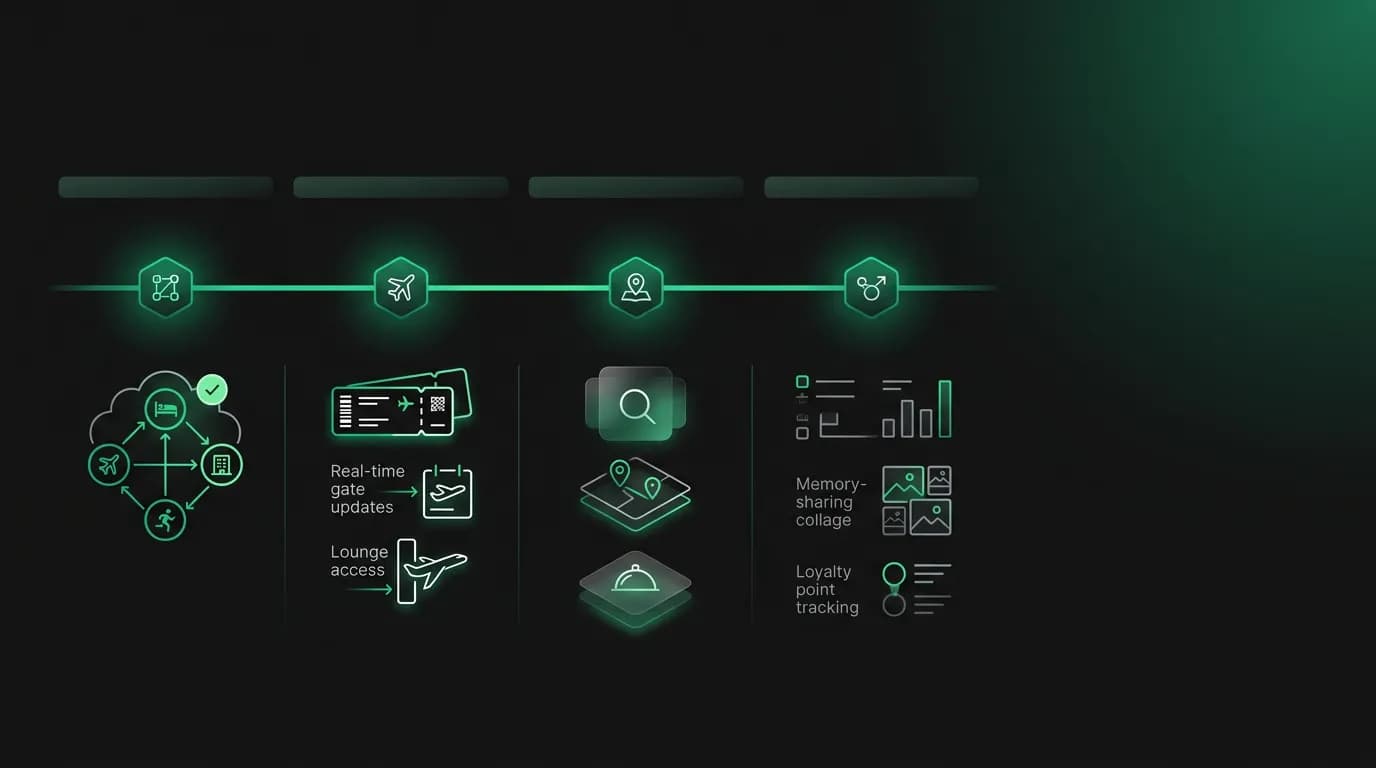
Most travel apps think the job ends at booking. You search, you pay, you get a confirmation email. See you next time.
This is like a restaurant that takes your order and then disappears. The booking is the appetizer. The actual trip, the thing the user cares about, is the main course. And almost nobody designs for it.
We think the trip timeline is the most underbuilt part of travel technology. From the moment you book to the moment you get home, there is a continuous stream of information, decisions, and experiences that benefit from AI assistance. The booking confirmation is the starting line, not the finish line. Here is how we designed Nowah to be useful across the entire trip lifecycle.
Pre-trip: countdown to departure
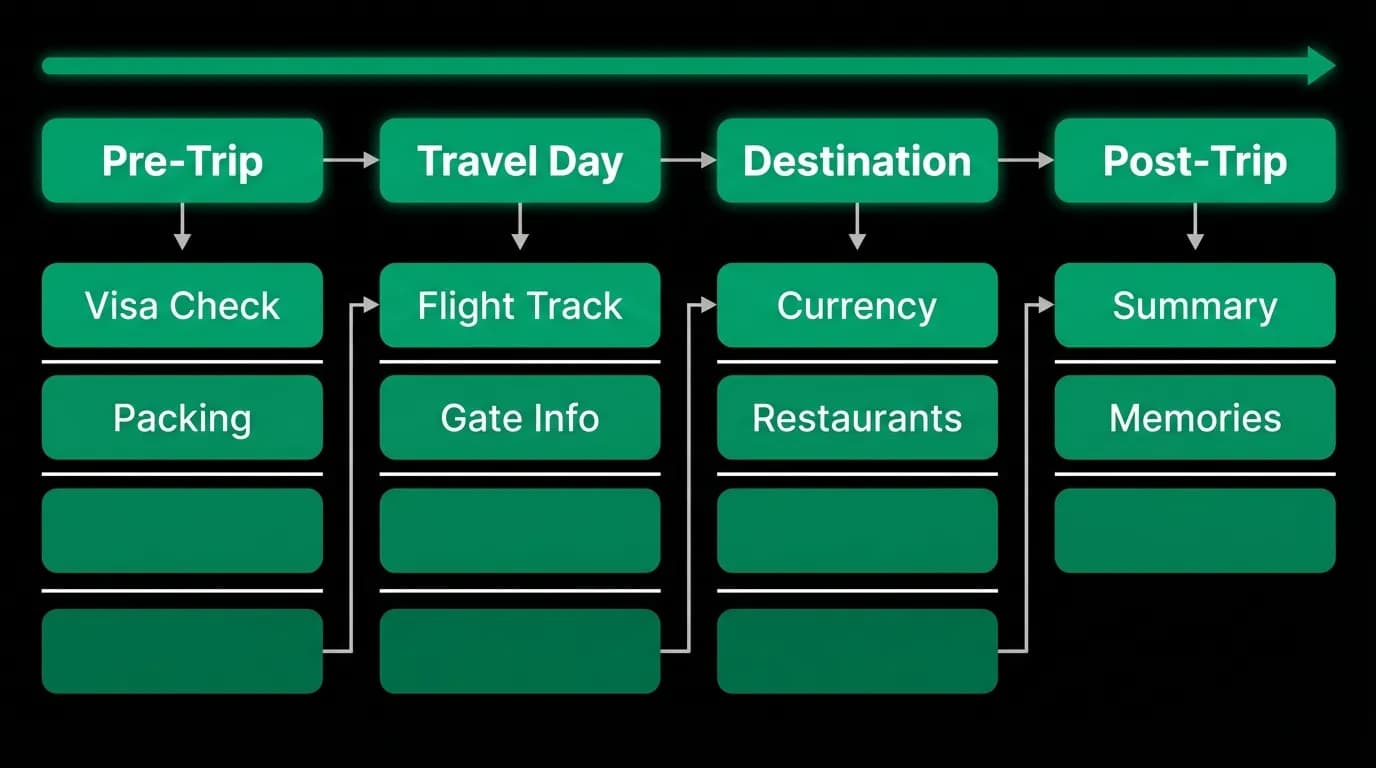
The period between booking and departure is surprisingly active. There are documents to organize, things to pack, logistics to arrange, research to do. Most travelers manage this with a combination of email search ("where is my booking confirmation?"), Google searches ("do I need a visa for Portugal?"), and mental checklists they constantly worry they forgot something on.
Nowah fills this gap with proactive pre-trip intelligence. Once a trip is booked, the agent starts working in the background.
Document verification is the highest-stakes item. The agent checks passport validity against the destination's requirements. For a trip to Japan booked six months out, the agent checks whether the user's passport will have six months of validity remaining at the time of travel. If not, it alerts the user months before departure, when there is time to renew. This check happens automatically. The user does not have to ask or remember to check.
Visa requirements are surfaced based on the user's nationality and destination. Not a generic "check with the embassy" message, but specific information: "US citizens can visit Portugal for up to 90 days without a visa. No action needed." Or: "Vietnam requires a visa. You can apply for an e-visa online, processing takes 3-5 business days." The agent provides this at booking time and reminds again closer to departure.
Weather forecasting helps with practical preparation. Two weeks before departure, the AI provides a weather outlook for the travel dates. Not a generic seasonal summary, but actual forecast data. "Barcelona next week: 22-26 degrees, partly cloudy, low chance of rain. Light layers and sunscreen should be enough." This is practical information that affects what you pack.
Packing suggestions are contextualized by destination, weather, trip duration, and trip type. A four-day business trip to London in November needs different packing than a week-long beach trip to Bali. The agent knows the difference because it booked the trip and knows the context.
All of this appears in the Trips tab as a pre-trip checklist that updates as departure approaches. Items are checked off automatically (passport verified, documents collected) or require user action (renew passport, apply for visa). The agent nudges when deadlines approach.
Travel day: real-time command center
Travel day is when AI assistance matters most and when most travel apps contribute least. You are in transit. You are stressed. You need information fast and you do not want to dig for it.
Nowah transforms into a real-time command center on travel day. The Trips tab becomes the primary interface, organized around the immediate next action.
Flight tracking is live. The app knows your departure time, and it starts tracking flight status several hours before. Gate assignments, boarding time, delay notifications, terminal changes: all pushed to the user as they happen, both in the app and via push notifications. Push notification engagement for travel is between 8% and 12%, significantly higher than most categories because travel notifications are immediately actionable.
Boarding pass quick access puts the boarding pass (or the airline's check-in link) one tap away from the main trip screen. No digging through email. No searching through the airline's app. Open Nowah, see the trip, tap the boarding pass. This sounds small. It saves real stress when you are standing in a security line.
Connection monitoring matters for trips with layovers. The agent tracks whether the first flight is on time and whether the layover is sufficient. If the first leg is delayed and the connection gets tight, the agent alerts proactively. "Your SFO to ORD flight is delayed 45 minutes. Your ORD to LHR connection is now 1 hour 10 minutes. That is tight but still possible. I will monitor and find alternatives if it gets shorter."
Ground transportation timing provides estimates for getting to the airport. "Based on current traffic, it will take approximately 55 minutes to reach LAX. I'd recommend leaving by 3:15 PM for your 6:30 PM flight." This integrates with the flight status to provide a unified departure timeline.
The goal of travel day design is ambient awareness. The user should be able to glance at their phone and know exactly where they stand: on time, delayed, gate changed, connection at risk. No searching. No switching apps. One screen, updated in real time.
At destination: local AI intelligence
Once the user arrives at their destination, the trip is not over. It is just getting started. And the AI agent has the context to be genuinely helpful because it knows where the user is, how long they are staying, what they like, and what they have already planned.
Restaurant suggestions come from the agent's knowledge of the destination combined with what it knows about the user. Not a generic "top 10 restaurants in Rome" list. Contextual suggestions: "You are near Trastevere tonight. There is a trattoria two blocks from your hotel that has strong reviews for pasta and has outdoor seating. Want me to send you the address?" The agent knows the user's hotel location, the time of day, and their food preferences.
Currency context is always available. The user can ask "how much is 50 euros in dollars?" or the agent can proactively note: "A coffee in Rome typically costs 1-1.50 euros, which is about $1.60-$2.00. Tip is not expected in cafes." This cultural context is something most travelers Google repeatedly. Having it available in a conversation saves constant app-switching.
Local customs and practical tips surface when relevant. Tipping norms by country. Public transportation guidance. Safety advice for specific neighborhoods. Opening hours for attractions. The agent delivers these in short, practical messages rather than lengthy travel guides. "Most museums in Rome are closed on Mondays. The Vatican Museums are open every day except Sundays (free first Sunday of the month)."
Emergency assistance is the safety net. If the user needs to find a hospital, contact their embassy, or deal with a lost passport, the agent can provide location-specific guidance. This is a low-frequency need but extremely high value when it occurs.
The at-destination experience ties together everything the agent knows: the user's location, their trip itinerary, their preferences, local knowledge, and real-time conditions. It turns the AI from a booking tool into a travel companion.
Post-trip: memories and reflection
Here is where most travel products have zero presence. You get home. The trip is over. Silence until the next time you want to book.
We believe the post-trip experience is a missed opportunity for two reasons. First, it is when emotional attachment to the trip is highest. People want to reminisce. They want to organize photos. They want to remember where they ate that incredible meal. A product that helps with this earns genuine affection.
Second, the post-trip experience drives the next booking. Users who engage with post-trip features rebook at measurably higher rates than users who do not. The trip memory becomes the trigger for the next trip. "Remember how great Barcelona was? Let us plan another one."
Nowah's post-trip experience in the Passport tab includes AI-generated trip summaries. The agent compiles a summary of the trip: where you went, where you stayed, how many days, key moments. This is not a listing of booking records. It is a narrative: "5 days in Barcelona. Stayed in the Gothic Quarter. Flew United direct from JFK."
Expense tracking aggregates the financial picture of the trip. Total spent, broken down by flights, hotels, and other expenses that the user logs. "Your Barcelona trip cost $2,340 total: $680 flights, $850 hotel, $810 everything else." This is useful for personal budgeting and for setting expectations for future trips of similar scope.
The trip record persists as a memory in the user's travel journal. Over time, the Passport tab fills with trips: a visual history of where the user has been. The agent references past trips in future conversations. "You went to Spain last April. Want to explore a different part of Europe this time, or revisit somewhere you loved?"
How AI makes each phase intelligent
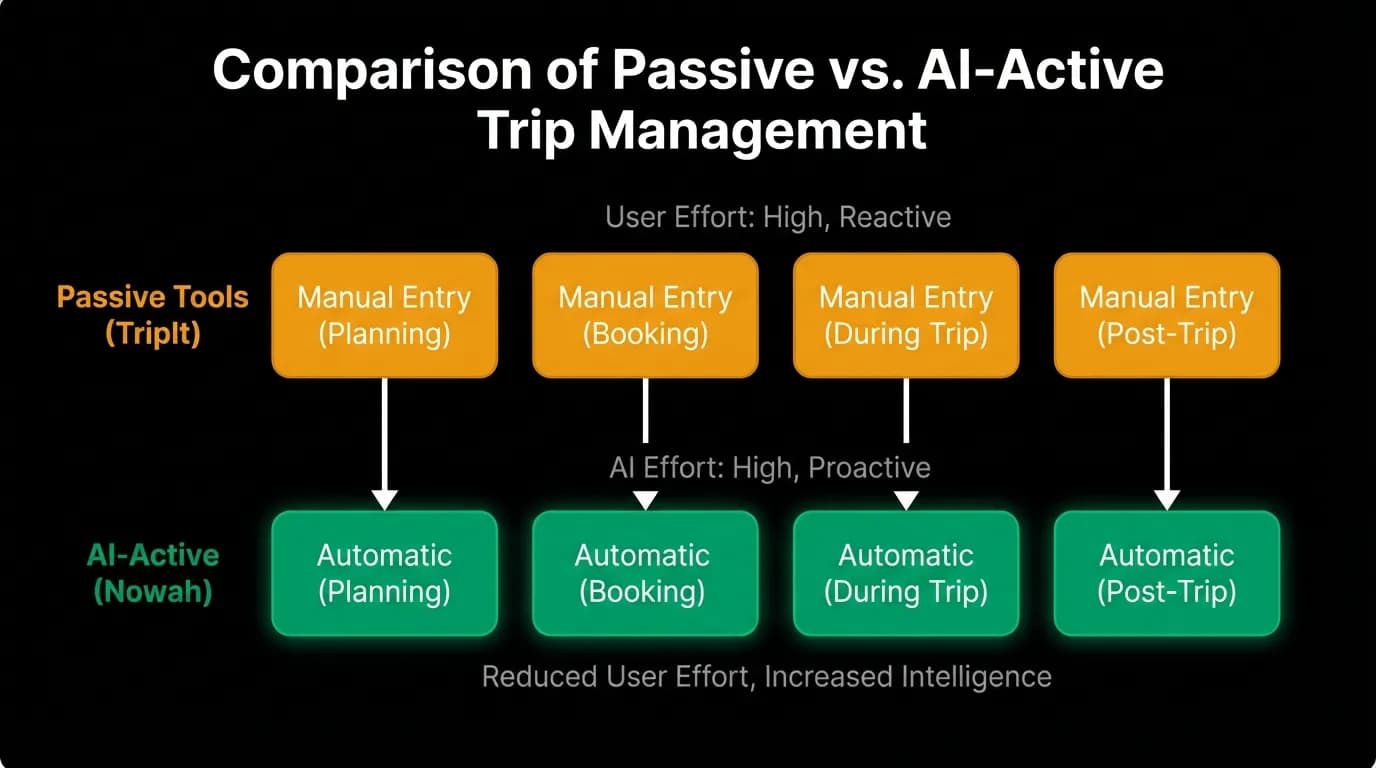
The common thread across all four phases is that AI replaces manual effort with automated intelligence.
Pre-trip: instead of manually checking visa requirements, passport validity, weather forecasts, and packing lists across multiple websites, the agent handles all of it automatically and surfaces only what requires the user's attention.
Travel day: instead of manually checking flight status on the airline's app, checking gate assignments on the airport's website, and calculating connection times in your head, the agent monitors everything and alerts you to what matters.
At destination: instead of Googling "restaurants near me" and reading through Yelp reviews, the agent synthesizes local knowledge with your preferences and delivers relevant, contextual suggestions.
Post-trip: instead of manually organizing photos and expenses, the agent compiles a summary and maintains your travel history as a searchable, referenced knowledge base.
The intelligence is not magic. It is the integration of multiple data sources (booking data, real-time flight data, location data, weather data, preference memory) into a single agent that has the context to be useful at every phase. No individual piece of information is hard to find. The value is having it all in one place, delivered proactively, by an agent that knows your trip and your preferences.
What TripIt and Google Trips attempted (and why they fell short)
TripIt, launched in 2006, was the first serious attempt at trip organization beyond the booking. Forward your confirmation emails, and TripIt creates an itinerary. It was useful. Millions of people used it. But TripIt was a passive organizer. It received data from the user (forwarded emails) and displayed it in a structured format. It did not search for information, make suggestions, or anticipate needs. It was a filing cabinet, not an agent.
Google Trips, launched in 2016 and discontinued in 2019, went further. It automatically pulled booking information from Gmail, added destination guides, and provided offline access. But Google Trips was also passive. It organized information. It did not act on it. It could show you that you had a flight tomorrow but could not monitor whether that flight was delayed and suggest alternatives.
The gap both products had: no intelligence, no proactivity, no action capability. They organized what the user already had. They did not generate new value or anticipate needs. They were tools you used, not agents that worked for you.
The AI agent model is fundamentally different. The agent does not wait for the user to forward an email or check the app. It monitors, anticipates, and surfaces information when it is relevant. It does not just organize an itinerary. It enriches it with weather, local tips, and real-time updates. It does not just show a flight time. It tracks the flight and alerts you to changes.
This is the difference between a travel filing system and a travel companion. TripIt and Google Trips were filing systems. Useful, but limited. An AI travel agent with access to real-time data, persistent memory, and proactive capabilities is a companion.
The trip timeline as a retention loop
The strategic reason to invest in the full trip lifecycle is retention. Post-booking engagement for most OTAs is near zero. You book on Expedia, you never open Expedia again until you want to book something else. Expedia gets one touchpoint per trip: the booking. If they are lucky, you come back. If not, you go to Booking.com next time.
A product that is useful from booking through post-trip gets dozens of touchpoints per trip. Each touchpoint reinforces the product's value. Each interaction builds the memory that makes the next trip better. The pre-trip reminders, the travel day assistance, the at-destination suggestions, the post-trip memories: they all contribute to a relationship that extends beyond the transaction.
Travel planning happens in micro-moments. Five to eight minutes at a time on mobile. The trip timeline design gives users a reason to open the app in those micro-moments across the entire trip lifecycle, not just when they are booking. Check the weather. Glance at the flight status. Find a restaurant. Review the trip summary.
The more touchpoints in the lifecycle, the stronger the retention. The stronger the retention, the higher the lifetime value. The higher the lifetime value, the more sustainable the business. It starts with designing for the full trip, not just the booking.
That is why we believe the trip timeline is the most strategically important feature area in AI travel. Not the booking flow. Not the search quality. Not the payment speed. The thing that keeps users coming back is a product that is useful every day of their trip, not just the day they purchase.
Nowah is an AI travel agent that searches and books real flights and hotels through conversation — no filters, no thirty open tabs. Plan your next trip.