Streaming Text: Designing for an AI That Thinks Out Loud
Token-by-token text streaming reduces perceived wait time by a large share and transforms a loading screen into a live conversation where users read as the AI writes.
You send a message. The AI processes it. Ten seconds pass. A wall of text appears all at once — three paragraphs and a set of flight options. You were not reading during those ten seconds. You were staring at a loading indicator, wondering if the app was broken.
Now imagine a different experience. You send a message. Within a second, text begins appearing word by word. You start reading immediately. While you are reading the first sentence, the rest is still being generated. By the time you finish the second paragraph, flight cards slide in below the text. The total wait time was the same ten seconds, but you spent those seconds reading instead of waiting.
Streaming reduces perceived wait time by a large share compared to block delivery. The improvement is not in actual speed — it is in the experience of speed. And for an AI travel agent where responses involve real-time searches of flight and hotel inventory, that perception gap is the difference between a product that feels alive and one that feels broken.
How server streaming streaming turns waiting into reading
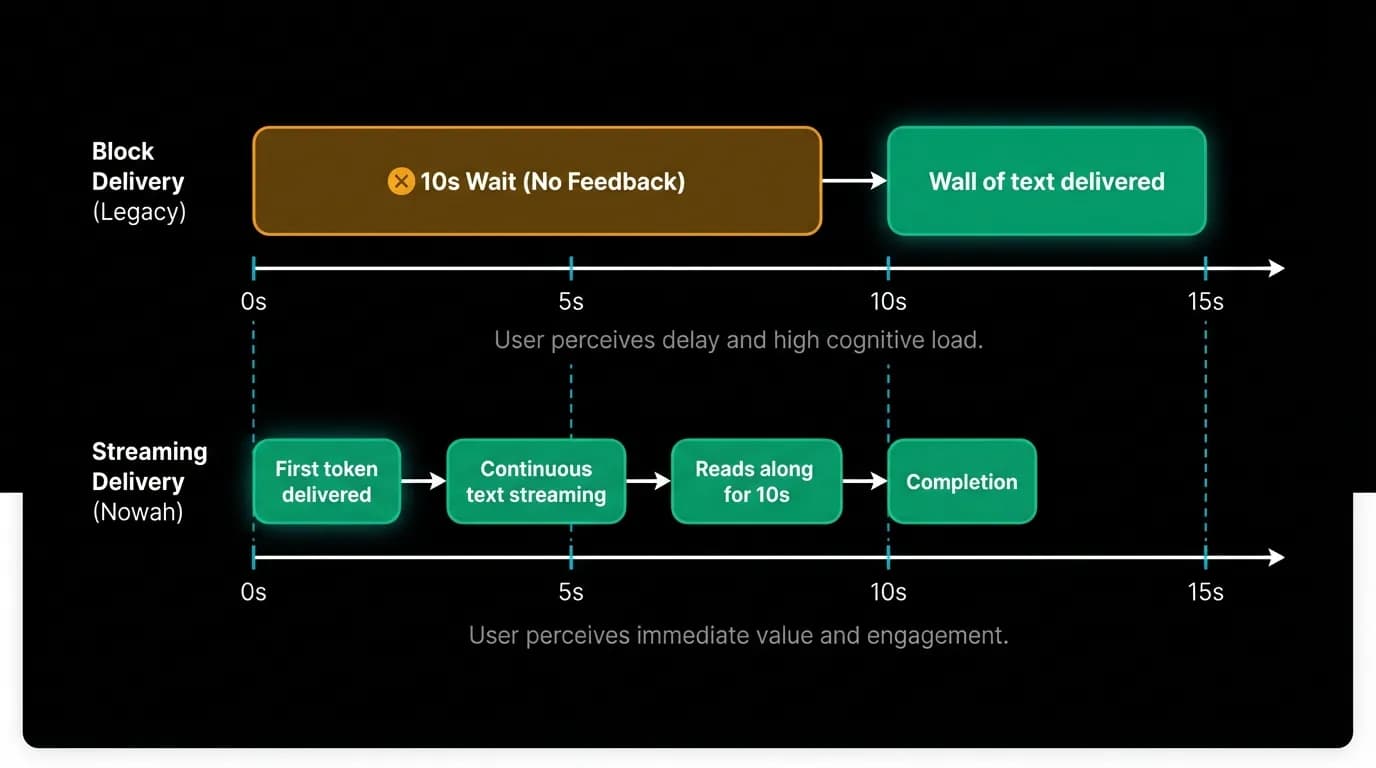
Server-sent events provide a one-directional stream from server to client. When the user sends a message, the server begins generating a response and pushes each token (roughly each word) to the client as it is produced. The client renders each token immediately, creating the effect of the AI typing its response in real time.
The technical mechanism matters less than the experiential effect. Streaming transforms the interaction from request-response (wait, then read) to progressive revelation (read as it appears). The user's attention engages within the first second of the response, long before the full answer is complete.
This is not a subtle improvement. It changes the fundamental rhythm of the conversation. Without streaming, there are long silences followed by information dumps. With streaming, there is a continuous flow of content that mimics the pacing of a human conversation. The AI appears thoughtful rather than absent.
Token timing and the rhythm of natural text
We render tokens at approximately 30 milliseconds per token with an ease-out timing curve. This rate is fast enough to feel responsive — you never see individual words appear so slowly that you are waiting for them — but slow enough to track visually. The text appears to flow rather than pop.
The ease-out curve means each token appears quickly and then settles into position. This creates a subtle animation effect that feels organic, like handwriting that flows rather than type that stamps. The visual rhythm matches the natural reading pace closely enough that users report the experience as "watching the AI think," which is precisely the perception we want.
Timing matters more than you might expect. At 10 milliseconds per token, the text appears too fast to follow — it might as well be block delivery. At 100 milliseconds per token, the text is frustratingly slow on long responses. The 30-millisecond sweet spot keeps the reader engaged without making them wait.
Tool-use status pills
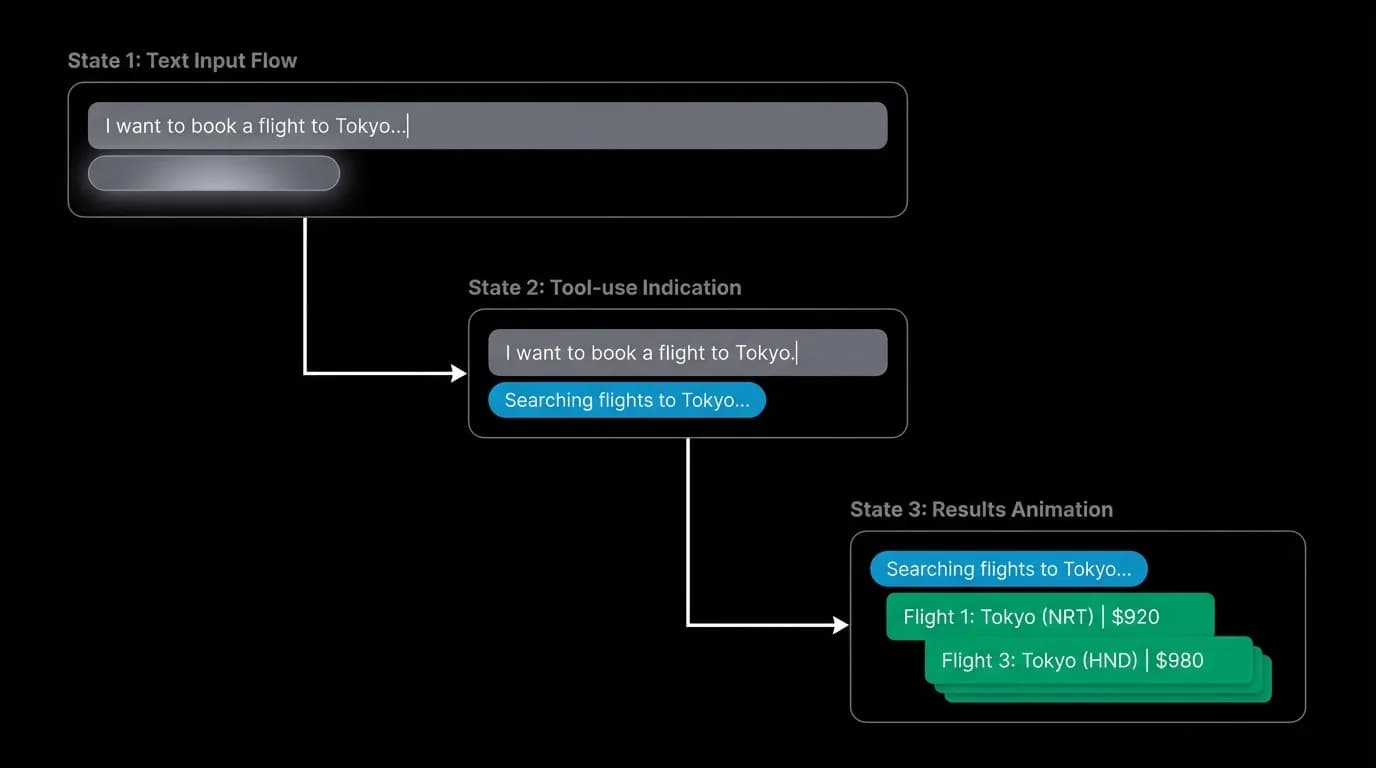
Streaming text is not the only content type in a response. When the AI calls a tool — searching for flights, checking hotel availability, looking up weather — a status pill appears in the message stream. "Searching flights to Tokyo..." with a small animated icon.
The status pill serves a critical communication function. Without it, the stream would pause while the tool executes, and the user would see an incomplete message with a pulsing cursor and no explanation for the delay. The pill explains the pause and converts dead time into informative time.
Status pills animate in with a 200-millisecond slide-up and fade. They appear at the point in the message where the AI decided to call the tool, maintaining the logical flow of the response. After the tool completes, the pill might update ("Found 3 flights") or fade out as the results render.
If the AI calls multiple tools — searching flights and hotels simultaneously — multiple pills appear in sequence. Each pill is labeled specifically ("Searching flights to Tokyo..." and "Checking hotels in Shibuya...") so the user knows exactly what the AI is working on.
The pulsing dot
At the end of the streaming text, a pulsing dot indicates that the AI is still generating. This is the thinking indicator — the simplest and most important animation in the entire interface.
The dot pulses between 30% and 100% opacity on a 1000-millisecond cycle. This rate is calm — not frantic, not static. It communicates activity without urgency. The user knows more content is coming. They can keep reading what has already appeared while the rest generates.
The dot disappears the moment the stream completes. Its removal is the signal that the response is finished and the conversation is back in the user's hands. This transition is as important as the dot itself — without a clear end signal, users might wait indefinitely for more content that is not coming.
Handling stream interruption
Network connections drop. Servers time out. Streams get interrupted. In a block-delivery model, a failed request shows an error and the user retries. In a streaming model, the user might have already read half the response before the stream fails.
We handle this by preserving whatever content has already been received. If the stream drops after two paragraphs of text, those paragraphs remain visible. An inline message appears: "Connection interrupted. Resuming..." The client attempts to reconnect and resume the stream from where it stopped. If reconnection fails, the preserved content stays and a conversational error message explains the situation.
This is significantly better than losing the entire response and showing a generic error. The user keeps what they already read, and the recovery feels like a momentary hiccup rather than a system failure.
The experience of speed
Travel searches take time. Querying live flight inventory across multiple airlines and routes is not instant. Hotel availability checks involve multiple provider APIs. A complex search might genuinely need 8 to 15 seconds to produce complete results.
In a block-delivery model, those 15 seconds are dead time. The user stares at a spinner. At 5 seconds, they wonder if something is wrong. At 10 seconds, they consider refreshing. At 15 seconds, they might leave.
In a streaming model, the AI starts responding immediately with context and explanation. "Let me search for flights to Tokyo in April. I will focus on nonstop options since you prefer those..." The user is reading useful content while the actual search happens in the background. When the search completes, the flight cards slide in below the text — and the user has been engaged the entire time.
Users rate streamed responses as faster even when the total response time is identical. The perception of speed is the speed that matters, and streaming is the single most effective technique for improving perceived performance in any AI interface.
Build your AI responses to stream. Not as an optimization. As a core design requirement.
Nowah is an AI travel agent that searches and books real flights and hotels through conversation — no filters, no thirty open tabs. Plan your next trip.