The 10-Second Rule: AI Response Time Determines Booking Success
Users tolerate 3 seconds for simple queries and 10 for complex searches. Streaming buys time. After 10 seconds without visible progress, they leave.
There is a clock running every time a user sends a message to an AI agent. The user doesn't see it, but their behavior follows it precisely.
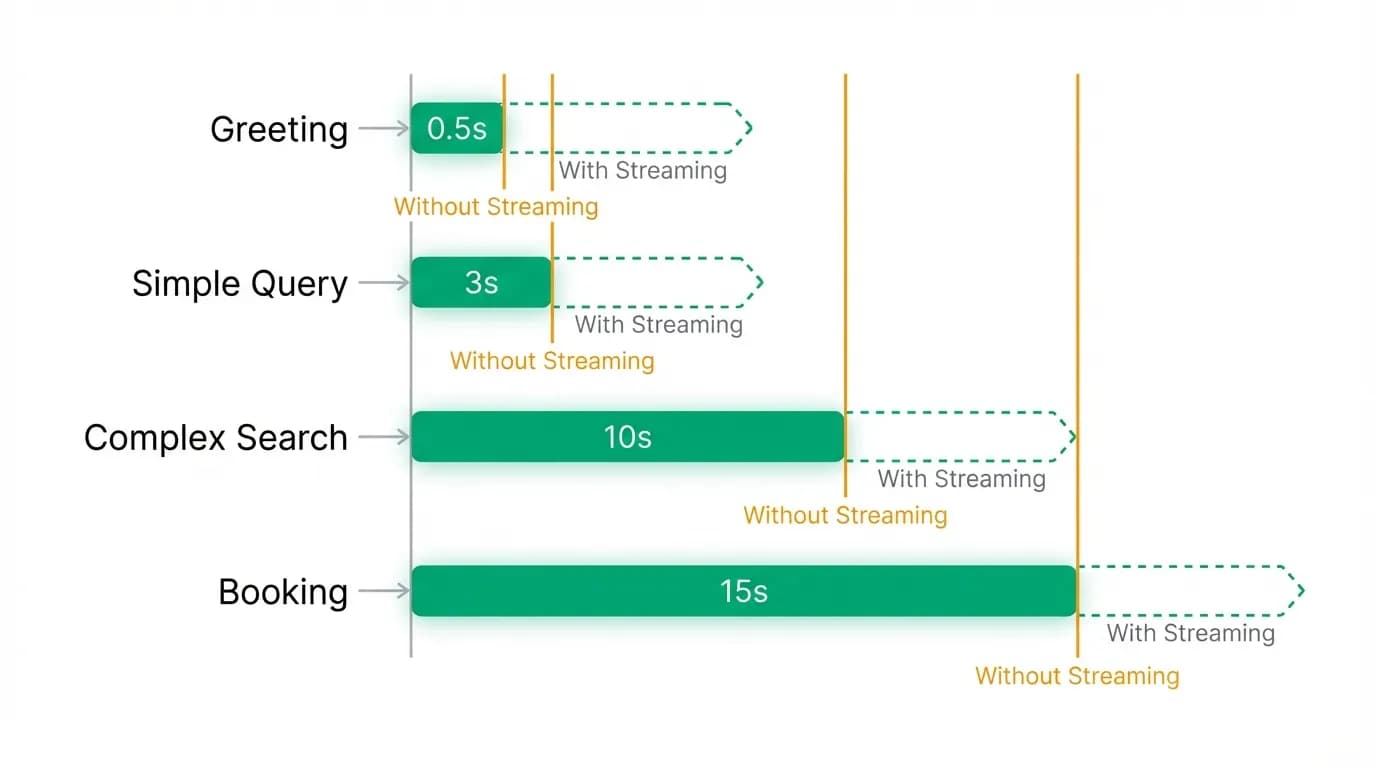
For a simple query, "what time is my flight?" the tolerance is about 3 seconds. After 3 seconds of silence, the user starts to wonder if the app is frozen. After 5 seconds, they're annoyed. After 8, they're reaching for the back button.
For a complex operation, "find me flights to Tokyo next month," the tolerance stretches to about 10 seconds. Users understand that searching takes time. But 10 seconds is the hard ceiling. After 10 seconds of nothing, engagement drops off a cliff. The user assumes something went wrong, or worse, stops caring.
This is the 10-second rule, and it governs the entire design of an AI travel booking experience. Every technical decision, every UX choice, every architectural trade-off exists in conversation with this clock.
User tolerance is predictable and non-negotiable
We didn't discover the 10-second rule through theoretical research. We saw it in our data.
User engagement during AI response times follows a remarkably consistent pattern across thousands of conversations. For simple, factual queries (weather, currency conversion, flight status), the engagement curve starts dropping at 2 seconds and falls sharply after 4. For complex queries that involve API calls and data processing (flight search, hotel comparison), users maintain engagement for about 7-8 seconds before a visible decline, with a steep drop after 10.
These thresholds aren't arbitrary. They're rooted in how humans perceive waiting.
The psychological research on this goes back decades. Jakob Nielsen's work on response time thresholds established three key numbers: 0.1 seconds for feeling instantaneous, 1 second for maintaining thought flow, and 10 seconds as the limit of attention. These numbers haven't changed much, because they're based on human cognition, not technology expectations.
What has changed is the context. Google trained an entire generation to expect sub-second search results. When you type a query into Google, results appear in 0.3-0.5 seconds. This set a baseline expectation for "how fast should finding information be?" that every subsequent product has had to contend with.
AI products face a problem: they're often slower than traditional search because they do more work. A flight search on Google Flights returns results in 1-2 seconds because it's querying a pre-indexed database. An AI agent that processes natural language, determines intent, constructs API queries, calls live pricing APIs, processes results, applies preferences, and generates a natural language response with curated options takes 5-10 seconds. The work is more valuable, but the clock is the same.
Streaming as the primary solution
The single most impactful technical decision we made for perceived performance was streaming.
Instead of waiting for the AI to complete its entire response and then displaying it all at once (batch mode), we stream the response as it's generated. The user sees words appearing in real time, the way a person typing a message would appear in a chat app.
For flight searches, the streaming goes further. The user sees the agent's thinking process:
"Searching for flights to Tokyo in April..." "Found 53 options across 8 airlines..." "Comparing prices and schedules..." "Here are my top three picks for you."
Each of these updates appears as it happens, within 1-2 seconds of the user's message. The user sees immediate activity. They know the agent is working. The wall clock might show 8 seconds from message to final results, but the perceived wait is much shorter because the user has been engaged throughout.
The data backs this up. Streaming increases user engagement by 2-3x compared to batch responses for the same total response time. A user who sees streaming updates for 8 seconds stays engaged. A user who sees a spinner for 8 seconds starts to disengage.
This is the same principle that makes progress bars work in software. A file download with a progress bar feels faster than one without, even though the actual download takes the same time. Visible progress converts waiting into watching, and watching is active while waiting is passive.
The thinking indicator effect
Beyond streaming text, showing the agent's "thinking" state has a measurable impact on perceived wait time.
When the AI is processing a complex request, we show a thinking indicator: a subtle animation with a label like "Searching flights..." or "Comparing hotels..." This indicator serves multiple purposes.
First, it confirms receipt. The user knows their message was received and is being processed. This eliminates the "did it work?" anxiety that causes duplicate messages and abandonment.
Second, it sets expectations. "Searching flights" tells the user this will take a few seconds. They mentally adjust their wait tolerance upward because they understand the task is non-trivial. This is cognitive reframing: the same wait feels shorter when you understand what's happening during it.
Third, it builds trust. Showing the user what the agent is doing (searching, comparing, analyzing) creates transparency. The user isn't staring at a black box. They're watching an agent work on their behalf. This transparency converts passive waiting into active trust-building.
In our testing, adding thinking indicators reduced the perceived wait by 2-3 seconds. Users who saw "Searching flights across airlines..." rated the same 8-second wait as feeling "fast" at significantly higher rates than users who saw a generic loading spinner.
Making it actually faster
Perceived performance matters, but actual performance matters too. Streaming and indicators buy time, but they don't eliminate the need for speed.
We invested heavily in reducing actual response times through several strategies.
Parallel tool execution. When the AI needs to search flights and check weather and look up visa requirements, these calls happen simultaneously rather than sequentially. This reduces total response time significantly for complex queries that involve multiple data sources. A sequential approach would take the sum of all API call times. Parallel execution takes the time of the slowest call.
Smart caching. Frequently requested data (airport information, airline details, visa requirements, currency rates) is cached and refreshed periodically rather than fetched live on every request. This eliminates API call latency for data that doesn't change by the second.
Predictive fetching. When a user mentions "Tokyo" the agent can begin background data gathering (weather, visa requirements for the user's nationality, typical price ranges) before the user has finished describing their trip. By the time the user says "find me flights," some of the contextual data is already loaded.
Response chunking. For complex responses that include multiple components (flight options, price context, scheduling notes), the AI generates and sends each component as it's ready rather than waiting for the complete response. The user sees the first flight option while the agent is still analyzing the third.
Each of these optimizations shaves hundreds of milliseconds to seconds off the total response time. Individually, they seem small. Together, they're the difference between an 8-second response that feels snappy and a 15-second response that feels broken.
The speed-quality trade-off
Here's a tension we deal with constantly: faster responses versus better responses.
The AI could respond instantly with a generic answer. Or it could take 10 seconds to search live inventory and provide curated, personalized results. The second response is dramatically more useful, but it takes dramatically longer.
The right answer depends on the query type.
For simple, factual queries, speed wins. "What's the weather in Tokyo in April?" should be answered in under 2 seconds. The user wants a fact, not an essay. Spending 5 seconds to provide a more detailed weather analysis is worse than spending 1 second to give the key numbers.
For complex, consequential queries, quality wins within the tolerance window. "Find me flights to Tokyo" should take as long as it needs to return good results, up to about 10 seconds. A 3-second response with mediocre options is worse than an 8-second response with excellent options, because the user is going to spend hundreds of dollars based on the recommendation.
For medium-complexity queries, the balance depends on context. "Can you check if I need a visa for Japan?" could be answered quickly from cached data (the user's nationality and Japan's visa policy are both known) or more thoroughly with additional context (visa-free stay limits, passport validity requirements). We generally err toward quick-then-deep: give the essential answer fast, then provide additional context in a follow-up message.
The key insight is that speed and quality aren't always opposed. The strategies I described above (parallelization, caching, predictive fetching, chunking) improve speed without sacrificing quality. They make the AI faster at doing the same amount of work, rather than making it do less work.
How Google set the expectations we're fighting
Google deserves both credit and blame for response time expectations.
Credit because sub-second search results are genuinely impressive and have trained users to expect fast information retrieval. This expectation pushes all technology products toward better performance, which benefits everyone.
Blame because the standard Google set is for a fundamentally different kind of work. Google returns pre-indexed results from a database. The "search" happened months ago when Google's crawlers indexed the web. The query just retrieves stored results. The latency is index lookup, not computation.
An AI travel agent does real work in real time. It interprets natural language, constructs API queries, calls live pricing systems, waits for external APIs to respond, processes and ranks results, applies personalization, and generates a natural language response. This is orders of magnitude more computation than a Google search.
Users don't care about the technical explanation. They care about the experience. And the experience needs to feel responsive even when the underlying work takes longer.
This is why streaming is so important. It bridges the gap between Google-speed expectations and AI-reality response times. The user gets immediate feedback (the streaming starts within 1-2 seconds, similar to Google's speed) while the substantive work happens in the background.
Measuring what matters
We track response time as a core product metric, but we measure it more granularly than most products.
Time to first token (TTFT). How long from the user's message to the first visible response. This is the most important metric because it determines whether the user feels the app is responsive. Target: under 1 second.
Time to useful content (TTUC). How long from the user's message to the first piece of actionable information. For a flight search, this is when the first flight option appears. Target: under 6 seconds.
Time to complete response (TTCR). How long from the user's message to the full, final response. For a complex query with three flight options and context, this might be 8-10 seconds. Target: under 10 seconds.
Perceived wait score. A qualitative metric from user feedback about how the wait felt. "Felt fast," "felt normal," or "felt slow." This metric captures the effect of streaming and thinking indicators independent of actual latency.
TTFT is the metric we obsess over most. If the first token appears within 1 second, everything else becomes manageable through streaming. If the first token takes 3+ seconds, the user enters a "dead air" state that degrades the entire experience regardless of what follows.
Response time as product experience
Response time isn't a technical metric. It's a product experience.
Every second of waiting is a second where the user might lose focus, switch to another app, or start second-guessing whether to use the product at all. Every second of visible progress is a second of engagement, trust-building, and forward momentum.
The difference between an AI travel product that feels magical and one that feels clunky often has nothing to do with the quality of the AI's recommendations. It has everything to do with whether the user stayed engaged long enough to see them.
At Nowah, we think about response time as a first-class product dimension, equal in importance to recommendation quality and booking reliability. The best recommendation in the world doesn't matter if the user bounces at second eleven.
Build fast. Stream everything. Show your work. And respect the clock, because your users absolutely will.
Nowah is an AI travel agent that searches and books real flights and hotels through conversation — no filters, no thirty open tabs. Plan your next trip.