Haptic Feedback in Travel: When to Vibrate and When Not To
A confirmation vibration after booking a $500 flight adds physical certainty. A vibration on every tap creates noise. Haptic restraint is the key to meaningful feedback.
You just booked a flight. You tapped Confirm, watched the processing animation step through its checkmarks, and then the screen erupted with a confirmation burst. At that exact moment, your phone vibrated. Not a notification buzz. A distinct, satisfying pulse that traveled through your fingertips and told your body what your eyes were already seeing: it is done. You are going to Tokyo.
That vibration carries more weight than any visual animation could on its own. Screens are visual. Haptics are physical. When you combine the two at the right moment, you create a multi-sensory confirmation that leaves no doubt. The booking is real. The money has moved. The trip is happening.
But haptic feedback is a tool of precision, not volume. The same vibration that feels meaningful after a booking becomes irritating if it fires on every tap, every scroll, every screen transition. The line between helpful feedback and annoying noise is narrow, and in travel apps, where users interact during stressful, high-stakes moments, getting it wrong has real consequences.
The confirmation haptic: a physical stamp of completion
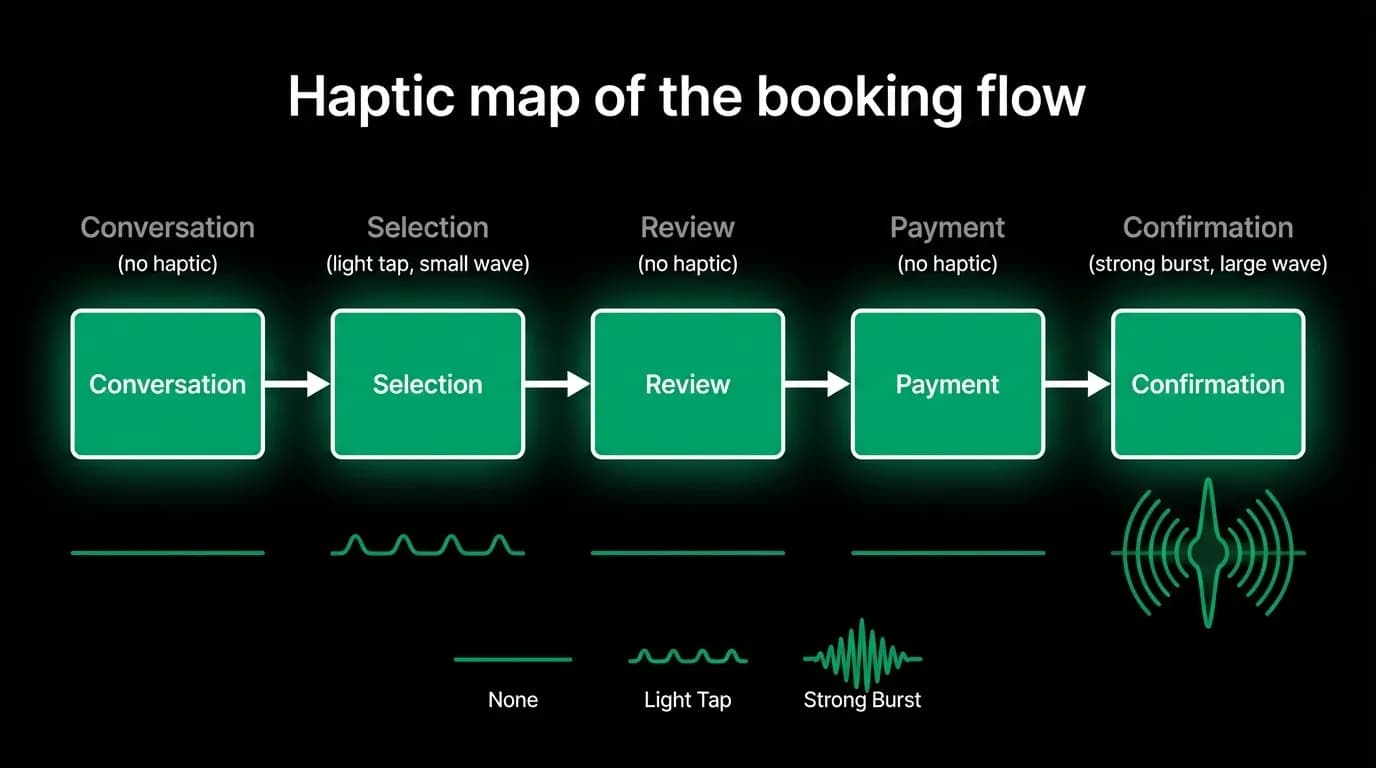
The most important haptic in a travel app is the booking confirmation. This is the moment where the user commits real money to a real trip, and the feedback needs to match the significance of the action. Our confirmation uses a burst haptic at the 400-millisecond mark, synchronized with the visual burst animation.
The synchronization matters. If the haptic fires before the visual, it feels premature. If it fires after, it feels like an echo. At exactly the same moment, the two senses reinforce each other and create a single, unified confirmation event.
This is the strongest haptic in our system. It is unmistakable. It says: this happened, this is final, this is real. In a product where someone is spending hundreds of dollars through a screen, that physical certainty is not a luxury. It is a trust mechanism.
Error haptics: a different pattern for failures
Not all haptics should feel the same. When something goes wrong, the vibration pattern needs to be distinct from the success pattern so the user can tell them apart even before they process the visual information.
Our error haptic uses a different rhythm: two short pulses instead of one burst. The first pulse interrupts your expectation. The second confirms that something unexpected happened. Combined with a visual error state and a clear message from the AI explaining what went wrong, the double-pulse creates an unmistakable "that did not work" signal.
This distinction matters in noisy environments. In an airport, on a train, walking through a foreign city, the user might feel the haptic before they can look at the screen. A single burst means success. A double pulse means check the screen, something needs your attention.
Selection feedback: light taps for card interactions
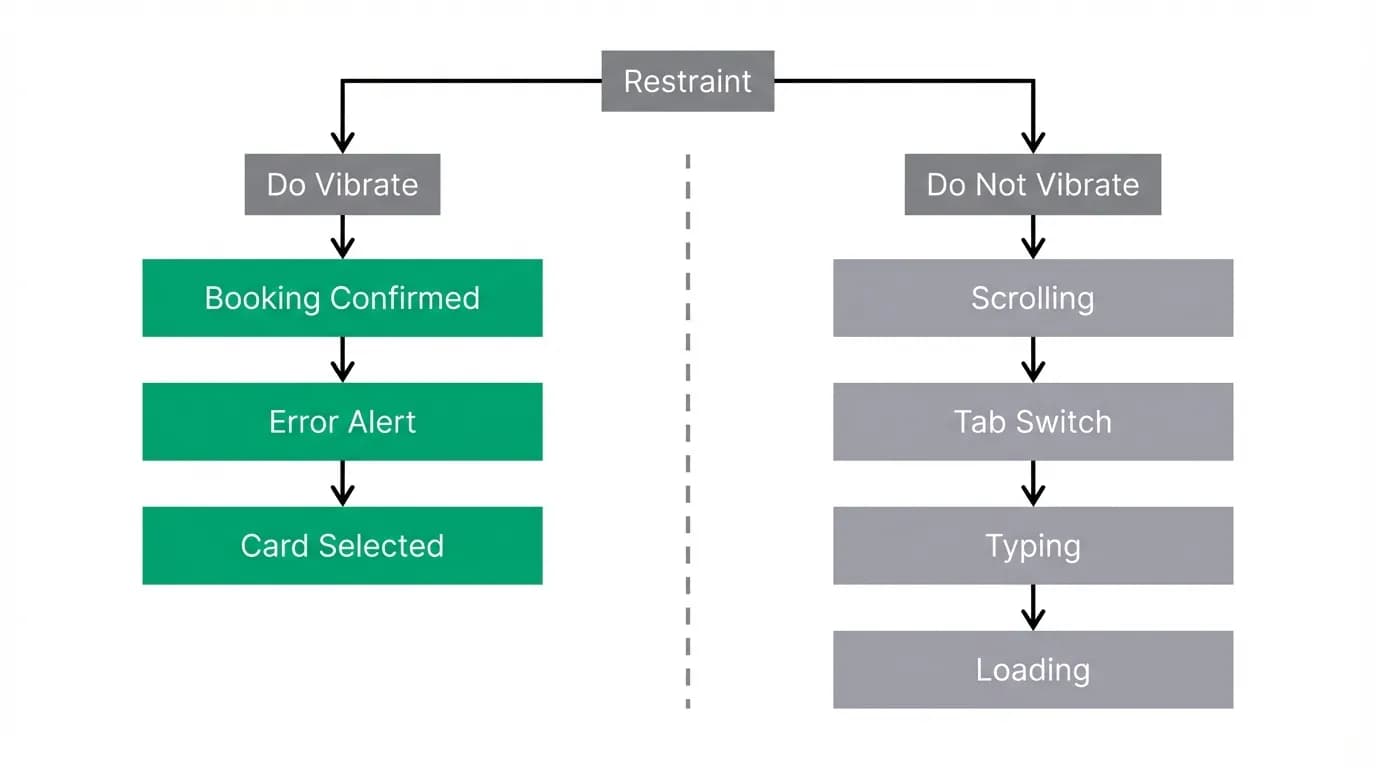
When you tap Select on a flight card, a light haptic fires. Not the strong confirmation burst, but a subtle tap that confirms your finger landed on the right target. It is the digital equivalent of a button click, and it pairs with the 0.97 scale animation to create the sensation of pressing something physical.
This is optional and light. Some platforms support nuanced haptic intensity levels, others do not. On devices with sophisticated haptic engines, the selection tap is a gentle, precise pulse. On devices with cruder vibration motors, we skip it entirely rather than deliver a coarse buzz that undermines the subtlety.
The key principle: a light tap for selection. Never for browsing. When the user is scrolling through cards, reading AI responses, or navigating between tabs, the phone stays silent. Haptic feedback is reserved for intentional actions, not passive consumption.
Where not to vibrate
The restraint list is more important than the trigger list. Here is what should never produce a haptic:
Scrolling through the chat. Navigation between tabs. Typing in the input bar. Loading states and skeleton screens. Tool-use status pills appearing. Streaming text arriving. Card carousels being swiped.
All of these are passive, high-frequency interactions. Adding vibration to any of them would create a constant buzz that trains the user to ignore haptic feedback entirely. And once haptics become noise, you lose the ability to use them as meaningful signals.
Payment processing is a special case. During the seconds between tapping "Pay" and receiving confirmation, the phone stays still. No haptic. This is deliberate. The processing moment is serious and slightly tense. A vibration during processing could be misinterpreted as an error or a completion. Silence maintains the tension and makes the eventual confirmation burst more impactful.
Cancellation is another deliberate omission. When a user cancels a booking, there is no celebration to reinforce. The absence of haptic feedback matches the emotional tone of the action. The visual UI handles the confirmation quietly. The phone stays respectfully silent.
Platform differences
Haptic implementation differs significantly across platforms. Some devices offer a sophisticated haptic engine with multiple feedback types: impact, selection, notification, and custom patterns with tunable sharpness and intensity. Other devices have a basic vibration motor that can only do on and off.
Our approach is to design for the sophisticated case and degrade gracefully. On capable devices, users get the full range of nuanced haptics: light selection taps, distinct error patterns, and satisfying confirmation bursts. On devices with limited haptic hardware, we reduce to two states: confirmation vibration and error vibration. Everything else is silent.
We never fake nuance on limited hardware. A coarse buzz pretending to be a gentle tap is worse than no haptic at all. Better to skip the feedback than to deliver it badly.
Mapping haptics to the booking flow
Here is the complete haptic map for a booking:
Conversation with the AI: no haptic. The user is reading and typing. Card carousel appears: no haptic. The user is browsing. Select button tapped: light haptic. An intentional action was taken. Review modal opens: no haptic. The user is reading details. Traveler form filled: no haptic. Data entry does not need reinforcement. Payment sheet appears: no haptic. A serious moment begins. Payment confirmed, processing: no haptic. Silence during the work. Booking confirmed: strong burst haptic. The trip is booked.
One strong burst for the entire flow. One light tap. Everything else is silent. That restraint is what gives the confirmation its power. When the phone vibrates, it means something happened that matters.
Nowah is an AI travel agent that searches and books real flights and hotels through conversation — no filters, no thirty open tabs. Plan your next trip.